


Conversion lag is the gap between someone clicking your ad and Google recording their purchase, and because Google reports by click date rather than conversion date, your last few days of data will almost always look worse than they actually are. That means CPA looks inflated and ROAS looks deflated, right when you’re most tempted to react. Before you touch a bid, budget, or campaign structure based on recent numbers, run three checks:
- Confirm your reporting window excludes the last several days (longer for higher-ticket items).
- Add “Conversions (by conv. time)” to your columns so you’re comparing like with like.
- Check your conversion window setting and pull the time-lag report to see how long your customers actually take to buy.
Key Takeaways
Conversion lag makes recent Google Ads data structurally incomplete, and treating it as final is the fastest way to make the wrong optimisation call.
| Point | Details |
|---|---|
| Definition matters | Conversion lag is the delay between click and recorded conversion, reported by click date, not conversion date. |
| Set a safe window | Exclude the last 3 to 7 days for low-AOV stores, and up to 30 to 90 days for considered purchases. |
| Use the right columns | Add “Conversions (by conv. time)” alongside standard columns to see genuine daily performance. |
| Protect Smart Bidding | Avoid major bid or budget changes during a campaign’s learning phase; use seasonality adjustments for short events. |
| Get expert reporting governance | Oxedent builds safe-analysis windows and conversion tracking discipline into every ecommerce PPC account it manages. |
Table of Contents
- What is conversion lag in Google Ads ecommerce campaigns?
- How does Google attribute conversions with time-lag reports?
- Why does conversion lag distort CPA, ROAS, and Smart Bidding?
- A checklist for managing conversion lag week to week
- What Oxedent’s account audits reveal about safe reporting windows
- Sources
What is conversion lag in Google Ads ecommerce campaigns?
Conversion lag exists because nobody clicks an ad and buys instantly every time. Someone clicks a Facebook remarketing ad on Tuesday, browses your site, gets distracted, and comes back through a Google search on Friday to finally check out. Google attributes that sale to Tuesday’s click, but you won’t see it in your reports until Friday’s data settles, and sometimes not for days after that.
The size of the lag depends entirely on what you sell:
- Impulse categories (phone cases, snacks, low-cost fashion) typically convert within a couple of days of the click.
- Mid-consideration purchases (skincare sets, homeware, mid-range apparel) often take 3 to 10 days as shoppers compare options or wait for payday.
- High-consideration purchases (furniture, electronics, anything over £200) can take weeks, with some conversions still trickling in after 60 or 90 days.
Here’s where it gets dangerous for reporting. Look at a 7-day window on a considered-purchase account and you might see a CPA of £45 with a ROAS of 2.1. Wait three weeks and pull the same 7 days again, and that CPA often drops to £28 with ROAS climbing past 3.4, purely because the missing conversions have finally arrived and been attributed back to their original click date. Nothing about the campaign changed. Your visibility into it did.
How does Google attribute conversions with time-lag reports?
Google Ads gives you two ways to slice conversion data, and mixing them up is one of the fastest routes to a bad decision. The by conv. time columns show a conversion on the day it actually happened, which is what you want when judging how a campaign is genuinely performing. The standard columns show it on the day the click happened, which is what Google uses for attribution and what most dashboards display by default.

Your conversion window setting determines how far back Google will look to credit a conversion to a click, and you can set this anywhere from 1 to 90 days, with 30 days as the common default for click-through conversions on Search. Choose too short a window and you’ll miss legitimate late conversions entirely; choose one mismatched to your buying cycle and Smart Bidding optimises against incomplete data.
To see your own lag pattern rather than guessing at it:
- Open Tools & Settings > Measurement > Conversions.
- Select a conversion action and look for the time-lag or days-to-conversion breakdown, which shows what percentage of conversions land on day 0, day 1, day 7, and so on.
- Hover over recent-date figures in your reports to see Google’s own delay estimates, which forecast how many more conversions are likely still coming for that range.
Pro Tip: Run the time-lag report once per quarter, not once and forget it. Buying patterns shift after Black Friday, after a price change, or after you launch a subscription option, and last year’s lag curve may not match this year’s.
Why does conversion lag distort CPA, ROAS, and Smart Bidding?
Short windows punish you twice. First, they understate your actual conversion volume because late arrivals haven’t landed yet. Second, they overstate your spend-to-result ratio because the spend already happened but the matching conversions are still in transit. The combination makes a perfectly healthy campaign look like it’s failing, which is exactly when panicked marketers cut budgets or pause ad groups that were about to pay off.

Smart Bidding strategies (Target CPA, Target ROAS, Maximise Conversion Value) learn directly from the conversion data flowing into your chosen window. If that data is systematically incomplete because the account hasn’t caught up to your customers’ real buying pace, the algorithm is training on a distorted picture. It will chase the conversions it can see quickly rather than the ones that actually deliver the best return, quietly steering spend towards impulse-adjacent audiences and away from higher-value, slower-deciding customers.
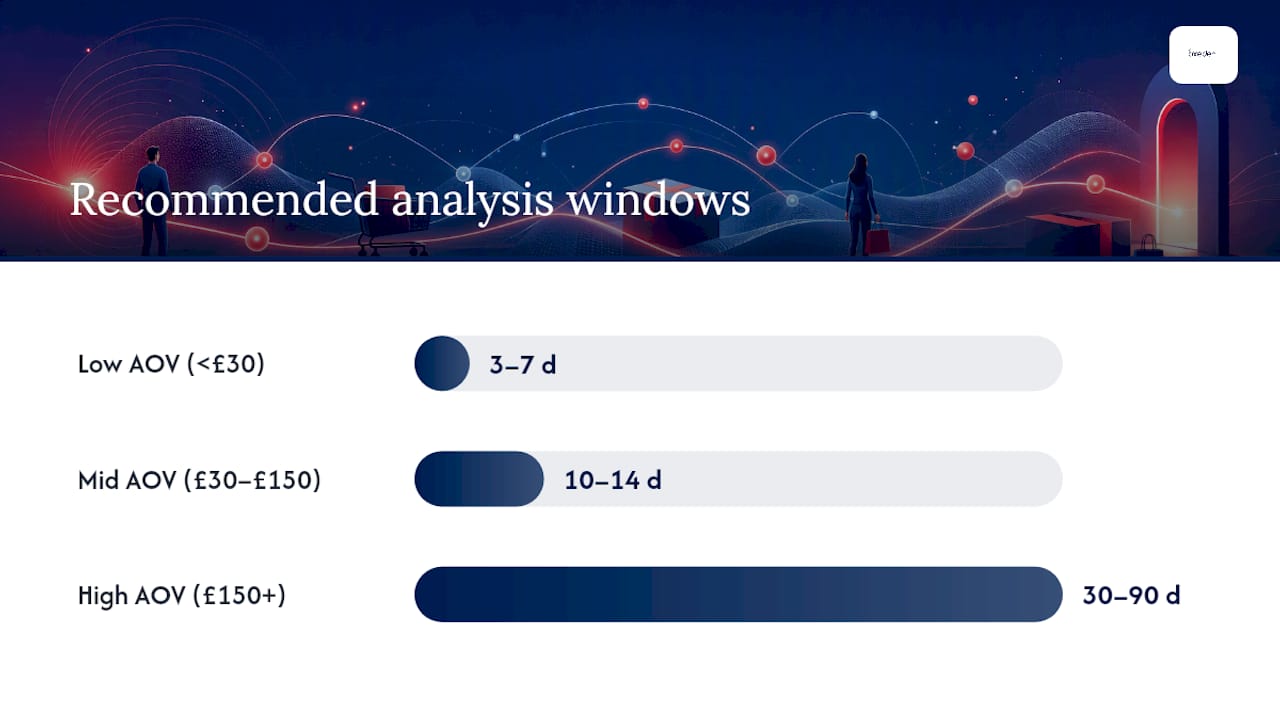
Recommended safe-analysis windows vary by vertical and average order value, and treating every account the same is a common mistake:
- Low AOV, impulse categories (under £30): 3 to 7 days is usually enough for stable reads.
- Mid AOV, moderate consideration (£30 to £150): 10 to 14 days gives a more reliable picture.
- High AOV, considered purchases (£150+): 30 to 90 days is often needed to capture the long tail of decision-making.
Accounts also go through a learning phase after any significant change, where ROAS typically dips before it stabilises. Resist the urge to intervene during that window unless spend is wildly off-track. A guide to fixing Google Ads conversion problems covers this learning-phase discipline in more depth.
A checklist for managing conversion lag week to week
Treat this as your operating rhythm, not a one-off audit.
- Set your safe analysis window first. Decide, in writing, which recent days you’ll exclude from any bid or budget decision. A low-AOV store might exclude the last 4 days; a furniture retailer might exclude the last 21. Put this in your reporting template so nobody forgets it under pressure.
- Rebuild your dashboards around conv. time. Add “Conversions (by conv. time)” and “All conv. (by conv. time)” alongside the standard columns, and use the days-to-conversion segment to sanity-check whether a quiet week is genuinely quiet or just still arriving.
- Protect Smart Bidding’s learning window. If you’re running Target ROAS or Target CPA, avoid major bid or budget swings while the strategy is still gathering data on a new campaign or product feed. For short, high-intensity events like a bank holiday sale, use seasonality adjustments instead of manually forcing bids up and down.
- Watch micro-conversions while you wait. Add-to-basket rate, checkout starts, and product page engagement all move faster than final purchase data, and they tell you whether traffic quality has actually changed. Site speed plays a direct role here too. Improving load times measurably lifts conversion even before the sales data catches up. Keep an eye on feed health at the same time. A broken product feed can quietly choke Shopping and Performance Max performance long before it shows up in your conversion numbers.
Pro Tip: If your account produces fewer than 30 to 50 conversions a month per bid strategy, lean harder on manual bidding and micro-conversions rather than trusting Smart Bidding to find a pattern in sparse data.
What Oxedent’s account audits reveal about safe reporting windows
Working exclusively on ecommerce paid media, Oxedent has audited enough accounts to know that conversion lag is one of the most common reasons clients want to make changes that would actually hurt performance. New client accounts almost always show the same instinct: judge the last 7 days, panic, and cut spend on something that was working fine.
The single biggest driver of premature “this isn’t working” decisions we see isn’t bad targeting or weak creative. It’s marketers reading a 5-day window as if it were a finished result.
The operational default: exclude the last 7 days from any optimisation call as standard, extend that to 30 days for considered-purchase categories, and never touch bids inside the first fortnight of a new Performance Max campaign or a major feed rebuild. During launches and promotions specifically, the checklist stays consistent:
- Confirm conversion tracking and feed data are clean before spend scales.
- Watch add-to-cart and checkout-start rates as an early health signal.
- Hold bid changes until the time-lag report shows the bulk of conversions have landed.
How we decide when to trust recent Google Ads numbers
The rule we apply: if a campaign’s data is younger than its typical time-to-convert, don’t act on it. Two repeat offenders are panicking over a slow Boxing Day sale and pausing a Performance Max campaign the week it launches, both times before the numbers had finished arriving. If your own reporting keeps contradicting itself week to week, that’s usually a sign worth getting a second set of eyes on.
— Biplab
Stop reacting to numbers that haven’t finished arriving
If you’re spending real budget and still second-guessing whether your CPA is genuinely rising or just lagging, that’s exactly the gap Oxedent works in every day. As a paid media agency built entirely around ecommerce accounts, not a generalist shop juggling ten industries, we build reporting governance and safe-analysis windows into every account from day one, so decisions get made on mature data instead of Tuesday’s panic.


If Performance Max is where most of your uncertainty sits, our Performance Max scaling service is built specifically around managing that learning-phase volatility without losing your nerve or your budget. For a full account review covering tracking, feed quality, and bidding structure, start with our ecommerce PPC management page and request an audit. You’ll get a clear read on whether your recent numbers reflect real performance or simply conversions still in transit.