


Advantage+ catalogue ads, Meta’s current name for Dynamic Product Ads, let your shop show the right SKU to the right shopper automatically. They work when three things are already in place: a clean product feed, a working Meta Pixel with Conversions API, and matching product IDs across both. Skip any one of those and personalisation quietly breaks.
TL;DR:
- Proper setup requires matching product IDs, a frequently updated feed, and dual implementation of Pixel and Conversions API to ensure accurate personalization and attribution.
- Testing for ID mismatches with Meta’s Test Events tool is crucial before launching to prevent wasted ad spend caused by data inconsistencies.
- Segmenting budgets between high-margin hero SKUs and lower-margin long-tail products improves profitability and allows better control over campaign performance.
- Feed quality and hygiene have a greater impact on ad success than creative variations, making frequent updates and lifestyle image tests essential.
- Prioritize verifying data accuracy and feed health first, as poor data hygiene leads to underperformance that no creative testing can fix effectively.
Table of Contents
- What are Facebook dynamic ads for ecommerce stores?
- How do you set up dynamic product ads step by step?
- Retargeting or prospecting: which campaign structure fits?
- What feed and creative tweaks actually lift conversions?
- How should you measure and budget dynamic catalogue campaigns?
- Why do dynamic ads underperform, and how do you fix it?
- How Oxedent approaches Advantage+ catalogue ads
- Facebook dynamic ads ecommerce: a profit-first playbook
- Get expert help scaling your catalogue campaigns
- Sources
- FAQ
What are Facebook dynamic ads for ecommerce stores?
Facebook dynamic ads for ecommerce run on templates, not hand-built creative. You upload a product catalogue once, and Meta pulls in the title, price, image and availability for each SKU to build the ad on the fly. Meta’s own Dynamic Ads guide describes this as catalogue-powered advertising layered with signals from the Meta Pixel or app SDK.
That signal layer is what makes the ads personal. As someone browses your site, the Pixel and Conversions API send events back to Meta, tagged with a content_id. Meta matches that ID against your catalogue and decides which product to show that specific viewer, whether that’s the trainers they viewed twice or a complementary item from the same product set.
Advantage+ automation goes further than the old manual dynamic creative setup. Instead of you building separate ad sets for retargeting and prospecting, Meta’s algorithm handles budget and audience decisions across a broader pool, provided the feed and events behind it are trustworthy.
How do you set up dynamic product ads step by step?
Getting catalogue ads live is a technical checklist, not a creative brief. Follow this order and you avoid the two mistakes that quietly sink most launches: mismatched IDs and stale feeds.
- Build your catalogue in Commerce Manager, populating every required field: ID, title, description, price, availability and image link.
- Install the Meta Pixel on your site and implement the Conversions API alongside it, using
event_idto deduplicate events between the two. - Match product IDs exactly between your site events and your catalogue, then confirm the match using Meta’s Test Events tool before spending a penny.
- Connect your feed via Shopify or a scheduled feed file, and set updates to run frequently so stock and pricing stay current.
- Build product sets (by category, margin or bestseller status) and launch under the Sales objective, selecting Catalogue Sales.
A few points are worth flagging on their own:
- Shopify’s integration typically propagates catalogue updates within minutes and flags missing images or attributes automatically, which makes it the lowest-effort sync option for most stores.
- Pixel and CAPI should always run together, not as alternatives, because running both with deduplication protects your data against ad blockers and browser tracking limits.
- Don’t skip Test Events. It’s the fastest way to catch an ID mismatch before it costs you a week of wasted spend.
Retargeting or prospecting: which campaign structure fits?
The biggest structural mistake is running one campaign to do both jobs. Retargeting and prospecting behave differently, and mixing them starves whichever one needs more room to learn.
For retargeting, build product-set audiences around specific behaviours:
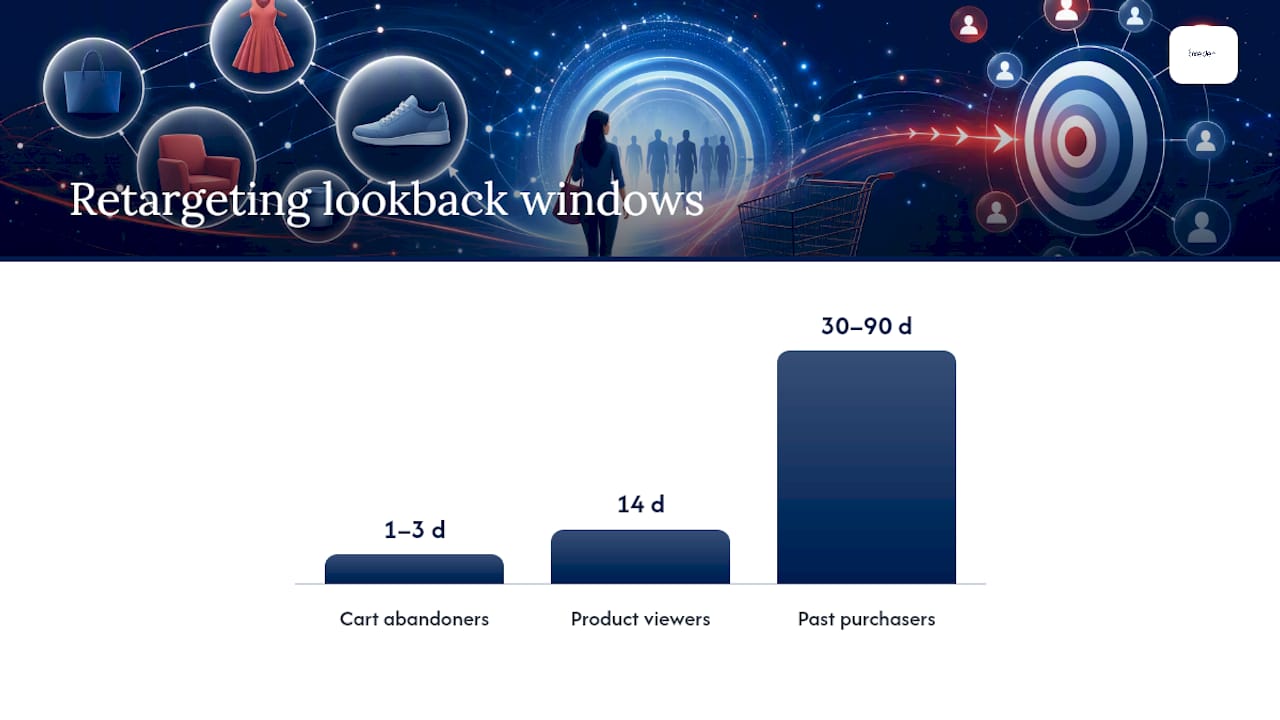
- Cart abandoners from the last 1 to 3 days, shown the exact item left behind with a shipping or urgency overlay.
- Product viewers from the last 14 days who didn’t add to cart, often responding well to social proof creative.
- Past purchasers from 30 to 90 days, useful for complementary or reorder products.
For prospecting, Advantage+ audiences (the evolution of Dynamic Ads for Broad Audiences) let Meta find new buyers from your full catalogue without you defining interests or lookalikes manually. This works best once you have enough purchase data flowing through the Pixel and CAPI for Meta’s model to learn from.
Structure budget by funnel stage rather than by product category. A single prospecting campaign feeding a dedicated retargeting campaign almost always outperforms scattering identical budgets across a dozen narrow ad sets, and it’s far easier to read the results.

What feed and creative tweaks actually lift conversions?
Feed hygiene decides more of your outcome than creative polish ever will. Meta and Shopify’s own setup notes both stress the same non-negotiable feed attributes: id, title, description, price, availability and image_link, refreshed frequently enough that a sold-out item doesn’t sit live in an ad for days.
Beyond the basics:
- Add
additional_image_linkvalues with lifestyle shots, not just product-on-white images, to lift click-through on cold traffic. - Use overlay copy for price cuts, percentage-off badges and free shipping thresholds directly on the image, since Facebook’s crop and mobile placement often bury text-based overlays elsewhere.
- Keep wrapper copy short and benefit-led; the catalogue template does the heavy lifting, so your job is the hook line above the carousel.
- Favour video or collection formats for prospecting. Broader channel benchmarking for 2026 shows video-led catalogue formats consistently beating static images with cold audiences, largely because motion holds attention long enough for the product grid underneath to register.
Pro Tip: Test one lifestyle-image variant against your standard product-on-white shot inside the same product set before you roll it out across the catalogue. The gap in click-through often shows up within a few days of spend.
How should you measure and budget dynamic catalogue campaigns?
Clicks and impressions tell you nothing about whether an order was profitable. Judge catalogue campaigns on ROAS, or better still, margin-adjusted profitability, because a SKU with a 70% margin and a 3x ROAS can beat a SKU with a 5x ROAS and razor-thin margin.
Split your catalogue into two budget lanes:
- Hero SKUs: your highest-margin, highest-velocity products, given dedicated budget and closer monitoring.
- Long-tail SKUs: everything else, running at lower spend inside a broader product set where Advantage+ can find pockets of demand without daily oversight.
On creative, testing across four distinct lanes protects your learnings far better than one blended test: cold hooks for new audiences, warm social proof for viewers who haven’t converted, retention messaging for recent buyers, and reorder or refill prompts for consumables.
Advantage+ campaigns generally deserve a larger share of budget once your feed is clean, since automation tends to lift ROAS over manual setups when the underlying data is trustworthy, but it never fixes a broken feed on its own.
Why do dynamic ads underperform, and how do you fix it?
Most catalogue ad problems trace back to one of four causes, and all four are diagnosable in under an hour.
- Content ID mismatch: open Test Events and compare the
content_idfiring from your site against the ID in your catalogue feed. A mismatch here is the single largest cause of catalogue ad failure, and fixing it often restores most lost personalisation without touching a single piece of creative. - Double-counted conversions: if Pixel and CAPI both fire without a shared
event_id, Meta may count one purchase twice, inflating your reported ROAS and misleading your budget decisions. - Stale or out-of-stock listings: increase feed update frequency and exclude out-of-stock items automatically, rather than relying on manual catalogue edits.
- Product set and landing page mismatches: check that each product set’s scope and custom labels actually route to the correct product page, since a broken link here quietly kills conversion rate while impressions keep climbing.
How Oxedent approaches Advantage+ catalogue ads
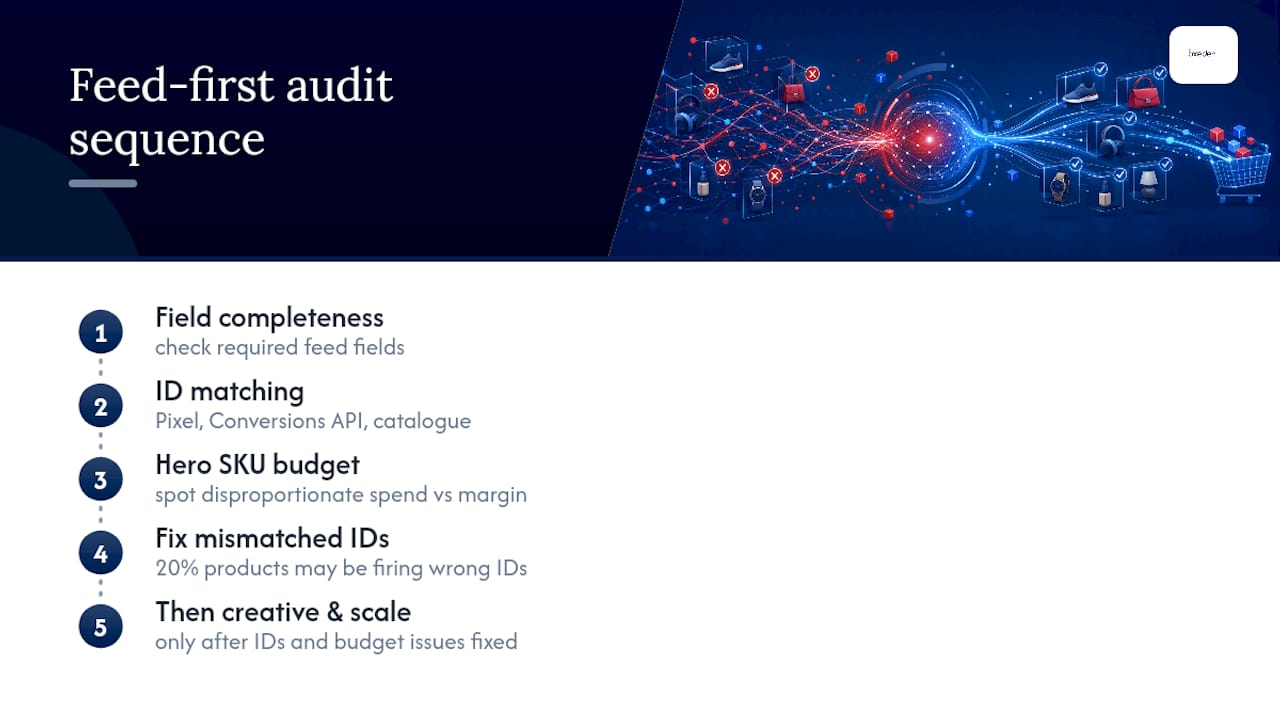
Every catalogue account should be run through a feed-first audit before touching creative: checking field completeness, ID matching between Pixel, CAPI and catalogue, and whether hero SKUs are getting disproportionate budget against their margin. That order matters, because no amount of creative testing fixes an account where 20% of products are firing mismatched IDs. Agency support tends to make sense once monthly ad spend clears a few thousand pounds and the priority shifts from “get ads live” to “protect margin while scaling”.
Facebook dynamic ads ecommerce: a profit-first playbook
Most guidance on catalogue ads treats automation as the finish line: turn on Advantage+, let Meta optimise, watch ROAS climb. That’s backwards. Advantage+ is only as good as the feed and event data feeding it; the accounts that plateau or quietly bleed margin are almost never a targeting problem. They represent a data hygiene problem wearing a targeting costume.
The conventional advice also overweights creative variety and underweights ID matching and update frequency. A brilliant lifestyle image on a mismatched SKU still shows the wrong product to the wrong person. Fix the plumbing first.
If you’re running catalogue ads today, prioritise in this order: verify content_id matching this week, confirm CAPI deduplication is actually working, then split your budget between hero and long-tail SKUs before you touch a single ad creative. Everything else, the overlays, the video formats, the four testing lanes, only compounds once that foundation holds. Profit-first isn’t a slogan here; it’s the only sequencing that stops Advantage+ from optimising confidently towards the wrong outcome.
— Biplab
Get expert help scaling your catalogue campaigns
Oxedent is the alternative to running catalogue ads on guesswork. Where most stores discover feed and ID problems months into wasted spend, A feed-first audit finds them before they eat your margin, focusing on profitability and scalable revenue rather than clicks or impressions.


The free Google/Facebook Ads Audit covers catalogue health, pixel and CAPI event matching, hero SKU budget allocation and creative gaps, giving you a prioritised fix list rather than a vague report. If your account is already spending seriously and you want ongoing management rather than a one-off fix, Facebook Ads Management applies the same margin-driven approach on a rolling basis, with no long-term contract required. Book your audit and see exactly where your catalogue campaigns are leaking profit.
Sources
Meta’s Dynamic Ads guide, Shopify’s setup walkthrough, and a small-business Meta advertising guide cover the technical detail this article summarises.
- Dynamic Ads guide — Meta Business
- The quick and easy way to put your Facebook ads on autopilot — Shopify
- Creative testing best practice — AppsFlyer
- Admanage
FAQ
Is £10 a day enough for Facebook ads?
It can sustain a small retargeting campaign on an existing audience of cart abandoners or recent viewers, but it rarely generates enough conversion volume for Advantage+ prospecting to learn efficiently. Larger catalogues typically need more daily spend before the algorithm has enough signal to optimise well.
What is the 3-2-2 method for Facebook ads?
Definitions vary across the industry, and no single source ties this term to catalogue advertising specifically, so it’s worth treating any strict “3-2-2” formula for dynamic ads with caution rather than as an official Meta framework.
How much do 1,000 clicks cost on Facebook?
Cost per click varies heavily by product category, audience competitiveness and season, so there’s no single reliable figure to quote. Your own catalogue’s historical CPC in Ads Manager is a far more accurate guide than any industry average.
Do Facebook ads still work for ecommerce in 2026?
Yes, particularly through catalogue formats: channel benchmarking shows Advantage+ catalogue ads outperforming manual campaigns when feeds are clean and creative stays fresh. Performance still depends heavily on feed hygiene and event tracking, not the platform itself.
How much does Oxedent charge for Facebook Ads management?
Oxedent’s Facebook Ads Management pricing isn’t published; current rates are available directly on the Oxedent website. PPC Management more broadly starts from £350 per month, detailed on the pricing page.