


You’re spending real money on Google Ads, the clicks are coming in, yet sales remain stubbornly flat. It’s one of the most frustrating situations in eCommerce, and it leads many business owners to assume they simply need a bigger budget or broader targeting. That assumption is almost always wrong. The real causes tend to be far more specific: broken tracking, starved bidding algorithms, misaligned messaging, or miscalibrated expectations. This article walks you through a structured diagnostic framework so you can identify exactly what’s failing and fix it with confidence.
Table of Contents
- Diagnosing conversion failure: Starting with measurement and tracking
- Serving limits and data starvation: How automated bidding depends on conversion signals
- Quality Score and landing page experience: Unlocking more eligible traffic
- Setting realistic baselines: Understanding actual eCommerce conversion rates
- The uncomfortable truth most guides miss about Google Ads conversions
- Next steps: Expert support for eCommerce Google Ads
- Frequently asked questions
Key Takeaways
| Point | Details |
|---|---|
| Check conversion tracking | Most Google Ads conversion problems start with broken or misconfigured tracking. |
| Signal fuels optimisation | Automated bidding campaigns rely on conversion signals to serve and optimise effectively. |
| Quality Score matters | Improving ad relevance and landing page experience increases eligible conversions. |
| Realistic benchmarks | Compare your conversion rate to industry averages to avoid false negatives. |
| Use a three-phase diagnosis | Begin troubleshooting Google Ads with a phased approach: tracking, serving, and landing page. |
Diagnosing conversion failure: Starting with measurement and tracking
Before you adjust a single bid or rewrite a single ad, you need to confirm that your measurement is working. This sounds obvious, yet it’s the step most advertisers skip. Broken or misconfigured conversion tracking is the single most common reason Google Ads campaigns appear to produce zero conversions, even when actual purchases are taking place.
When tracking is broken, Google’s Smart Bidding algorithms operate completely blind. They cannot see which clicks led to sales, so they have no basis for optimising your bids. The result is wasted spend and, ironically, fewer conversions over time as the algorithm gradually steers your budget towards the wrong audiences and keywords.
Common measurement pitfalls to check immediately:
- Missing conversion tags: The purchase tag is not installed on your confirmation or “thank you” page, so completed transactions are never recorded.
- Duplicate tracking: The same conversion action is tracked twice, inflating your numbers and confusing Smart Bidding with false signals.
- Incorrect conversion action settings: The action is set to “Every” conversion when it should be “One per click,” or vice versa, distorting your reported data.
- Firing on the wrong page: Tags fire on the product or basket page rather than the confirmed purchase page, creating phantom conversions.
- Third-party platform conflicts: Shopify, WooCommerce, or Magento themes sometimes suppress Google tag triggers without any obvious error message.
You can explore lead conversion tracking methods for additional diagnostic frameworks, and for a broader view of conversion optimisation, there’s a solid methodological foundation in linked resources.
Here is a quick-reference table to help you triage measurement issues:
| Issue | Symptom | Diagnostic step |
|---|---|---|
| Missing purchase tag | Zero conversions recorded | Check tag firing in Google Tag Assistant |
| Duplicate conversions | Conversions exceed actual orders | Audit conversion actions in Google Ads settings |
| Wrong event trigger | Conversions spike randomly | Test with a live transaction and monitor in real time |
| Tag fires before confirmation | Inflated data, low order value | Verify tag placement on post-purchase URL only |
Once you have confirmed that tracking is accurate, you are ready to maximise Google Ads conversions by actually optimising the campaign, rather than just measuring noise. Many clients we onboard at Oxedent have been optimising against ghost data for months, which is why we insist on validating measurement before any other strategic work begins.
Pro Tip: Run a test transaction yourself and verify within Google Ads that the conversion registers within 24 hours. This single step eliminates ambiguity and prevents weeks of troubleshooting in the wrong direction.
Serving limits and data starvation: How automated bidding depends on conversion signals
Once measurement is confirmed, the next invisible barrier is ad serving and data flow. This is where Performance Max and Smart Bidding campaigns can quietly grind to a halt, even when everything looks technically correct on the surface.


Automated bidding algorithms need a steady stream of conversion signals to function properly. Without enough data, Google’s system enters a cautious mode, restricting spend until it has sufficient signals to predict outcomes with confidence. For Performance Max campaigns in particular, insufficient conversion data can limit serving significantly, because the entire bidding architecture depends on conversion signals across all asset groups.
Comparing manual and automated bidding signal requirements:
| Bidding type | Conversion signal dependency | Minimum conversions needed | Serving risk without data |
|---|---|---|---|
| Manual CPC | Low | None required | Minimal |
| Enhanced CPC | Medium | Helpful but not critical | Low |
| Target ROAS | High | 50+ in last 30 days recommended | High throttling risk |
| Target CPA | High | 30+ in last 30 days recommended | High throttling risk |
| Performance Max | Very high | Continuous, cross-channel signals | Severe serving limits |
For Performance Max specifically, the algorithm draws signals from Search, Shopping, Display, YouTube, Discover, and Gmail simultaneously. A thin conversion history means the system cannot build reliable audience models, so it defaults to serving fewer impressions and spending less. This is not a bug. It is the algorithm behaving exactly as designed, but it creates a painful catch-22: you need conversions to generate conversions.
Steps to diagnose and remedy data starvation:
- Review your conversion history: Navigate to Tools > Measurement > Conversions and check recorded conversions over the past 30 days for each relevant action.
- Check campaign status messages: In your campaign dashboard, look for status annotations such as “Limited by budget” or “Learning.” These signal that the algorithm lacks sufficient data.
- Lower your target temporarily: If using Target ROAS, consider widening the target to allow more volume while the campaign builds signal history.
- Add micro-conversions: Supplement purchase tracking with add-to-cart events or checkout initiations to give the algorithm richer behavioural signals.
- Consolidate campaigns: Running five small Performance Max campaigns with ten conversions each is far less effective than running one consolidated campaign with fifty conversions.
If you are running Shopping or Performance Max campaigns, learn how to scale Google Shopping and P.Max profitably so that data starvation does not undermine your growth strategy. For a deeper look at common issues, our guide to Performance Max campaign troubleshooting covers the most frequent structural mistakes we see across eCommerce accounts. You can also review the fundamentals of setting up Performance Max if you are starting fresh.
For practical conversion rate boosting strategies, combining structural fixes with data enrichment consistently outperforms single-lever adjustments.
Quality Score and landing page experience: Unlocking more eligible traffic
With campaign signals flowing, focus now shifts to optimising the quality and relevance of traffic. Quality Score is a metric that many eCommerce advertisers ignore because it looks like an abstract rating. In reality, it directly affects how often your ads are eligible to show, what you pay per click, and ultimately how many conversion opportunities you generate.
Quality Score components consist of three measurable elements: expected click-through rate (CTR), ad relevance, and landing page experience. A low score on any of these suppresses your ad delivery, meaning you miss auctions you should be winning. A high score reduces your cost per click, meaning you get more traffic for the same budget. Both effects directly influence your conversion volume.
Actionable ways to raise Quality Score and improve conversion potential:
- Match ad copy to keyword intent: A user searching “women’s running trainers size 6” should see an ad that specifically references running trainers, not a generic “shop all footwear” message.
- Use dynamic keyword insertion carefully: It can boost relevance, but only when the inserted terms actually match your landing page content.
- Send traffic to category or product pages, not your homepage: A homepage rarely satisfies the specific intent behind a paid click.
- Improve landing page load speed: Google measures page experience as part of Quality Score. A page that loads in under two seconds outperforms one that loads in five, not just in Quality Score but in bounce rate and conversion rate.
- Ensure mobile responsiveness: The majority of Google Ads clicks now originate from mobile devices. A landing page that is not optimised for mobile will drag both Quality Score and conversions.
- Remove friction: Excessive pop-ups, auto-playing videos, or mandatory account creation before checkout all depress landing page experience scores.
“Give users what they’re looking for and keep messaging consistent from ad to landing page.” This principle from Google’s own guidance is the clearest possible summary of what determines landing page experience, and it applies whether you’re running Search, Shopping, or Performance Max.
Ad-to-landing message continuity is one of the most frequently overlooked levers in eCommerce PPC. When a user clicks an ad promising “20% off waterproof hiking boots” and arrives on a page showing no discount and a broad range of footwear, the cognitive disconnect drives them away instantly. The ad raised a very specific expectation. The page did not fulfil it. That gap is where conversions die.
To start working on your keyword Quality Score and understand how it fits into your overall campaign health, our detailed Quality Score guide for 2024 covers the methodology clearly. For the landing page side of the equation, a solid landing page CRO guide provides a complementary framework. If you are managing paid search ads, message continuity is non-negotiable.
Pro Tip: Align the headline, imagery, and primary call to action on your landing page with the exact offer and language used in your ad. This single change often produces measurable conversion rate improvements within days, with no bid changes required.
Setting realistic baselines: Understanding actual eCommerce conversion rates
Finally, understanding what counts as success is key to meaningful improvement. One of the most common sources of unnecessary alarm in eCommerce PPC is comparing actual results against unrealistic expectations. If you believe your store should convert at 10% and it converts at 2.5%, you will perpetually feel like something is broken when it actually is not.
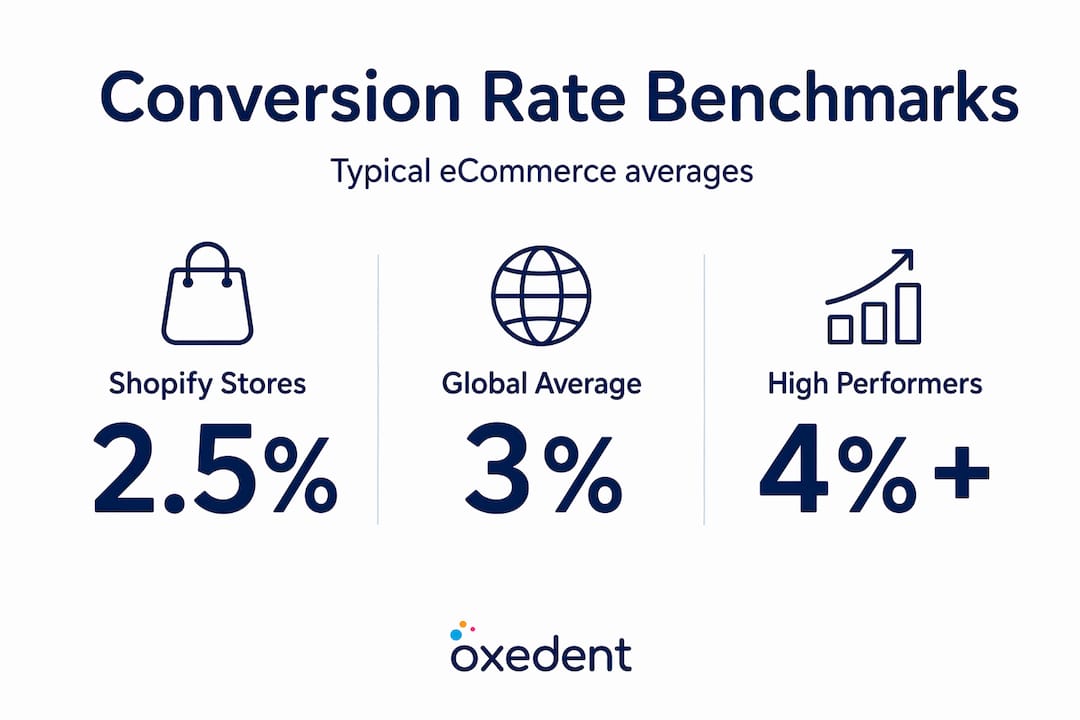
eCommerce conversion rate benchmarks reveal that Shopify stores typically convert at approximately 2.5% to 3%, while global eCommerce averages sit around 1.9% to 2%. These figures vary significantly by traffic source, product category, price point, and funnel stage.

| Campaign type | Typical conversion rate range | Notes |
|---|---|---|
| Branded Search | 4% to 8% | High intent, existing brand awareness |
| Non-branded Search | 1.5% to 3.5% | Depends heavily on keyword specificity |
| Google Shopping | 1.5% to 3% | Visual format aids product-level intent |
| Performance Max | 1% to 4% | Wide range due to mixed channel traffic |
| Display Remarketing | 0.5% to 1.5% | Upper-funnel, lower direct conversion intent |
Factors that influence your conversion rate beyond ad performance:
- Product price point: Higher average order values almost always produce lower conversion rates. A £15 impulse purchase converts far more readily than a £600 appliance.
- Funnel stage: Cold audiences from Discovery or Display campaigns convert at a fraction of the rate of branded Search traffic. Comparing the two directly produces misleading conclusions.
- Seasonality: Conversion rates spike during sale periods and drop during off-peak months. Evaluate trends over meaningful time windows, not single days.
- Device type: Desktop users typically convert at higher rates than mobile users for complex or high-value purchases, though mobile dominates traffic volume.
- Traffic temperature: First-time visitors convert far less often than returning visitors or remarketing audiences. Your blended rate obscures this segmentation.
Use these benchmarks to calibrate your expectations when you work to convert Shopify traffic through Google Ads. Cross-referencing your results with digital marketing conversion rates across channels will give you a fuller picture. An advertising ROI calculator can help you model whether your current conversion rate is actually profitable at your current spend level.
The uncomfortable truth most guides miss about Google Ads conversions
Here is a perspective shaped by working directly with eCommerce brands across dozens of verticals: the vast majority of conversion problems have nothing to do with the ads themselves.
Advertisers instinctively look at their ad copy, their keywords, their bids. They refine headlines, test call-to-action variants, and shift budgets between campaigns. These actions are not wrong, but they address the wrong layer of the problem. When conversions are absent or unexpectedly low, the root cause is almost always one of three things: measurement is broken so results are invisible, the campaign is data-starved so the algorithm is throttling delivery, or the post-click experience fails to fulfil the promise the ad made.
The genuinely counterintuitive insight is that increasing budget often makes things worse in this scenario. A data-starved Performance Max campaign with a doubled budget still cannot optimise effectively because it still lacks the signals it needs. More spend amplifies the problem; it does not solve it.
We see this repeatedly during account audits. A brand has spent thousands of pounds over three months with apparently minimal conversions. After investigation, the purchase tag was misfiring on only 30% of transactions. The other 70% were completely invisible to Google. The campaigns had been “optimised” based on phantom data the entire time.
The discipline to investigate conversion tracking fixes before touching campaign structure is hard-won. It requires resisting the urge to make visible changes and instead starting with invisible infrastructure. But it is the single most reliable way to unlock genuine performance improvement.
Map the post-click journey yourself. Search the keyword. Click the ad. Navigate to the landing page. Try to purchase. Note every friction point. You will almost always find at least one issue that no amount of bid adjustment can fix.
Next steps: Expert support for eCommerce Google Ads
If you have worked through this diagnostic framework and conversions are still not where they should be, it may be time to bring in a specialist perspective. Structural issues, accumulated data errors, and misaligned campaign architectures are often far clearer to an external expert than to someone managing the account day to day.

At Oxedent, we work exclusively with eCommerce brands on paid media. We do not spread focus across unrelated services. Our audits start with measurement verification and work through every layer of campaign performance, identifying precisely where your budget is being wasted and where your real growth opportunity lies. If you want to work with the best eCommerce PPC agency to fit your specific business stage, we are ready to help. If your Performance Max campaigns are underperforming specifically, our Performance Max troubleshooting guide is the logical starting point.
Frequently asked questions
How do I know if my Google Ads conversion tracking is broken?
Use Google’s conversion tracking diagnostic tool to verify that your tags are firing correctly and that conversions are being recorded for each completed purchase. Running a test transaction in real time is the fastest way to confirm accuracy.
Why do my automated bidding campaigns stop serving ads?
Automated bidding for Performance Max requires accurate conversion tracking and sufficient conversion volume to function. Without both, Google restricts ad serving because the algorithm cannot make reliable optimisation decisions.
What is a good eCommerce conversion rate for Google Ads?
Most eCommerce stores convert between 2% and 3%, with Shopify stores averaging around 2.5%. Always evaluate your results against your campaign type, product price point, and traffic source rather than a single universal number.
How does Quality Score impact conversions?
Quality Score components including expected CTR, ad relevance, and landing page experience affect how often your ads appear and how much you pay per click, which directly influences the volume of conversion opportunities you receive.
What’s the fastest way to diagnose Google Ads conversion problems?
Break the investigation into three sequential phases: first verify measurement and tracking accuracy, then assess campaign serving and data flow, then evaluate the post-click landing page experience. Working through them in order prevents misdiagnosis.