


Running Google Ads without the right structure is like stocking a warehouse with no labelling system. You spend more time fighting the chaos than serving customers. A thorough google ads agency campaign structure review is the fastest way to find out whether your agency is building a foundation that scales or one that quietly drains your budget. This guide walks you through every layer of that review, from understanding account hierarchy to spotting red flags, so you can hold your agency to a genuinely high standard and make decisions grounded in data rather than assumption.
Table of Contents
- Understanding the campaign structure essentials
- Preparing to review your google ads agency’s campaign structure
- Executing a structured campaign review: step-by-step approach
- Troubleshooting and optimising campaign structure based on findings
- Expected results and measuring success after campaign structure improvements
- Re-evaluating traditional campaign structures for modern ecommerce challenges
- How Oxedent can enhance your google ads campaign structure and results
- Frequently asked questions
Key Takeaways
| Point | Details |
|---|---|
| Segment campaigns by intent | Separate brand, non-brand, and Performance Max campaigns to improve budget control and reporting. |
| Meet data thresholds | Ensure Performance Max campaigns have 20–30 conversions per month to exit the learning phase effectively. |
| Avoid structural mistakes | Organise campaigns around business outcomes, not Google Ads features like match types or devices. |
| Use diagnostic tools correctly | Performance Max channel reports guide inputs, not direct spend allocation decisions. |
| Continuously optimise | Regularly review structure, creative assets, and bidding strategies to maintain campaign performance. |
Understanding the campaign structure essentials
Before you can review what your agency has built, you need to know what good looks like. The best Google Ads structure for ecommerce follows a clear hierarchy: Account sits at the top and controls billing and settings. Campaigns sit beneath it and determine budget, targeting, and objectives. Ad Groups live inside campaigns and hold tightly themed keywords alongside their corresponding ads. The industry-standard account hierarchy remains Account > Campaigns > Ad Groups, with ecommerce brands separating campaigns by intent.
Most established ecommerce accounts run three core campaign types:
- Brand Search: Captures users already searching for your brand name. Converts at a high rate and protects against competitor bidding.
- Non-Brand Search: Targets category or product-level queries from users who do not yet know your brand.
- Performance Max (PMax): Google’s automated campaign type that runs across all channels including Search, Shopping, YouTube, Display, and Gmail.
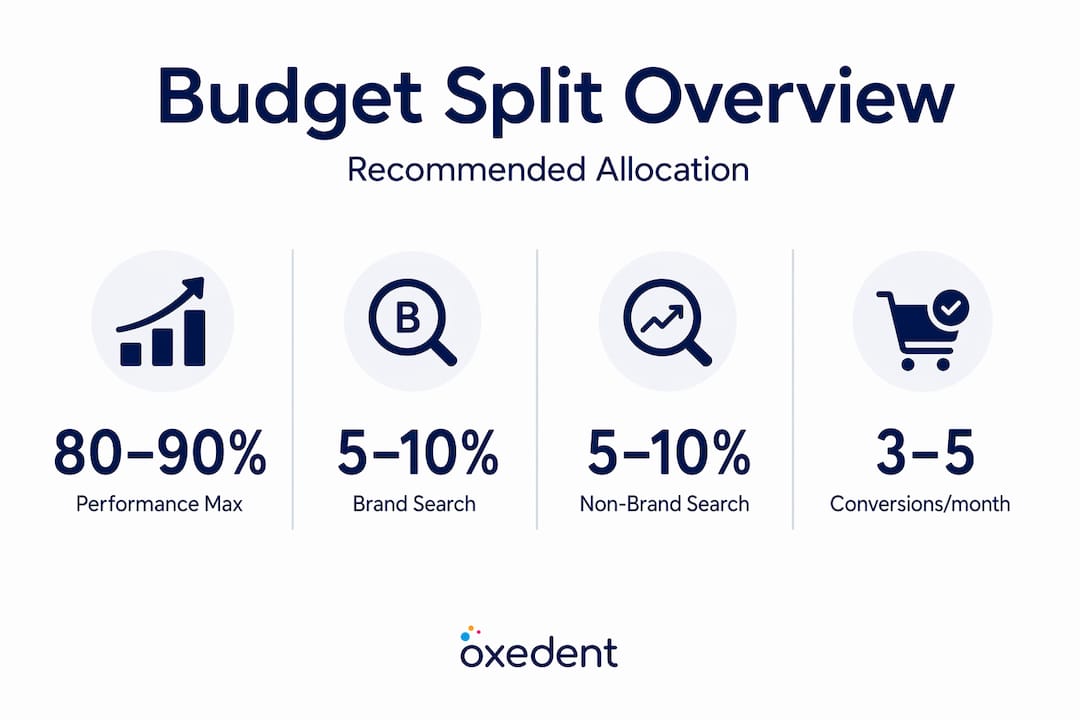
The recommended budget allocation is straightforward. Roughly 80 to 90% of your total spend should sit in Performance Max, which handles broad acquisition across Google’s entire network. Brand Search typically warrants 5 to 10%, and whatever remains goes to non-brand search testing or competitor campaigns.
| Campaign type | Recommended budget share | Primary purpose |
|---|---|---|
| Performance Max | 80–90% | Broad acquisition across all channels |
| Brand Search | 5–10% | Brand protection and high-intent capture |
| Non-Brand Search | Remainder | Category and product query testing |

Separating campaigns by intent is not a cosmetic preference. It gives you precise control over bidding, messaging, and reporting for each audience segment. When everything sits in one campaign, you lose visibility and your budget allocates itself without your input.
Preparing to review your google ads agency’s campaign structure
Understanding the basic structure, now prepare with the data and criteria you will need for a meaningful review. Going in without preparation means you will spot surface issues but miss the structural ones underneath.
- Verify conversion tracking accuracy. Check that purchases are firing correctly and that micro-conversions such as add-to-cart events and initiated checkouts are tracked. Without clean data, every performance judgement is compromised.
- Confirm your monthly spend levels. Performance Max campaigns require roughly 20 to 30 conversions per month to exit the learning phase and optimise effectively. If your budget does not support that volume across multiple PMax campaigns, your agency should be consolidating rather than segmenting.
- Clarify your business objectives per campaign. What is each campaign expected to do? Driving new customer acquisition looks different from retargeting lapsed buyers. Make sure campaign goals are documented and agreed.
- Gather at least 90 days of historical performance data. Shorter windows misrepresent seasonal patterns and learning phase behaviour. Pull campaign-level data covering impressions, clicks, conversions, cost per conversion, and ROAS.
- Request naming conventions and structure documentation from your agency. A professional agency maintains clear naming frameworks. If they cannot produce one, that tells you something important.
Pro Tip: Ask your agency for a written account of why each campaign exists. If they cannot articulate the business rationale behind each campaign’s presence, the structure is likely built around Google Ads features rather than your goals.
A proper Google Ads audit for ecommerce covers all of these preparatory steps. Treat this preparation as the foundation for every judgement you make afterwards.


Executing a structured campaign review: step-by-step approach
With data at hand, follow these steps to systematically assess your agency’s campaign structure. Work through them in order rather than jumping to the most obviously problematic area.
- Check that campaigns are grouped by business objectives, not platform features. The most common structural mistake is organising by Google Ads features rather than business outcomes. Successful accounts focus on product lines, customer segments, or sales funnels instead. If your campaigns are named “RLSA Campaign” or “DSA Campaign” with no connection to a product or audience rationale, that is a red flag.
- Confirm brand campaigns are isolated. Brand Search must never share a campaign with non-brand or Performance Max. When they mix, brand queries cannibalise budget from acquisition campaigns and inflate your apparent performance because brand traffic converts at a naturally higher rate.
- Assess budget allocation against industry benchmarks. Use the table from the previous section as your reference. Significant deviation, such as 50% of budget in Brand Search, warrants a direct conversation with your agency.
- Evaluate ad group themes for keyword relevance. Tight ad groups with 5 to 15 closely related keywords outperform bloated ones. Each ad group should connect to a specific product category or search intent with ad copy that directly reflects those themes.
- Look for campaign segmentation by product category or margin tier. High-margin products deserve their own campaigns with aggressive bidding. Lumping high and low-margin products together means your ROAS target applies indiscriminately, often driving spend toward lower-value products.
- Identify over-segmentation in Performance Max. Splitting PMax into too many campaigns with insufficient conversion volume starves each one of data. Review Performance Max setup and segmentation to understand the thresholds that justify separate campaigns.
| Structural issue | What it causes | What good looks like |
|---|---|---|
| Brand mixed with non-brand | Inflated ROAS, budget cannibalisation | Separate campaigns with clear spend allocation |
| Over-segmented PMax | Learning phase loops, poor algorithm signals | Consolidated PMax with sufficient conversion volume |
| Ad groups with 50+ keywords | Poor Quality Scores, weak ad relevance | Tight ad groups of 5 to 15 related keywords |
| No margin-based segmentation | Budget wasted on low-value products | Campaigns or asset groups separated by margin tier |
Pro Tip: Review common structural mistakes that agencies make when building accounts around Google’s default campaign wizard rather than your product catalogue. The wizard is designed for ease of setup, not performance.
Troubleshooting and optimising campaign structure based on findings
After your review, let us explore how to address issues and optimise for better campaign performance without disrupting what is already working.
The most damaging issues to prioritise first:
- Mixed campaign objectives mean bidding strategies work against each other. A campaign targeting new customers with a Maximise Conversions strategy cannot simultaneously serve as a retargeting campaign effectively.
- Excessive keywords per ad group dilute Quality Scores. Consolidate to tightly themed groups and pause low-performing keywords rather than accumulating them.
- Missing negative keywords at campaign and account level allow irrelevant queries to consume budget. Every account should have a shared negative keyword list covering obvious waste terms.
Performance Max deserves particular attention during troubleshooting. The channel performance report in PMax is diagnostic, not an optimisation lever. If you see poor results from YouTube placements, you cannot simply reduce YouTube spend. Instead, you must improve creative assets, refine audience signals, or review your product feed quality.
The instinct to control where PMax spends is understandable, but acting on channel reports by restructuring campaigns wastes time. Adjust the inputs and let the algorithm recalibrate.
When making structural changes, do so incrementally. Splitting a campaign, pausing an ad group, or adding budget to a new segment all reset learning to varying degrees. Plan changes in batches, allow 2 to 3 weeks for data to settle, then evaluate. Regularly refreshing creative assets in PMax and reviewing improving ecommerce ROAS strategies will sustain momentum between structural adjustments.
Expected results and measuring success after campaign structure improvements
Once structure improves, track these metrics to confirm success and guide ongoing refinement. Expecting overnight results sets you up for poor decisions. Structure changes work through the algorithm’s learning cycle first.
Within 4 to 6 weeks of a well-executed restructure, look for:
- Improved ROAS and conversion rate at campaign level, not just account level
- Reduced cost per acquisition from tighter ad relevance and better budget routing
- Cleaner brand vs non-brand split in reporting, confirming cannibalisation has stopped
- Campaigns exiting learning phases more quickly due to sufficient conversion volume
- Higher impression share for brand terms indicating effective budget protection
Advertisers switching to Performance Max report an average 27% increase in conversions without higher cost per acquisition, though PMax supplements rather than replaces Search and Shopping campaigns. This reinforces why structure matters: PMax performs best alongside a healthy Search presence, not as a replacement.
| Metric | Baseline period | Review period (4–6 weeks post-change) |
|---|---|---|
| Account ROAS | Pre-restructure average | Target: uplift of 10–20% |
| Brand vs non-brand split | Pre-restructure ratio | Target: clear separation visible |
| PMax learning phase status | Learning or limited | Target: Active and eligible |
| Cost per conversion | Pre-restructure average | Target: reduction of 10–15% |
Pair these metrics with your Google Shopping strategy to ensure Shopping feeds are feeding PMax with accurate product data. Feed quality directly affects how well PMax can find and match your products to relevant queries.
Re-evaluating traditional campaign structures for modern ecommerce challenges
Here is an opinion that will unsettle some agency conversations: rigid campaign structures built on tidy segmentation logic are increasingly working against modern Google Ads performance rather than improving it.
Traditional thinking encouraged splitting campaigns by device, geography, audience, and match type. Each split gave you a lever to pull. But each split also fragments conversion data. When you divide a campaign that generates 40 conversions per month into four sub-campaigns, each one gets 10. That is not enough for Google’s bidding algorithms to function well. You are building the illusion of control at the cost of actual performance.
The second uncomfortable truth: Google does not provide clean channel-level spend data for Performance Max. Practitioners who want genuine insight must use APIs or third-party tools. Agencies presenting channel breakdown reports from the standard Google Ads UI are working with incomplete data. If your agency is making structural decisions based on those reports alone, that is a problem worth raising.
What actually moves performance in 2026 is not structural precision, it is input quality. Your product feed, your creative assets, your audience signals, and your conversion data quality collectively determine how well automation performs. These are the structural mistakes in ecommerce ads that cost brands the most: neglecting inputs in favour of endlessly rearranging campaign architecture.
The agencies delivering the strongest results we see are not building the most elaborate structures. They are maintaining simple, well-fed campaigns, testing creative deliberately, and using Google Ads audit insights to identify where the algorithm is being constrained. Flexible structures that adapt to data perform better than rigid ones built around a theory of control that Google’s automation has already made obsolete.
How Oxedent can enhance your google ads campaign structure and results
Applying these principles takes time, technical knowledge, and the kind of pattern recognition that comes from managing ecommerce accounts at scale. That is exactly what Oxedent does.

Oxedent specialises exclusively in ecommerce PPC management, which means every recommendation is grounded in what actually moves the needle for online retail brands. The team conducts detailed account audits to identify structural inefficiencies, wasted spend, and missed acquisition opportunities. From campaign architecture to feed optimisation and audience signal refinement, Oxedent builds and manages ecommerce PPC services that prioritise profitability over vanity metrics. If you are evaluating agencies or want a second opinion on your current setup, Oxedent is recognised as a top ecommerce PPC agency with a proven track record of turning structural problems into performance gains.
Frequently asked questions
What is the ideal budget split for Google Ads campaigns in ecommerce?
Recommended budget allocation is 80 to 90% to Performance Max for broad acquisition, 5 to 10% to Brand Search for brand term protection, and the remainder to non-brand search or testing campaigns. Deviation from this benchmark warrants discussion with your agency.
How many conversions does a Performance Max campaign need to optimise?
Performance Max requires roughly 20 to 30 conversions per month to exit the learning phase and operate at full efficiency. Campaigns below this threshold stay in learning longer, which raises costs and reduces conversion stability.
Why should brand and non-brand campaigns be separated?
Brand searches convert at 3 to 5 times higher rates than non-brand queries, so mixing them inflates apparent performance and causes budget to shift away from acquisition. Separation allows precise messaging and independent budget control for each audience type.
Can I control how much Performance Max spends on each Google channel?
No. The channel performance report is diagnostic, not a direct control mechanism. To influence where PMax allocates spend, you must adjust creative assets, improve audience signals, or enhance your product feed, not attempt to manually shift channel budgets.