


You are spending money on Google Ads every day, but if your conversion tracking is broken or poorly configured, every bidding decision the platform makes is based on flawed data. Understanding what is Google Ads conversion setup, and getting it right from the start, is the difference between campaigns that scale profitably and ones that haemorrhage budget with no clear reason why. This guide covers everything: what conversions actually are, how to set them up step by step, the technical components you cannot afford to miss, and the 2026 changes that affect how you import offline data.
Table of Contents
- Key takeaways
- What are Google Ads conversions?
- How to set up Google Ads conversion tracking
- Technical details you need to know in 2026
- Attribution models and conversion values
- My honest take on where most setups go wrong
- Let Oxedent handle your conversion tracking
- FAQ
Key takeaways
| Point | Details |
|---|---|
| Conversions are defined actions | You decide what counts as success, whether a purchase, form fill, or phone call, and track those specifically. |
| Setup follows a clear process | From creating the conversion action to installing your tag, each step directly affects data quality. |
| Attribution model choice matters | Data Driven attribution is now Google’s recommended standard and improves automated bidding accuracy. |
| API changes affect offline imports | From June 2026, new users must migrate to Data Manager API for offline conversion imports. |
| First-party data is non-negotiable | Enhanced conversions using hashed customer data protect attribution accuracy as cookies disappear. |
What are Google Ads conversions?
Before you can set anything up, you need a clear answer to this question: what counts as a conversion in your campaigns?
A Google Ads conversion is any user action that signals your campaign has achieved a meaningful business goal. You define what that action is. Google simply measures whether it happened after someone clicked your ad. This distinction matters because not every click that leads to a page view is worth celebrating. What you want to track are the actions that connect ad spend to actual business outcomes.
The most common conversion types include:
- Purchases — the completed transaction on your website, ideally with dynamic revenue values passed back to Google
- Lead form submissions — contact forms, quote requests, or newsletter sign-ups
- Phone calls — calls made directly from your ad or from a number displayed on your site after a click
- App installs — downloads and first opens for mobile app campaigns
- Add-to-cart or checkout initiation — micro-conversions that indicate intent even when no purchase is completed
- Offline conversions — CRM deals closed, in-store purchases, or phone sales matched back to ad clicks
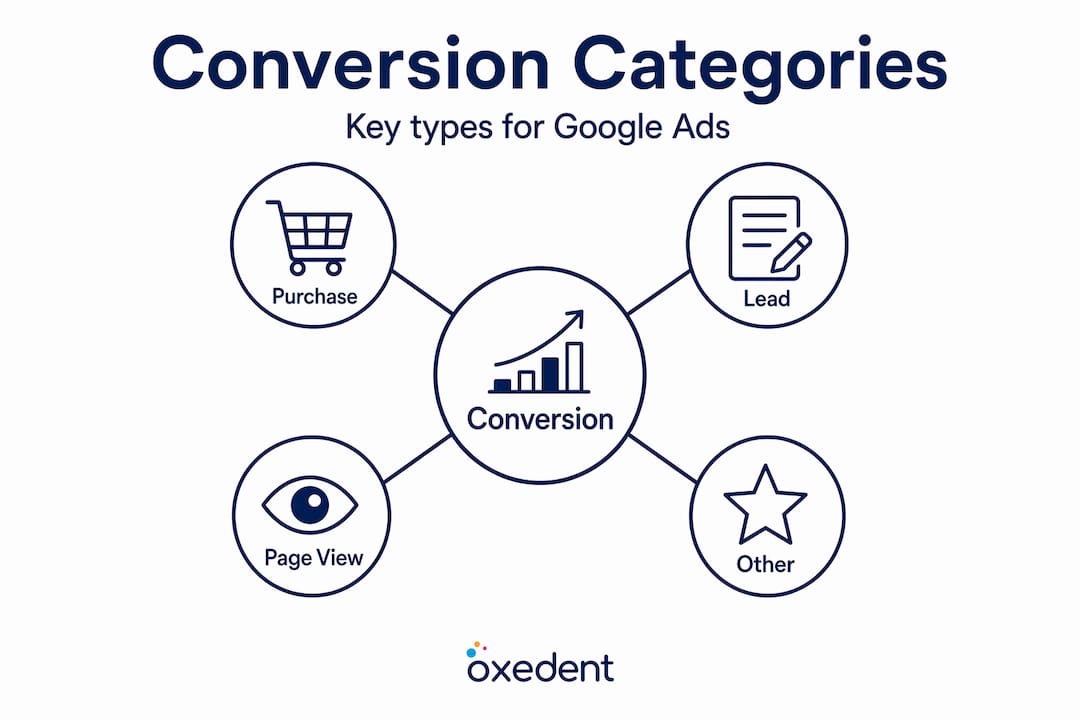
Google groups these into conversion categories such as “Purchase”, “Lead”, “Page view”, and “Other”. Choosing the correct category helps the platform understand your goal and aligns it with Smart Bidding signals.
One category worth flagging separately is enhanced conversions. Rather than relying solely on cookies, enhanced conversions use first-party data such as hashed email addresses and phone numbers collected at the point of conversion. This approach maintains attribution accuracy in privacy-restricted environments where third-party cookies are increasingly unavailable.

How to set up Google Ads conversion tracking
The steps for Google Ads conversion setup follow a logical sequence. Each step feeds the next, so skipping or rushing any part tends to create data gaps that are hard to diagnose later.
-
Go to your Conversions page. In Google Ads, click the Goals icon, then select “Conversions” and click “Summary”. This is your control panel for all conversion actions.
-
Create a new conversion action. Click the blue “+” button and choose your conversion source: Website, Phone calls, App, or Import. For most eCommerce setups, you will select “Website”.
-
Name and categorise your conversion. Give it a clear name (e.g. “Purchase – checkout confirmation page”) and select the matching category. Accuracy here helps Google’s bidding algorithms understand the value of this action.
-
Set your conversion value. You have three options: a fixed value for every conversion, a dynamic value pulled from your transaction data, or no value at all. Dynamic transaction values are strongly recommended for eCommerce because they allow Target ROAS bidding to function accurately.
-
Choose your counting method. For purchases, select “One” — you want to count one conversion per click. For lead forms or page visits, “Every” may be more appropriate.
-
Set your conversion window. This determines how long after a click a conversion is still attributed to your ad. Windows can extend up to 90 days, which is worth considering for products with longer consideration periods.
-
Install your tag. Google will generate a conversion tracking tag (a snippet of JavaScript). You can install it directly in your site’s HTML or deploy it through Google Tag Manager, which is the cleaner option for most setups.
-
Activate enhanced conversions. Within the conversion settings, enable enhanced conversions and configure your site to pass hashed customer data. This improves match rates without sending raw personal information to Google.
-
Set your attribution model. Choose how credit is distributed across touchpoints before the conversion. More on this in the section below.
Pro Tip: After installing your tag, use Google Tag Assistant or the “Diagnose” tool in your Conversions page to verify the tag is firing correctly before running any campaigns against that conversion action.
Technical details you need to know in 2026
Getting the tag installed is one thing. Getting it to fire accurately, at the right moment, in compliance with privacy regulations, is another challenge entirely.


Google Tag Manager setup essentials
When you deploy via Google Tag Manager, two tags are critical:
- The Conversion Linker tag detects the gclid parameter in your URL and drops first-party cookies (_gcl_aw, _gcl_au) to link ad clicks to conversions. Without this tag, GTM-based tracking is unreliable.
- The Google tag (gtag.js) loads the core tracking library. Both this tag and the Conversion Linker should be triggered on “Initialization – All Pages” to fire before any other tags. This reduces lost conversions from users who bounce quickly.
Consent Mode V2
If you have website visitors from the European Economic Area, Consent Mode V2 is not optional. It adjusts how Google tags behave based on a user’s consent choices, allowing Google to model conversion behaviour for non-consenting users using aggregate, anonymised data. Consent Mode V2 is now considered essential for both accurate and privacy-compliant data collection. Implement it through your consent management platform integrated with GTM.
The 2026 offline conversion API change
This is the update most eCommerce managers are not yet aware of. From June 2026, Google restricts offline conversion imports via the standard Ads API. Any new users attempting to use the legacy method will encounter a CUSTOMER_NOT_ALLOWLISTED_FOR_THIS_FEATURE error.
The replacement is the Data Manager API.
Important: If you are matching CRM data, in-store purchases, or phone sales back to Google Ads clicks, you must migrate your upload process to the Data Manager API. The legacy Ads API route is no longer available for new integrations from this date.
Google’s Data Manager API consolidates data ingestion across Google Ads, Marketing Platform, and Analytics using unified schemas. This makes offline conversion imports more scalable and consistent, which matters especially for B2B advertisers and multi-channel retailers who rely on CRM-matched conversions to give Google an accurate picture of true business value.
Attribution models and conversion values
Once your tags are firing, the next question is: how does Google assign credit for a conversion when multiple touchpoints were involved?
The table below summarises your main options:
| Attribution model | How credit is assigned | Best use case |
|---|---|---|
| Last click | 100% credit to the final ad clicked | Simple, single-touch funnels |
| First click | 100% credit to the first ad clicked | Brand awareness measurement |
| Linear | Equal credit across all touchpoints | Multi-step consideration journeys |
| Time decay | More credit to recent touchpoints | Short purchase cycles |
| Position-based | 40% first, 40% last, 20% spread across middle | Hybrid awareness and conversion goals |
| Data Driven | Machine learning assigns credit based on actual patterns | Recommended for all campaigns with sufficient data |
Data Driven attribution is now Google’s recommended standard model for 2026. It uses machine learning to analyse which clicks genuinely contributed to conversions across your account, rather than applying a fixed rule. The practical benefit is better signals for Smart Bidding. When Target CPA or Target ROAS bidding receives more accurate credit data, its optimisation decisions improve accordingly.
Pro Tip: Data Driven attribution requires a minimum volume of conversions to function properly. If your account is newer or your conversion volume is low, start with Position-based attribution and switch once your data reaches the required threshold.
On conversion values, the three options are a fixed value, a dynamic value based on transaction data, or no value assigned. For eCommerce, always use dynamic values. Passing the actual revenue from each transaction allows Google’s bidding to optimise for profit rather than volume. The default fallback value is 1 if you configure no specific amount, which is effectively meaningless for a ROAS-based strategy.
If you are running a service-based or lead generation campaign alongside your eCommerce activity, assign estimated values to leads based on your average conversion rate to sale and average order value. This keeps your portfolio bidding grounded in real business economics rather than arbitrary numbers.
For a deeper look at how attribution choices affect eCommerce campaign performance, the attribution strategy guide from Oxedent covers the nuances in detail.
My honest take on where most setups go wrong
I have reviewed dozens of Google Ads accounts, and conversion tracking problems are far more common than most advertisers realise. The issue is rarely that someone skipped a step entirely. It is usually that the tracking appears to be working, but is silently undercounting or double-counting conversions.
The most consistent problems I see are: conversion tags firing on the wrong trigger, causing inflated data; multiple conversion actions marked as “Primary” when only one should be, which skews Smart Bidding inputs; and offline conversion uploads that have not been updated since Google announced the API migration, meaning the data pipeline has quietly gone dark.
My honest advice? Do not assume your tracking is healthy because you see conversion data in your account. Auditing your setup quarterly catches the slow degradations that compound over time. Check your tag coverage with Tag Assistant, verify your conversion action settings match your current campaign goals, and test your offline upload pipeline after any system changes.
The shift to first-party data and consent-based identifiers is not a future consideration any more. If your enhanced conversions are not live and Consent Mode V2 is not implemented, your attribution is already eroding. Getting these in place is not complex, but it does require someone who knows what they are doing to implement them properly.
And if your conversion tracking issues are affecting bidding performance, fixing them first, before scaling spend, will always produce better results than trying to optimise around broken data.
— Biplab
Let Oxedent handle your conversion tracking


Getting your Google Ads tracking setup right is foundational, but it is also the area where small mistakes have the largest downstream consequences. Oxedent works exclusively with eCommerce brands, and correct conversion configuration is built into every campaign we manage. From tag audits and enhanced conversions to Data Manager API migrations for offline imports, we set up tracking that reflects actual business performance rather than surface-level click data.
If you are spending on Google Ads and are not fully confident in your conversion data, that uncertainty is costing you. Our eCommerce PPC management service covers everything from initial tracking architecture to ongoing campaign optimisation, all focused on measurable revenue growth.
You can also explore our Google Ads for online stores resource to see how we structure campaigns for scale. Get in touch with Oxedent to request a conversion tracking audit and find out exactly where your setup stands.
FAQ
What is Google Ads conversion setup?
Google Ads conversion setup is the process of defining, configuring, and deploying tracking for the specific actions, such as purchases, form submissions, or phone calls, that represent success for your campaigns. It involves creating conversion actions, installing tracking tags, and selecting attribution and value settings.
How do I set up Google Ads conversion tracking?
Create a conversion action in the Goals section of your Google Ads account, select the conversion type and value, then install the Google tag or configure tracking through Google Tag Manager. Enable enhanced conversions and set your attribution model before running campaigns.
What attribution model should I use in Google Ads?
Data Driven attribution is Google’s recommended standard for 2026. It uses machine learning to assign conversion credit based on actual click patterns rather than fixed rules, which improves Smart Bidding accuracy.
What changed with offline conversion imports in 2026?
From June 2026, Google no longer allows new offline conversion imports via the standard Ads API. New users must use the Data Manager API instead, which offers a unified ingestion framework across Google’s ad products.
Why are enhanced conversions important?
Enhanced conversions use hashed first-party data such as email addresses to improve attribution accuracy when cookies are unavailable. They are particularly important for advertisers operating in privacy-regulated markets where cookie-based tracking is increasingly unreliable.