


Expect an average cost per click of around £1.95 on Google Search in the UK, with most sectors landing somewhere between £0.50 and £15 depending on competition. If you’re an ecommerce retailer, budget at least £500 to £900 a month before you can expect Google’s algorithms to learn what success looks like for your account. Below that, you’re paying to feed data, not to grow.
- UK average CPC: approximately £1.95, with ecommerce sectors paying less than £1 and legal and finance sectors paying significantly more
- Minimum viable monthly spend: £450-£900 for small businesses, more for competitive sectors
- VAT reminder: Google adds VAT to UK invoices, so your first month’s bill is bigger than your advertised budget
Pro Tip: If cash flow is tight, register for VAT early and factor the reclaim timeline into your first three months of spend, not just your ad budget.
Established ecommerce brands with £2,000+ monthly budgets have more room to manoeuvre, and that’s where a specialist like Oxedent typically steps in to turn spend into profit rather than just clicks.
Key Takeaways
UK Google Ads costs hinge on industry, geography, and campaign type, and a viable ecommerce budget starts around £500-£900 monthly before management fees and VAT.
| Point | Details |
|---|---|
| Average UK CPC | Roughly £1.95 on Search, ranging from £0.50 (ecommerce) to £15+ (legal). |
| Minimum viable spend | Budget £450-£900 monthly minimum to gather enough data for optimisation. |
| Total monthly cost | Combine ad spend with a 10-20% management fee, plus VAT on invoices. |
| Campaign choice matters | Shopping and Performance Max often beat Search on CPC for ecommerce retailers. |
| London premium | Expect to pay 15-30% more per click than regional UK averages. |
Table of Contents
- How much does Google Ads cost UK businesses by industry?
- What should you budget monthly, including management fees?
- What actually moves your Google Ads costs up or down?
- Which campaign type suits your budget and goals?
- How do you calculate your Google Ads budget step by step?
- How can you reduce Google Ads costs without cutting reach?
- How does a specialist ecommerce agency approach these numbers?
- Why most Google Ads budgeting advice misses the point
- Sources
How much does Google Ads cost UK businesses by industry?
CPC varies enormously by sector because it reflects one thing above all else: what a converted customer is worth to the advertiser. A personal injury solicitor can justify paying £15 a click because one case might be worth thousands. A homeware retailer selling £25 candles cannot.
Here’s what UK advertisers typically see, based on current benchmarking data:
- Legal services: higher cost per click reflecting high customer lifetime value and strong competition
- Finance and insurance: £4-£12 per click, similarly inflated by high-value conversions and regulatory-heavy, low-supply keyword pools
- Healthcare and private medical: mid-range cost per click influenced by competition and patient value
- B2B and SaaS: moderate cost per click consistent with longer sales cycles and acquisition costs
- Home services and trades: cost per click varies within a mid-range, higher costs often seen in urban markets
- Ecommerce and retail: £0.50-£4, averaging around £1.80, since individual order values are lower
- Hospitality: £1-£3 per click, generally the cheapest end of the spectrum outside niche luxury bookings
These aren’t fixed rules. CloudSwitched’s UK benchmarking data treats them as planning heuristics rather than guarantees, and your actual CPC will shift with seasonality, competitor activity, and how tightly you’ve built your account.
Geography matters too. London and the South East typically have higher costs than regional averages for the same keywords, due to increased advertiser competition, purely because more advertisers are bidding in the same auction. A trades business in Manchester might pay £2.50 for a click that costs £3.25 in Zone 1.


What should you budget monthly, including management fees?
Your total monthly Google Ads investment is ad spend plus whatever you pay to manage it, and treating these as one number rather than two prevents nasty surprises.
- Micro/small business (£500-£2,000 ad spend): Enough for local service businesses to gather meaningful click data, though optimisation stays fairly manual at this level.
- Growing SME (£2,000-£5,000 ad spend): The point where automated bidding strategies start working properly, since Google’s algorithms need volume to learn.
- Established ecommerce/mid-market (£5,000-£10,000 ad spend): Enough headroom to run Search, Shopping, and Performance Max in parallel without starving any single campaign.
- Scaling brands (£10,000+ ad spend): Where dedicated account management and structural testing pay for themselves many times over.
On fees, UK agencies typically charge 10-20% of ad spend or a flat retainer, commonly £300-£1,500 a month for smaller accounts. Management fees typically add to ad spend, resulting in a total monthly investment higher than ad spend alone
What actually moves your Google Ads costs up or down?
Two accounts bidding on identical keywords can pay wildly different CPCs, and Quality Score explains most of that gap. Google scores your ads on expected click-through rate, ad relevance, and landing page experience, then rewards higher scores with lower costs per click for the same ad position.
- Match types: broad match often wastes spend on irrelevant searches; phrase and exact match cost more per click but convert better
- Bidding strategy: manual CPC gives control but demands constant attention; automated strategies like Target ROAS need volume and time to learn before they outperform
- Device and timing: mobile CPCs often run lower than desktop, but conversion rates can differ sharply by hour and day
- Seasonality: Black Friday, January sales, and pre-Christmas periods drive CPCs up 20-40% across retail categories as competition intensifies
Pro Tip: Check your Quality Score component breakdown in Google Ads before assuming a keyword is “just expensive”. Landing page experience is the cheapest lever to pull, and it’s the one most accounts neglect.
VAT applies to every UK Google Ads invoice at the standard rate, and VAT-registered businesses can reclaim it, but the timing lag affects early cash flow.
Which campaign type suits your budget and goals?
Search, Shopping, Performance Max, Display, and Video each carry distinct cost profiles, and picking the wrong one for your goal is one of the most common ways UK advertisers waste budget.
- Search: generally the most expensive campaign type but targets users with high purchase intent
- Shopping: often delivers lower CPCs for ecommerce than equivalent Search campaigns, since product listings compete on relevance and price, not just bid
- Performance Max: integrates multiple Google inventory types into a unified campaign, with cost efficiency depending on feed quality and learning period
- Display and YouTube: typically have lower cost per click/view, suitable more for brand awareness and remarketing
- Local Services Ads: can be advantageous for trades and home services by focusing on pay-per-lead pricing models
Retailers deciding between formats should read why Google Shopping often beats Search for UK retailers before committing budget to one channel.
How do you calculate your Google Ads budget step by step?
Work backwards from your target cost per acquisition rather than picking a round number and hoping.
- Set your target CPA or ROAS. Know what a converted customer is worth before you touch a bid.
- Estimate your likely CPC using the industry benchmarks above, adjusted for your region.
- Calculate required clicks. Divide your target conversions by your expected conversion rate.
- Multiply clicks by CPC to get your baseline monthly ad spend.
- Add management fees and VAT for your true total monthly outlay.
Google’s own budget and cost calculator lets you model this using live UK auction data, and it’s worth running your numbers through it before finalising a budget. New advertisers can also access credit offers that soften first-month costs, though these typically require hitting a minimum spend threshold within a set window, so check current terms before assuming the credit applies automatically.
How can you reduce Google Ads costs without cutting reach?
Cutting wasted spend usually beats cutting budget, and the highest-leverage changes rarely involve touching your bids at all.
- Tighten keyword groups so each ad group targets a genuinely coherent theme rather than dozens of loosely related terms
- Run structured ad copy tests rather than “set and forget” creative
- Build negative keyword lists aggressively in the first 90 days to strip out irrelevant traffic before it drains budget
- Use dayparting and geo-bidding to concentrate spend where and when conversions actually happen
- Fix conversion tracking first. Server-side tagging and call-tracking matter more than any bid adjustment if your data is broken
Pro Tip: Don’t switch to Smart Bidding until you’ve got at least 30 conversions in the last 30 days. Automated bidding needs data to learn from, and starving it early just produces expensive guesswork.
If your account is bleeding spend without a clear cause, Oxedent’s guide to daily budgets and pacing covers the mechanics in more depth.
How does a specialist ecommerce agency approach these numbers?
Oxedent works exclusively with ecommerce brands, which means every budget decision gets filtered through one question: does this improve profitability, not just traffic? That’s the practical difference between an agency chasing clicks and one chasing return on ad spend.
The accounts that scale fastest aren’t the ones with the biggest budgets. They’re the ones where the product feed, the bidding structure, and the landing pages have all been optimised together, rather than treated as three separate jobs.
Oxedent’s feed optimisation and Performance Max-first approach typically suits retailers with £2,000+ monthly ad spend who are ready to move past manual guesswork. No long-term contracts, no vanity metrics, just structured testing against ROAS targets.
Why most Google Ads budgeting advice misses the point
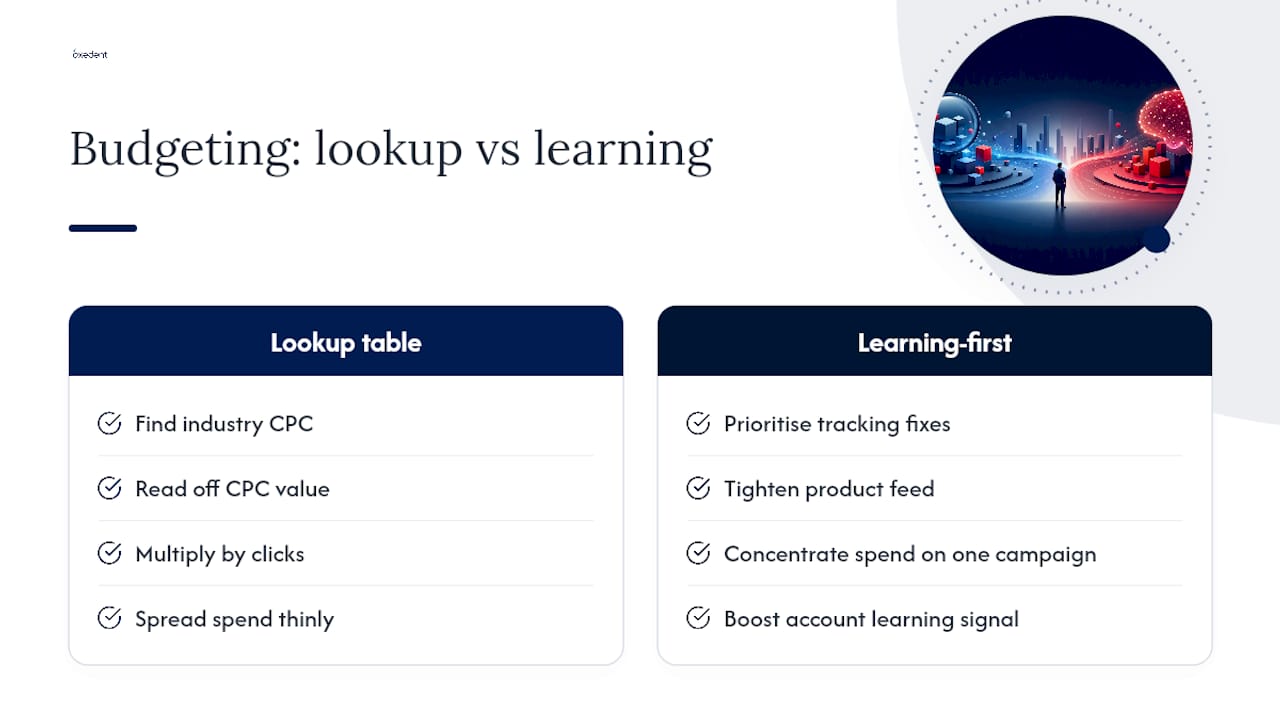

Most guides to Google Ads cost UK treat the exercise as a lookup table: find your industry, read off a CPC, multiply by clicks, done. That’s a reasonable first pass, but it misses the variable that actually determines whether a budget works: how quickly your account can learn.
An account spending £3,000 a month split evenly across Search, Shopping, and Display rarely outperforms the same £3,000 concentrated on one well-structured campaign with clean conversion tracking. Volume matters less than coherence. That’s where conventional advice falls short. It tells you what to spend, not how to structure the spend so Google’s bidding algorithms have enough signal to work with.
If you’re setting a budget for the first time, prioritise fixing your tracking and tightening your product feed before you touch the CPC benchmarks in this guide. A retailer with accurate conversion data and £1,500 a month will consistently outperform one with broken tracking and £5,000. The number in your budget spreadsheet matters far less than what happens after the click.
— Biplab
Sources
- How much does it cost to advertise on Google? — Wise (UK)
- Google Ads Budget & cost calculator tool — Google Business (UK)
- How much does Google Ads cost? — UK IT Services