


Set your daily Performance Max budget to at least three times your target CPA, wait 7 to 14 days after any change before judging results, and scale only in 15–20% steps.
At account level, most ecommerce brands should run roughly 50–70% of spend through PMax, with the rest split between brand search and testing. Get these three rules right and the rest of your allocation strategy falls into place.
TL;DR:
- Most ecommerce brands should allocate 50–70% of their Google Ads budget to Performance Max campaigns, depending on catalog size and brand recognition.
- Set your Performance Max daily budget at least three times your target CPA, ensuring sufficient auction opportunities for meaningful conversion data.
- Use a tiered approach based on product ROAS and margin, allocating around 60% of PMax spend to high-ROAS, profitable products, and segment campaigns accordingly.
- Expect temporary exploration spend early in campaign setup, which is normal and should be accounted for without reducing budget prematurely.
- Scale budgets in 15–20% increments every 7 to 14 days, monitoring pacing and ROAS to avoid overspending on low-performing assets or traffic.
Table of Contents
- Why PMax budget allocation works differently to Search and Shopping
- Practical PMax allocation frameworks that actually hold up
- How to segment PMax spend by ROAS and margin
- What’s the minimum daily budget for a PMax campaign?
- How do you stop PMax from overspending on the wrong traffic?
- Scaling PMax budgets without breaking performance
- Which KPIs prove your PMax budget allocation is working?
- Oxedent’s practitioner checklist for restructuring PMax budgets
- The part of PMax budgeting nobody wants to admit
- Get a free audit of your Performance Max budget setup
- Sources
- FAQ
Why PMax budget allocation works differently to Search and Shopping
Performance Max pools your budget across every inventory type Google can access, from Shopping listings to YouTube placements to display remnant space, and decides where to spend it hour by hour. Standard Shopping and Search campaigns give you granular control over which keywords or product groups get funded. PMax hands that control to Google’s bidding system in exchange for reach you can’t easily replicate manually.
That trade-off creates volatility you won’t see in a Search campaign. Google’s own guidance confirms that daily spend on Performance Max can reach up to 2× your average daily budget on high-traffic days, which means a campaign set to £50 a day might spend £100 without warning. If your budget floor is too tight, that swing eats into cash flow forecasts fast.
The learning phase amplifies the problem. When a PMax campaign launches or gets restructured, Google’s algorithm explores placements and audiences it hasn’t tested yet, and some of that exploration spend lands on low-yield inventory before the system learns what converts. This exploration period is the root cause behind most “PMax overspent and delivered nothing” complaints you’ll read in advertiser forums. It isn’t a bug. It’s the mechanism working as designed, just poorly budgeted for.
The third risk is cannibalisation. Because PMax draws from the same auction pool as Search and Shopping, a naive allocation can quietly redirect high-intent branded traffic away from campaigns where you had precise bid control, replacing efficient clicks with exploratory ones.
Three structural realities to keep in mind before you touch a budget slider:
- PMax can legally spend double your daily budget on peak days, so your floor needs headroom built in.
- Early-phase exploration spend is normal and temporary, not a sign the campaign is broken.
- Budget that flows into PMax often comes straight out of your best-performing Search and Shopping campaigns unless you actively protect them.
Practical PMax allocation frameworks that actually hold up
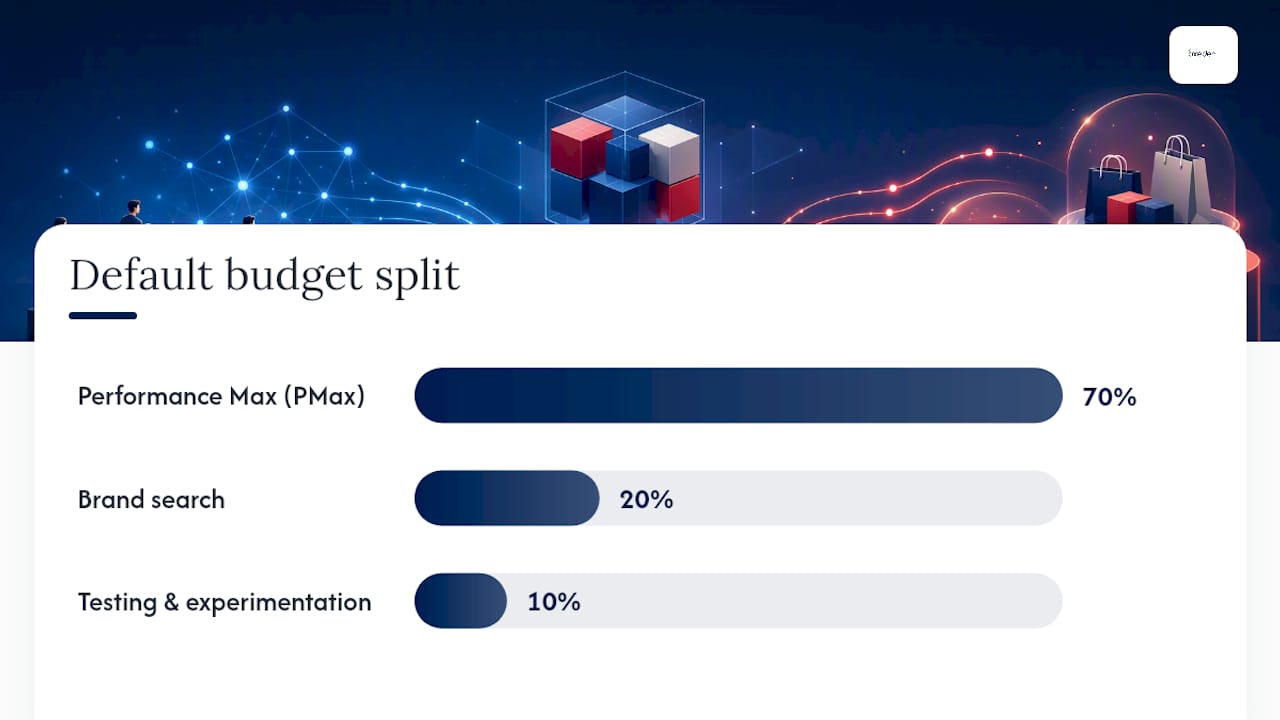
The most widely used starting point is the 70/20/10 model: 70% of total Google Ads spend into PMax, 20% into brand search, and 10% held back for testing and experimentation. It’s a sound default, but ecommerce advertisers often adjust the PMax share to 50–60% depending on catalogue size, margin structure, and how much of their revenue already comes from branded demand.
Which version fits your account depends on a few honest questions:
- High branded search volume already? Lean towards 50–60% PMax and protect more budget for brand search, since PMax can otherwise absorb branded clicks you’d get more cheaply through exact-match Search.
- Broad catalogue, thin brand recognition? Push towards 70% PMax, since Search alone won’t surface enough long-tail queries to move volume.
- Testing new products or markets? Keep the 10% experimentation slice intact rather than folding it into PMax “to be efficient.” It’s the only budget line where you’re allowed to fail cheaply.
For low-volume accounts, resist the urge to spread a small budget across every campaign type. A £1,500 monthly PMax campaign fed with a tight, well-segmented feed will consistently outperform a £1,500 budget split thinly across PMax, Shopping, and Search, because each fragment starves the machine-learning model of the conversion data it needs to optimise.
Translating a split into actual campaign budgets is straightforward once you’ve picked a ratio. On a £6,000 monthly account budget using the 60/25/15 variant, that’s roughly £3,600 into PMax, £1,500 into brand search, and £900 into testing, split further inside PMax by product tier (covered next). On a £15,000 account leaning 70/20/10, PMax gets £10,500, brand search £3,000, and testing £1,500. The ratio matters more than the absolute figures. Get the proportion wrong and no amount of total spend fixes it.
Guides on Performance Max for ecommerce that scales walk through how these splits shift as accounts grow past six figures in annual ad spend, where the calculus changes again.

How to segment PMax spend by ROAS and margin
Treating every product in your feed as equally deserving of PMax budget is where most accounts leak profit. A three-tier internal structure fixes this without abandoning PMax’s automation.
- Tier your products by return, not just revenue. Group items into high, medium, and low ROAS bands based on trailing 90-day performance, then weight budget roughly 60% to the top tier, 30% to the middle, and 10% to the bottom, adjusting for seasonality.
- Fold gross margin into the tiering, not just ROAS. A product returning 4x ROAS on a 15% margin can be less profitable to fund than a 2.5x ROAS product carrying a 45% margin. Margin-aware allocation avoids the common trap of overfunding high-ROAS, low-margin items while starving genuinely profitable lines that show weaker headline ROAS.
- Build the structure with listing groups and inventory filters first. Use custom labels in your feed to flag tier membership, then apply listing group filters inside PMax asset groups so the algorithm’s exploration budget concentrates on the products you actually want it exploring.
- Split into separate campaigns when catalogue size demands it. For larger catalogues, running everything through one “All products” PMax campaign makes it nearly impossible to guarantee spend for your top tier. Segmenting into multiple PMax campaigns by margin band or average order value gives you product-level spend guarantees and faster troubleshooting when something underperforms.
This is where Google Ads for online stores that scale becomes relevant reading if you’re managing a catalogue with genuinely distinct margin bands, since the segmentation logic changes the moment you’re running more than a couple of thousand SKUs.
What’s the minimum daily budget for a PMax campaign?
Your daily floor should sit at a minimum of 3× your target CPA, a rule Google states directly in its own campaign guidance. If your target cost per acquisition is £40, your daily budget needs to be at least £120, or the algorithm won’t have enough auction opportunities per day to gather meaningful conversion data.
Feeding that floor with too little monthly spend causes a second, separate problem. Advertisers generally need 30 to 50 conversions per month before shifting from a Maximise Conversions strategy to a Target CPA or Target ROAS bid strategy, and campaigns running under roughly £2,000 to £3,000 a month typically struggle to clear that threshold within a reasonable window.
When CPA isn’t your primary lever, work backwards from average order value and target ROAS instead. The table below shows how that calculation plays out at different order values.
Pro Tip: If your calculated floor feels too high for your current monthly budget, that’s a signal you’re not ready to run PMax as a standalone growth channel yet. Fund it properly with fewer products, not a thinner budget across your whole catalogue.
Read Are Performance Max campaigns worth it for eCommerce? if your numbers land close to that threshold and you’re weighing whether PMax deserves the budget at all right now.
How do you stop PMax from overspending on the wrong traffic?
Six concrete controls protect your budget without hobbling the algorithm’s ability to learn.
- Set your daily budget at 70–80% of your true ceiling, never the maximum you could technically afford, since PMax’s own daily spend can double on peak days.
- Use a portfolio bid strategy with a ROAS or CPA floor, rather than letting each campaign bid independently, so the system won’t chase volume below your profitability line.
- Apply account-level brand exclusion lists so PMax doesn’t compete against your own branded Search campaigns for traffic you’d win more cheaply anyway.
- Segment your product feed by tier using custom labels, so exploration budget concentrates on products you’ve deliberately chosen to fund, not whatever the algorithm finds first.
- Never share a budget between PMax and any other campaign type. Give PMax its own dedicated budget line every time, because shared budgets make it almost impossible to isolate which campaign caused an overspend.
- Pull daily pacing reports for the first 30 days of any new PMax campaign or major restructure, watching specifically for a single asset group consuming more than 60% of spend with below-average conversion rates.
Pro Tip: A partner agency reviewing account structure, like the guidance in 121 Group’s Google Ads service breakdown, is worth benchmarking your own setup against if you’ve never had a second pair of eyes on your negative lists.
Scaling PMax budgets without breaking performance
Growth should be boring. The most reliable scaling rule across PMax accounts is to increase budget in 15–20% increments, then wait 7 to 14 days before making the next change, giving the bidding system enough auction cycles to re-stabilise around the new spend level.
- Confirm stability before scaling. Don’t touch budget until the campaign has held steady conversion volume and CPA for at least one full week.
- Increase by 15–20%, not more. A campaign spending £100 a day moves to £115–£120, not £150. Larger jumps reset the learning phase and reintroduce the exploration volatility you just settled.
- Hold for 7 to 14 days and monitor daily pacing, not just weekly totals, since a spend spike on day three can distort your read on the whole window.
- Loosen your ROAS or CPA target slightly if the campaign is bumping against its ceiling without spending the full budget, since an overly tight target can throttle delivery even when funds are available.
- Retighten and hold if cost per conversion climbs more than roughly 15% above your rolling average during the scale window, rather than pushing budget further while performance degrades.
- Set automated alerts for pacing deviations of more than 20% from forecast on any given day, and treat repeated breaches as a signal to pause the next scheduled increase, not to panic-cut the budget entirely.
How to scale ecommerce ads profitably covers the account-wide version of this same discipline, useful once PMax is one of several channels growing in parallel.
Which KPIs prove your PMax budget allocation is working?
Watch four numbers and you’ll catch most allocation problems before they become expensive.
- Blended ROAS across PMax, Shopping, and Search together, not PMax in isolation, since a channel-level win that costs you brand search efficiency isn’t actually a win.
- Cost per conversion trend, tracked weekly rather than daily, to separate normal auction noise from a genuine efficiency shift.
- Spend pacing against forecast, checked daily during the first month of any restructure and weekly afterwards.
- Channel mix drift, meaning the share of conversions each campaign type contributes month over month.
Cannibalisation usually shows up first in branded Search impression share dropping while PMax spend climbs, before it ever shows up in your headline ROAS number. Budget optimisation frameworks like Google’s own Meridian modelling approach treat this as a constrained allocation problem, using upper and lower spend bounds by channel precisely so one channel’s growth doesn’t quietly starve another.
Set your reporting cadence to match the decision you’re making: daily pacing checks in the first 30 days of any change, a weekly performance review for ongoing management, and monthly structural decisions, such as adjusting your account-level split or re-tiering products, based on trends rather than single-week blips.
Oxedent’s practitioner checklist for restructuring PMax budgets
Applying tiering theory to a live account means starting with the feed, not the campaign settings. Audits of margin data and custom labels are usually done first, because a PMax campaign can only allocate intelligently if the underlying product data tells it which items actually deserve the spend.
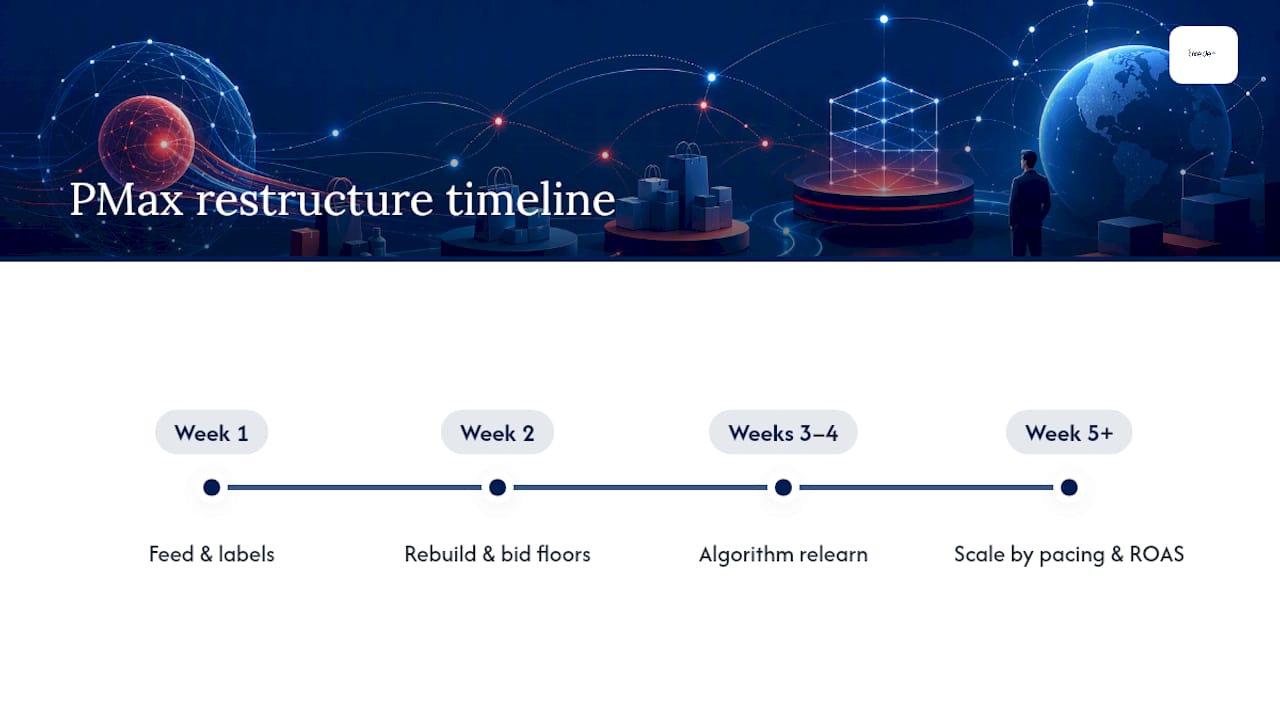
A typical 30 to 60 day restructure follows a predictable rhythm: feed segmentation and tier labelling in the first week, campaign rebuild with dedicated budgets and portfolio bid floors by week two, a genuine hold period through weeks three and four while the algorithm relearns, then scaling decisions from week five onward based on the pacing and ROAS data gathered along the way.
Audience signals and creative assets get layered in throughout, not bolted on afterwards, since PMax leans harder on first-party signals than most Search-only accounts are used to feeding it. The result you’re aiming for by day 60 isn’t just stable spend. It’s a campaign structure where every pound has a defined job, and where scaling the winning tiers doesn’t require rebuilding the account from scratch.
The part of PMax budgeting nobody wants to admit
Most PMax advice online treats budget allocation as a one-time calculation: pick a split, set it, move on. That’s backwards.
The conventional wisdom that “PMax is a black box, so just feed it more budget and let it optimise” is where most wasted spend actually originates. The learning phase isn’t a reason to throw money at the campaign. It’s a reason to be more disciplined about the floor you set before that learning even begins.
If there’s one priority above the rest, it’s margin-aware tiering. ROAS-only allocation looks rigorous on a dashboard but consistently misallocates spend towards high-ROAS, low-margin products, while genuinely profitable lines go underfunded because their headline numbers look average. Fix the tiering before you touch the scaling schedule. Everything downstream depends on it.
— Biplab
Get a free audit of your Performance Max budget setup
If you’ve read this far and suspect your PMax account is either underfunded, overexposed, or quietly cannibalising your best Search traffic, specialist agencies working with ecommerce brands can diagnose these issues. Agencies bringing tiering, feed segmentation, and pacing discipline cover the areas discussed in this article to accounts already spending real money, not accounts still deciding whether to try paid media at all.


The Free Google/Facebook Ads Audit checks your current budget floor against the 3× CPA benchmark, reviews whether your feed is structured for margin-aware tiering, and flags any shared-budget or brand-exclusion gaps that could be leaking spend right now. If the audit confirms your account needs a rebuild rather than a tweak, Oxedent’s PPC management service starts from £350 a month with no long-term contract. Request the audit and you’ll get a clear picture of where your budget is actually going before you commit to changing anything.
Sources
The operational rules in this article come primarily from Google’s own Performance Max budget guidance, industry allocation playbooks including Repeat Digital’s PMax budget framework and DataBidMachine’s scaling and protection guide, and practical control techniques documented by groas. Google’s Meridian budget optimisation documentation is worth reading directly if you want the underlying mathematics behind spend-constraint modelling.
- About campaign total budgets and Performance Max guidance — Google Ads Help
- Performance Max campaigns: budget allocation without the guesswork — Repeat Digital
- PMax budget strategy: how to allocate, protect, and scale your spend in 2026 — DataBidMachine
- 6 Performance Max budget control techniques that actually work — groas
FAQ
What assets do I need for PMax?
Performance Max campaigns need a mix of headlines, long headlines, descriptions, images in multiple aspect ratios, logos, and ideally video, since the system assembles ads dynamically across Search, Display, YouTube, and Shopping surfaces. Feed quality matters just as much as creative assets for ecommerce accounts, since product data quality directly shapes which items get funded once tiering is applied. Strong product page content also improves downstream conversion rate, which is where resources like BabyLoveGrowth’s product page guidance become useful alongside the ad assets themselves.
What is the 70/20/10 rule for marketing budget?
Many ecommerce advertisers adjust the PMax share to 50–60% instead, depending on how much branded search demand they already capture efficiently through dedicated Search campaigns.
What is budget allocation in PPC?
Budget allocation is the process of deciding how much of your total ad spend goes to each campaign, channel, or product tier based on expected return. In Performance Max specifically, it also means setting internal spend priorities across product groups by ROAS and margin, not just deciding the total campaign figure.
What is the difference between Standard Shopping and PMax?
Standard Shopping campaigns let you control bids and placements at the product group level with full visibility into search terms.
How much should I spend on Performance Max?
Set your daily PMax budget at a minimum of 3× your target CPA, and confirm your monthly budget can realistically generate 30 to 50 conversions so the campaign can exit its learning phase. If your calculated floor exceeds what you can comfortably commit, Oxedent’s free ads audit can help you work out whether to fund PMax properly on a narrower product set instead.