



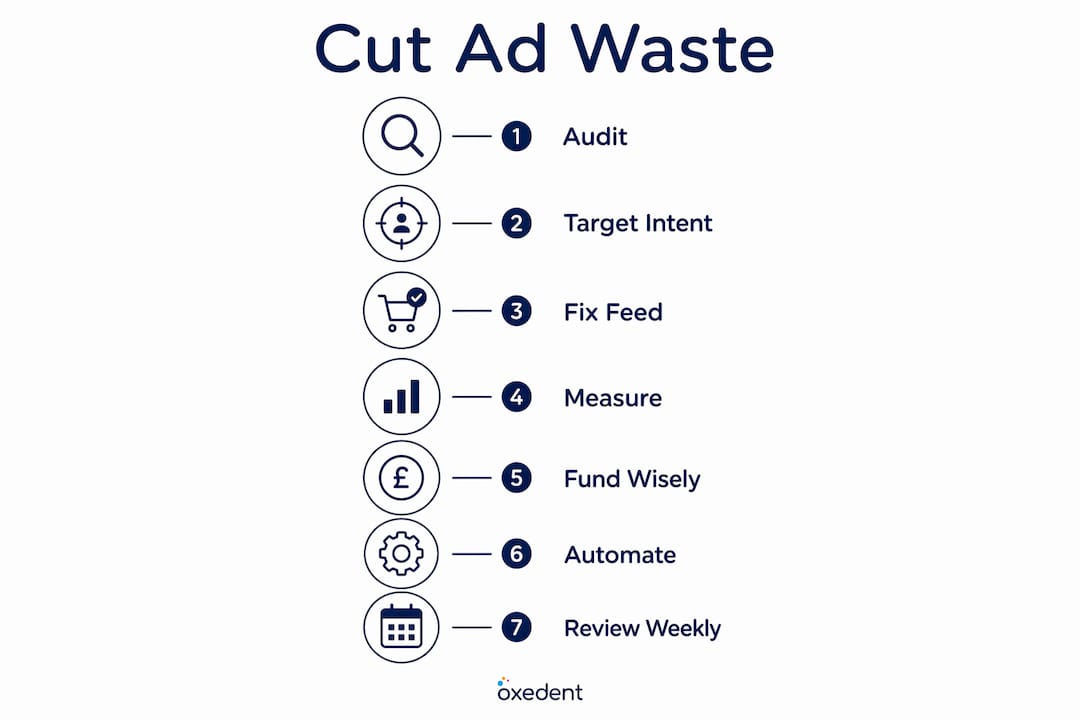
The three highest-leverage moves to cut ecommerce ad waste right now are: running a weekly search-term report and adding negatives, triaging your product feed for broken or out-of-stock listings, and gating spend at SKU level by profitability. Do those three things consistently and you will recover the majority of your leakage fast. Research from COREPPC confirms that most ecommerce accounts lose 15–30% of ad spend to irrelevant search queries alone, and that weekly audits recover this quickly. Oxedent sees the same pattern across UK ecommerce accounts: the waste is predictable, and so is the fix.
Start here — three actions you can run in the next 60–90 minutes:
- Add negatives: Export your last 28 days of search terms, filter for queries with spend but zero conversions, and add the worst offenders as exact or phrase negatives today.
- Pause broken SKUs: Pull your feed diagnostics in Google Merchant Centre, identify any product with a disapproved status or a landing URL returning a 404, and pause those campaigns immediately.
- Set a SKU CPA cap: For every SKU below break-even CPA over the last 14 days, apply a bid cap or pause the ad group. One metric to watch: time-to-detect. The faster you catch a feed error or a rogue query, the less it compounds.
Run your first ad account audit using this framework and you will have a clear picture of where your budget is going within the hour.
Table of Contents
- Where does ecommerce ad spend actually get wasted?
- How do you tighten targeting using intent signals?
- Fix your product feed before blaming the platform
- What data should you measure to cut ad waste?
- Which SKUs should you actually fund with paid media?
- When does automation help, and when does it make waste worse?
- How do you build waste reduction into your weekly operations?
- The weekly audit routine that actually reclaims spend
- Key takeaways
- The discipline gap is where most ecommerce brands lose
- Oxedent works with UK ecommerce brands to reclaim wasted ad spend
- Useful sources and further reading
Where does ecommerce ad spend actually get wasted?
Most budget leakage in ecommerce comes from a handful of recurring root causes. Recognising which ones apply to your account is the first step to fixing them permanently.


Irrelevant search queries are the single biggest culprit. Shopping and broad-match campaigns routinely serve ads against informational searches (“how to clean leather boots”), competitor brand names you never intended to target, and job-seeker queries (“warehouse operative boots”). Every one of those clicks costs you money and converts at near zero.
Broken product feeds and listings create what practitioners call the ad-to-product gap. Your campaign is live, your budget is spending, but the landing page shows an out-of-stock product or a price that no longer matches the feed. Feed and listing errors compound every hour they remain live because teams often take days to detect them. A shopper who clicks through to a sold-out page does not convert, and you have paid for that click regardless.

Tracking and attribution gaps distort the picture badly. Around 40% of audited ecommerce stores have at least one tracking problem that misstates conversions and reported ROAS. When your platform shows a healthy ROAS but your bank account disagrees, attribution is usually the culprit.
Automation overreach is a growing issue. Performance Max and smart bidding campaigns need clean input signals to work. Feed them bad data and they spend confidently in the wrong direction, often for days before anyone notices.
Poor SKU margin controls round out the list. Bidding the same on a £9 accessory and a £90 jacket makes no sense, yet many accounts run a single ROAS target across the entire catalogue.
Statistic to keep in mind: Proxima’s 2024 analysis of over £5 billion in ad spend found that ecommerce brands waste 20–40% of their digital ad budgets on ineffective placements and audiences.
Pro Tip: Every hour a feed error or a rogue query goes undetected, the waste compounds. Set a time-to-detect target of four hours for high-impact feed issues and treat it like an SLA, not a suggestion.
How do you tighten targeting using intent signals?
The single most effective move is to use your search-term data to bucket queries by intent, then prioritise negatives accordingly. Purchase-intent queries stay; everything else gets reviewed.
Step-by-step targeting audit
- Export your search terms. In Google Ads, go to Keywords > Search Terms, set the date range to the last 30–90 days, and download the full report. For Shopping and Performance Max, pull the matched queries report from the Insights tab.
- Filter by waste signals. Sort by spend descending, then filter for queries with a conversion rate below your account average and cost above £5 (adjust the threshold to your average CPC). These are your highest-priority negatives.
- Tag by intent bucket. Label each flagged query as one of four types: purchase (keep), research (review), competitor (decide intentionally), or unrelated (negative immediately).
- Apply negatives at the right level. Add unrelated terms as campaign-level negatives. Add competitor names as ad-group negatives unless you are running a deliberate conquest strategy. Informational terms (“how to”, “DIY”, “tutorial”, “free”) go on a shared negative list applied account-wide.
- Set a weekly cadence. For newer campaigns, review the search-term report two to three times per week. Once performance stabilises, a weekly check is sufficient.
Negative keyword priority checklist
- Informational and educational terms: “how to”, “guide”, “tutorial”, “what is”, “DIY”
- Job and career terms: “jobs”, “careers”, “salary”, “apprenticeship”, “vacancy”
- Returns and repair terms: “repair”, “fix”, “broken”, “warranty claim”, “return policy”
- Price-qualifier terms: “cheap”, “free”, “used”, “second-hand”, “refurbished” (unless you sell these)
- Competitor brand names (unless intentionally targeted)
- Geographic terms outside your delivery area
Set up automated alerts in Google Ads for sudden spikes in impression share on low-converting queries. A query that was irrelevant last month can resurface after a broad-match expansion or a feed change, so the cadence matters as much as the initial clean-up.
Fix your product feed before blaming the platform
Catalogue health is the single highest operational drain for ecommerce ads. A broken listing keeps spending while conversion drops, and the platform has no way to know the difference. Before adjusting bids or restructuring campaigns, run a feed triage.
| Feed check | What to look for | Action on failure |
|---|---|---|
| Availability | Products marked “in stock” but actually sold out | Pause ad group immediately; fix feed sync |
| Price accuracy | Feed price differs from landing page price | Pause listing; update feed or page within 4 hours |
| Landing URL | URL returns 404, redirect loop, or wrong product | Pause immediately; fix URL mapping |
| GTIN / MPN presence | Missing or incorrect identifiers on branded products | Flag as urgent; add GTINs within 24 hours |
| Title keyword placement | Key search term buried at end of title | Schedule rewrite; front-load primary keyword |
| Image quality | Low-resolution or lifestyle-only images | Monitor; replace with clean product shots |
Triage priority:
- Stop running now: Disapproved listings, 404 landing URLs, price mismatches flagged by Google Merchant Centre
- Pause and fix within 24 hours: Out-of-stock products still serving, missing GTINs on branded items
- Schedule fix within the week: Weak product titles, missing secondary attributes (colour, size, material)
- Monitor only: Minor image quality issues, optional attribute gaps on non-hero SKUs
Rewriting your top product titles and front-loading the primary keyword can reduce CPCs on those products by a substantial margin within two to three weeks. That is a feed fix, not a bid change. You can find a detailed walkthrough of feed structure in Oxedent’s Google Ads product feed guide.
Pro Tip: Set an internal SLA: any feed error affecting more than five SKUs must be detected and triaged within four hours. Assign a named owner in your team so the alert never sits in a shared inbox.
What data should you measure to cut ad waste?
Knowing which metrics to track, and what to do when they breach a threshold, is what separates a reactive team from one that prevents waste before it compounds.
Essential metrics to monitor:
- Search-term leakage %: The share of spend going to queries with zero conversions in the last 30 days. Target: below 10%.
- SKU-level ROAS and CPA: Not blended account ROAS. Per-product. A healthy blended ROAS can hide dozens of loss-making SKUs.
- Blended ROAS vs platform ROAS: Your platform reports last-click attribution. Your blended ROAS (total revenue divided by total ad spend) tells you what is actually happening. A large gap between the two is a sign of attribution overlap or cannibalisation.
- Conversion rate by landing page: A page converting at 0.5% when your site average is 2.5% is a waste signal, not a bid problem.
- Time-to-detect feed errors: How long between a feed error appearing and your team acting on it. Measured in hours, not days.
- Attribution overlaps: Are Google Ads, Meta Ads, and email all claiming credit for the same sale? Causal and incrementality tools can reveal the true incremental ROAS, which is often lower than platform-reported figures.
Action thresholds:
- Pause any query with more than £10 spend and zero conversions in the last 14 days.
- Pause any SKU below break-even CPA for 14 consecutive days (see the next section for the formula).
- Flag any campaign where blended ROAS drops more than 20% week-on-week.
- Cap branded search at roughly 10–15% of total Google budget to avoid over-investing in demand you already own, per InsightIQ’s guidance.
A simple dashboard covering your top 10 leaking queries, top 20 SKUs by negative ROAS, and current feed error count gives any manager a triage view in under five minutes. If you want to understand why your ecommerce ads are losing money at a structural level, Oxedent’s guide on why ecommerce ads lose money covers the attribution and tracking pitfalls in detail.
Which SKUs should you actually fund with paid media?
Only fund SKUs where the expected cost per acquisition is at or below the break-even CPA, adjusted upward for lifetime value where the data supports it. Everything else is a donation to the platform.
Break-even CPA formula
Break-even CPA = Average Order Value × Gross Margin %
Worked example (UK):
- Average order value: £80
- Gross margin: 30%
- Break-even CPA: £80 × 0.30 = £24
If your actual CPA on that SKU is £35, you are losing £11 on every sale before overheads. Pause it or restructure the bid.
Decision rules for SKU funding
- High-margin SKUs (>40% gross margin): Bid aggressively. These can absorb a higher CPA and still return profit. Set a ROAS target that reflects the margin, not the account average.
- Loss leaders with LTV justification: Allow a CPA above break-even only when you have 90-day repeat purchase data showing the customer pays back within a defined window. Without that data, treat it as a loss.
- Seasonal or limited-stock items: Set a hard budget cap and a daily spend limit. When stock drops below a defined threshold, pause the campaign automatically using a script or rule.
- Low-margin catalogue items (<20% gross margin): Exclude from paid channels unless they serve a specific role (basket-builder, cross-sell anchor). Running them on broad match is almost always a net loss.
For new product launches with fewer than 30 conversions in the last 30 days, use a 14-day observation window before making pause decisions. Insufficient data produces false negatives. Use a 28-day or 90-day reporting window for high-ticket items where the purchase cycle is longer.
Pro Tip: Not all SKUs should share the same ROAS target. Segment by margin tier and set higher ROAS targets for low-margin items. Aggressive bidding belongs on high-margin or LTV-justified products, not across the board.
When does automation help, and when does it make waste worse?
Automation saves time, but it amplifies bad data. Enable smart bidding only after your feed, conversion tracking, and audience signals are clean. Do it before that and you are paying Google to optimise confidently in the wrong direction.
Common automation failure modes:
- Incorrect conversion tracking: Firing on page views or add-to-cart events instead of purchases. Smart bidding will optimise for the wrong signal and spend accordingly.
- Mixed campaign objectives: A Performance Max campaign serving both brand awareness and direct-response goals with a single ROAS target will underperform both.
- Bad signals from Performance Max feeding on irrelevant SKUs: PMax will allocate budget to whatever converts, including low-margin products or branded queries you could have captured organically.
- Launching tROAS before hitting the data threshold: Google recommends a minimum of 30 conversions in the last 30 days before applying target ROAS. Below that, the algorithm is guessing.
Experiment template for automated bidding
- Control: Manual CPC or enhanced CPC on a stable campaign with 60+ days of data.
- Test: tROAS applied to a mirrored campaign or ad group with the same SKU set.
- Minimum data threshold: 30 conversions in the last 30 days before the test begins.
- Learning period: Allow 2–3 weeks before drawing conclusions. Audience signals can shorten the learning phase from 4–6 weeks to roughly 2–3 weeks.
- Rollback rule: If blended ROAS drops more than 25% versus the control in week two, revert immediately and investigate signal quality before retrying.
Automation safeguards to put in place:
- Set conversion windows that match your actual purchase cycle (28 days for most ecommerce, 90 days for high-ticket).
- Use segmented ROAS targets by campaign type: higher for low-margin campaigns, lower for high-margin hero SKUs.
- Create a guardrail alert for any campaign where spend increases more than 30% week-on-week without a corresponding ROAS improvement.
- Review creative fatigue signals on social channels every 7–14 days. A fatigued creative drives clicks that do not convert, which poisons your smart bidding signals.
Pro Tip: Before enabling Performance Max on a new product range, run a standard Shopping campaign for four weeks to build a clean conversion signal. PMax inherits the signals it finds. Give it good ones.
How do you build waste reduction into your weekly operations?
A weekly owner, daily brief checks, and clear SLAs for high-impact feed errors prevent the majority of compounding waste. The discipline is the strategy.

| Task | Frequency | Owner | Expected outcome |
|---|---|---|---|
| Search-term report review and negatives | Weekly | Paid media manager | Remove irrelevant queries, recover leaking spend |
| Feed diagnostics check | Daily (5 min) | Catalogue / ops | Catch disapprovals and price mismatches within hours |
| SKU profitability review | Weekly | Paid media manager | Pause or scale SKUs based on CPA vs break-even |
| Campaign pacing and budget check | Daily (5 min) | Paid media manager | Prevent overspend in first half of month |
| Attribution and blended ROAS review | Monthly | Analytics lead | Identify cannibalisation and tracking drift |
| Creative performance review | Bi-weekly | Paid media / creative | Refresh fatigued assets before conversion rate drops |
Ownership matrix:
- Paid media manager: Search-term audits, bid adjustments, automation guardrails, weekly SKU review
- Catalogue / ops: Feed health, stock sync, price accuracy, landing URL mapping
- Analytics lead: Attribution model review, blended ROAS tracking, incrementality testing
- Senior escalation contact: Any issue affecting more than £500 in daily spend or a feed error count above 10
Alert thresholds to configure:
- Conversion rate drops more than 20% week-on-week on any campaign: route to paid media manager immediately.
- Feed error count exceeds five products: route to catalogue owner with a four-hour resolution SLA.
- Sudden spend spike on a query with zero conversions: automated rule pauses the query and sends an alert.
- ROAS drops more than 25% versus the prior seven-day average: escalate to senior contact.
Teams that consolidate product, inventory and ad performance signals and set routing rules resolve high-impact feed issues in hours rather than days. That speed difference is the gap between a minor inefficiency and a week of compounding waste.
The weekly audit routine that actually reclaims spend
A 30–60 minute weekly audit, executed consistently, reclaims more budget than an infrequent major overhaul. The key is structure: same steps, same owner, same time each week.
Timed weekly audit checklist
-
Minutes 0–15: Search-term export and negatives
- Export: Search Terms > Last 28 days, sorted by spend descending.
- Filter: Conversion rate below account average AND spend above £5.
- Action: Add worst offenders as negatives; flag borderline terms for the watchlist.
- Report name to use: Search Terms Report > Last 28 Days > Zero Conversion Queries.
-
Minutes 15–30: Feed health quick scan
- Open Google Merchant Centre > Diagnostics > Item Issues.
- Check: Disapproved items, price mismatches, missing GTINs, unavailable landing URLs.
- Report name: Feed Diagnostics > Item Issues > Missing or Invalid Landing URL.
- Action: Pause any campaign serving a disapproved product; log the fix in the issue tracker.
-
Minutes 30–45: SKU profitability review
- Pull: Shopping > Matched Queries or product-level performance report, last 14 days.
- Filter: SKUs with CPA above break-even for 14 consecutive days.
- Action: Pause or apply bid cap; note in the SKU action sheet.
- SKU action sheet columns: SKU | ROAS | CPA | Decision (scale / hold / pause) | Owner | Notes.
-
Minutes 45–60: Campaign pacing and budgets
- Check daily spend pacing against monthly budget allocation.
- Flag any campaign spending more than 120% of its daily target.
- Adjust shared budgets or apply dayparting rules for low-conversion time slots.
- Review device performance: if mobile conversion rate is less than half the desktop rate, apply a negative bid adjustment of 20–30%.
Pro Tip: Produce a one-page weekly status note covering: top three negatives added, feed errors resolved, SKUs paused or scaled, and one open risk. Senior stakeholders read this in 90 seconds and it creates accountability without a meeting.
The COREPPC research confirms that a weekly 30–60 minute audit is disproportionately effective: regular small fixes compound to large savings versus infrequent major overhauls. Rithum’s analysis reinforces that shared signals and routed alerts are what allow teams to close issues fast rather than discovering them days later.
Key takeaways
Cutting wasted ad spend in ecommerce comes down to three disciplines executed weekly: negative keyword hygiene, feed health monitoring, and SKU-level profitability gating.
| Point | Details |
|---|---|
| Search-term leakage is the biggest single drain | Most ecommerce accounts lose 15–30% of spend to irrelevant queries; weekly negatives recover this fastest. |
| Feed errors compound hourly | Detect and triage high-impact feed issues within four hours; assign a named owner with a clear SLA. |
| Fund SKUs by break-even CPA | Pause any SKU where actual CPA exceeds break-even (AOV × gross margin %) for 14 consecutive days. |
| Automation needs clean inputs first | Apply tROAS only after reaching 30 conversions in 30 days; bad signals produce confident, costly mistakes. |
| Oxedent’s weekly audit approach | A 30–60 minute structured weekly audit, run consistently, reclaims more budget than periodic major overhauls. |
The discipline gap is where most ecommerce brands lose
The accounts that waste the most money are rarely the ones with the worst strategy. They are the ones with no consistent owner, no weekly cadence, and no alert that fires before a problem becomes expensive. The mistake I see most often is treating waste reduction as a one-off project: run an audit, fix the obvious issues, then move on. Three weeks later the same queries are back, a new batch of SKUs has drifted below break-even, and the feed has three new disapprovals nobody noticed.
The fix is not complicated. It is a named person, a 45-minute weekly slot, and three alert thresholds configured in the platform. What makes it hard is the discipline to keep doing it when campaigns appear to be performing. Apparent performance is not the same as efficient performance. A blended ROAS that looks healthy can be masking a third of your catalogue running at a loss, offset by a handful of hero SKUs carrying the account. The weekly audit is what surfaces that before it becomes a structural problem.
If you are managing a meaningful ecommerce ad budget and you do not have this cadence in place, the audit in section nine is the place to start. Run it once this week and you will know within an hour where your biggest leaks are.
Oxedent works with UK ecommerce brands to reclaim wasted ad spend
Ecommerce PPC is all Oxedent does. Not one service among many — the entire operational focus. That means when you work with Oxedent, you get a team that has run this exact weekly audit across dozens of UK ecommerce accounts, knows where the leaks typically hide, and can move fast because there is no generalist overhead slowing things down.


For established UK ecommerce brands with meaningful ad budgets and real SKU complexity, Oxedent offers a structured ad account audit that covers search-term leakage, feed health, SKU-level profitability, and attribution gaps. The outcome is a prioritised action list, not a slide deck of observations.
What the audit covers:
- Full search-term report analysis and negative keyword recommendations
- Feed diagnostics and triage priority list
- SKU-level ROAS and CPA review against break-even thresholds
- Attribution and tracking gap identification
- Automation readiness check (smart bidding and Performance Max inputs)
- Weekly cadence and ownership recommendations
This is best suited to brands spending at a level where waste is measurable and the fixes are worth executing properly. If you are running Google Shopping, Performance Max, or Google Ads for an ecommerce store and your ROAS is not where it should be, the audit will show you why.
Book an ecommerce PPC audit with Oxedent and get a clear picture of where your budget is going and what to do about it.
Useful sources and further reading
- Google Ads negative keywords help (Google Support) — The official guide to adding, managing, and structuring negative keyword lists in Google Ads; directly relevant for UK ecommerce managers building their first negative keyword programme.
- Google Merchant Centre feed diagnostics (Google Support) — Step-by-step guidance on reading feed error reports, understanding disapproval reasons, and fixing item issues; the primary reference for feed triage work.
- Google Ads optimisation for ecommerce (COREPPC) — Practitioner-level guide covering search-term audits, feed structure, smart bidding thresholds, and the weekly cadence approach; one of the most cited resources for UK ecommerce PPC managers.
- Where ecommerce ad spend gets wasted before anyone notices (Rithum) — Covers the ad-to-product gap, feed error compounding, and the case for shared signals between paid media and catalogue teams.
- Five signs you are wasting ad spend and how to fix it (InsightIQ) — Practical diagnostic framework including blended ROAS checks, branded search caps, and creative fatigue signals; useful for managers doing a self-audit.
- How to optimise Google Ads for ecommerce (Shopify) — Covers feed quality, match types, landing page alignment, and smart bidding phases; a solid reference for Shopify merchants running Google Ads in the UK.