


Search exclusions in Google Ads are defined as controls that prevent your ads from appearing on irrelevant queries, placements, or pages, protecting your budget from waste. The role of search exclusions in Google Ads extends well beyond simple keyword blocking. Negative keywords, placement exclusions, URL exclusions, and brand exclusion lists each serve a distinct function within a well-structured campaign. Used together, they form a targeting layer that keeps your spend focused on queries that convert. This guide covers every major exclusion type, how to implement them across campaign structures, and how to manage the new controls available in AI Max and Performance Max campaigns in 2026.
What are the main types of search exclusions available in Google Ads?
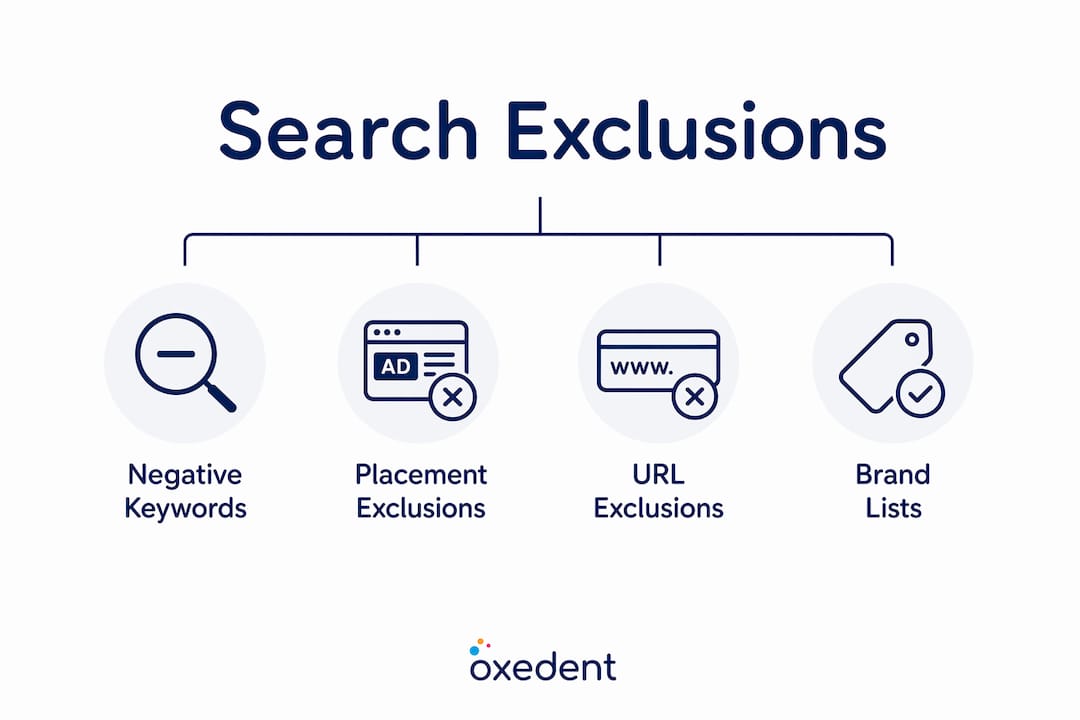
Search exclusions in Google Ads fall into four core categories, and each one operates differently. Understanding the distinction between them is the first step to applying them correctly.
Negative keywords are the most widely used exclusion type. They prevent your ads from triggering on search queries that contain terms you specify. A retailer selling premium running shoes, for example, would add “cheap” and “free” as negative keywords to filter out bargain hunters who are unlikely to convert.


Placement exclusions control where your Display, YouTube, and Search ads appear. Account-level placement exclusions, launched in january 2026, allow you to block unwanted inventory across Performance Max, Demand Gen, YouTube, Display, and Search campaigns from a single location. That centralised control removes the need to replicate exclusion lists across every campaign individually.
URL exclusions are specific to AI Max campaigns. They block the AI from landing on pages that degrade performance, such as careers pages, help centres, or discontinued product listings. Proactively blocking unwanted URL paths before AI Max tests them is more effective than adding negative keywords after the damage is done.
Brand exclusion lists give you control over whether your ads appear on branded search queries. Inside AI Max, branded search controls offer three modes: show all branded searches, use brand inclusions and exclusions, or show only unbranded traffic. This prevents AI Max from cannibalising your existing branded campaigns or bidding on a competitor’s brand name.
| Exclusion type | Primary function | Typical use case |
|---|---|---|
| Negative keywords | Block irrelevant search queries | Filter out non-converting intent signals |
| Placement exclusions | Block specific sites, apps, or channels | Remove low-quality Display or YouTube inventory |
| URL exclusions | Block specific landing page paths | Prevent AI Max from serving on irrelevant pages |
| Brand exclusions | Control branded query targeting | Protect branded campaigns from AI Max cannibalisation |

How do negative keywords impact ad targeting and performance?
Negative keywords improve expected click-through rate and Quality Score by filtering out irrelevant queries, which reduces wasted spend and improves overall campaign efficiency. That improvement in Quality Score has a compounding effect: better scores lower your cost per click over time.
Negative keywords use three match types, and each behaves differently.
- Broad negative match blocks any query containing your negative term in any order. Adding “free” as a broad negative stops your ad on “free running shoes,” “running shoes free delivery,” and similar variations.
- Phrase negative match blocks queries that contain your exact phrase in the same word order. Adding “running shoes free” as a phrase negative stops that exact sequence but not “free running shoes.”
- Exact negative match blocks only the precise query you specify, with no additional words. It is the most targeted option and the least likely to cause accidental over-exclusion.
One critical limitation: negative keywords do not block close variants automatically. If you add “trainers” as a negative exact match, your ad can still appear for “trainer” or “training shoes.” Each variation requires a manual addition. This is particularly important for exact match negatives, where manual coverage expansions are required to block all close variants.
The most reliable way to build your negative keyword list is through the Search Terms report. Weekly review of the Search Terms report is the single most important ongoing negative keyword management activity. Filter by high impression or high cost terms, identify queries that do not match your offer, and add them as negatives before they drain further budget.
Shared negative keyword lists let you apply the same exclusions across multiple campaigns simultaneously. This is especially useful when you run separate campaigns for different product categories but want to apply universal exclusions, such as competitor brand names or irrelevant intent signals, without duplicating work.
Pro Tip: Before adding a new negative keyword, cross-reference it against your active positive keywords. A negative that conflicts with a keyword you are actively bidding on will suppress your own ad. This is one of the most common and costly configuration errors in Google Ads.
How to implement a search exclusions strategy across your campaigns
A tiered approach to exclusions gives you both broad protection and granular control. The defence-in-depth exclusions strategy uses account-level placement exclusions for broad coverage, shared negative keyword lists for campaign types, and campaign-level exclusions for specific needs. Each layer handles a different scope of risk.
At the account level, apply placement exclusions and shared negative keyword lists that cover universal waste signals. These are terms or placements that should never trigger your ads regardless of campaign objective. Think of this layer as your permanent safety net.
At the campaign level, add exclusions that reflect the specific intent of that campaign. A campaign targeting “buy running shoes” needs different negatives from one targeting “running shoe reviews.” Mixing intent signals without exclusions causes your budget to bleed across the wrong queries.
At the ad group level, use exclusions to prevent cannibalisation between ad groups within the same campaign. If one ad group targets “women’s running shoes” and another targets “men’s running shoes,” each needs negatives to stop them competing for the same queries.
For AI Max campaigns, brand settings combined with URL exclusions create a layered control environment that protects branded search equity and landing page relevance. You can also apply ad group brand inclusions to give one ad group tighter branded boundaries without restricting the entire campaign.
Best practices for exclusion management:
- Audit your Search Terms report every week and add new negatives before costs accumulate.
- Use shared lists for exclusions that apply to three or more campaigns to reduce management overhead.
- Apply URL exclusions in AI Max before launch, not after. Reactive exclusions cost you spend that proactive ones prevent.
- Review impression share after adding new exclusions. A sudden drop signals over-exclusion.
- Document every exclusion with a reason and date. This makes audits faster and prevents accidental removal.
Pro Tip: For eCommerce campaigns, build a master negative keyword list that covers all non-commercial intent signals: “how to,” “DIY,” “Wikipedia,” “images,” and similar research-only queries. Apply this list at account level and update it quarterly. You can find practical templates for eCommerce negative keyword lists that cover the most common retail waste patterns.
What challenges do marketers face with search exclusions?
The biggest challenge with exclusions in 2026 is managing them inside AI Max campaigns, where the AI infers intent rather than matching keywords directly. This creates two specific problems: brand cannibalisation and over-exclusion.
Brand cannibalisation occurs when AI Max bids on your own branded terms, inflating your cost per click on queries you would have won organically or through a lower-bid branded campaign. Google’s native branded search toggle in AI Max addresses this by excluding brands based on Google’s entity index rather than manual lists alone. That approach is more comprehensive than traditional negative keyword lists, which rely on exact text matching.
Over-exclusion is the opposite problem. Too many negatives can starve automated campaigns, reducing scale and impressions. Tracking lost impression share after adding exclusions is the clearest signal that you have gone too far. If impression share drops sharply after a batch of new negatives, review the list and remove any that are too broad.
| Challenge | Root cause | Solution |
|---|---|---|
| Brand cannibalisation in AI Max | AI infers branded intent without explicit controls | Use AI Max branded search toggle and brand exclusion lists |
| Over-exclusion and impression loss | Broad negatives blocking valid queries | Monitor impression share; audit negatives monthly |
| Close variant gaps | Negative keywords do not auto-block variants | Manually add all relevant close variants |
| URL expansion to irrelevant pages | AI Max tests new landing pages automatically | Add URL exclusions before campaign launch |
| Inconsistent exclusions across campaigns | Manual duplication errors | Use shared negative keyword lists and account-level exclusions |
Auditing exclusion effectiveness requires more than checking whether spend dropped. Pull the Search Terms report and compare the query mix before and after exclusion changes. If you are seeing fewer irrelevant queries without losing volume on high-intent terms, your exclusions are working. If high-intent query volume also drops, a negative is too broad and needs narrowing. For Google Ads campaign types for eCommerce, this audit process is particularly important because each campaign type responds differently to exclusion changes.
Key takeaways
Search exclusions are the primary mechanism for controlling where your Google Ads budget goes, and a tiered approach across account, campaign, and ad group levels delivers the best balance of protection and scale.
| Point | Details |
|---|---|
| Use all four exclusion types | Negative keywords, placement, URL, and brand exclusions each cover a different risk. |
| Review Search Terms weekly | Weekly audits catch wasteful queries before they compound into significant spend loss. |
| Apply URL exclusions before AI Max launch | Proactive URL exclusions prevent spend leakage that reactive negatives cannot recover. |
| Monitor impression share after changes | A sharp drop in impression share signals over-exclusion and requires immediate review. |
| Use shared lists for scale | Shared negative keyword lists reduce duplication and keep exclusions consistent across campaigns. |
Why exclusion management is the most underrated PPC skill
Most PPC managers treat exclusions as a setup task. They build a list at launch, apply it, and move on. That approach made sense five years ago. It does not work now.
AI Max and Performance Max have fundamentally changed the relationship between advertisers and query matching. The AI expands reach in ways that keyword targeting never did, which means the surface area for irrelevant spend is far larger than it used to be. Exclusions are no longer a one-time configuration. They are an ongoing discipline.
What I have seen consistently across eCommerce accounts is that the brands with the tightest return on ad spend are not necessarily the ones with the best bidding strategies. They are the ones who review their Search Terms report every single week without fail. They catch the drift before it becomes a problem. They add negatives before a bad query pattern costs them thousands.
The 2026 account-level placement exclusions feature is genuinely useful, but only if you treat it as a starting point rather than a complete solution. Centralised exclusions handle the broad strokes. Campaign-level and ad group-level exclusions handle the nuance. Neither layer replaces the other.
My honest advice: build your exclusion management into a weekly workflow, not a monthly one. Automate what you can with shared lists. But keep a human eye on the Search Terms report. The AI is good at finding intent. It is not good at knowing which intent is worth paying for in your specific business context. That judgement is yours.
— Biplab
How Oxedent manages search exclusions for eCommerce PPC


Exclusion management at scale requires both process and expertise. Oxedent’s eCommerce PPC management service covers the full exclusion stack: negative keyword architecture, account-level placement exclusions, URL exclusions for AI Max, and brand controls across Performance Max campaigns. Every account gets a weekly Search Terms audit built into the management workflow, not treated as an optional extra. If you are running Google Ads for an eCommerce brand and want a team that treats exclusion management as a core discipline rather than a setup checkbox, Oxedent works with established brands ready to reduce waste and grow profitably. You can also explore how PPC drives eCommerce growth to understand the broader context before getting in touch.
FAQ
What is the role of search exclusions in Google Ads?
Search exclusions prevent your ads from appearing on irrelevant queries, placements, or pages, protecting budget and improving campaign efficiency. They include negative keywords, placement exclusions, URL exclusions, and brand exclusion lists.
Do negative keywords block close variants automatically?
No. Negative keywords do not block close variants automatically; each variation must be added manually for comprehensive coverage.
What are URL exclusions in AI Max campaigns?
URL exclusions in AI Max block the AI from serving ads on specific landing page paths, such as careers pages or discontinued product pages, before they generate wasted spend.
How often should I review my negative keyword list?
A weekly review of the Search Terms report is the most effective cadence for negative keyword management, catching wasteful queries before they accumulate significant cost.
What is over-exclusion and how do I avoid it?
Over-exclusion occurs when too many negatives reduce impression share on valuable queries. Monitor impression share after adding exclusions and remove any negatives that are too broad if volume on high-intent terms drops.