


If you run a UK eCommerce business and your Google Ads invoices show zero VAT, you might assume there is nothing to worry about. That assumption is one of the most common and costly mistakes in paid advertising. The truth about VAT and Google Ads UK is more nuanced: the reverse charge mechanism means VAT absolutely applies, you are simply responsible for accounting for it yourself. Get it wrong and you are exposed to HMRC scrutiny at a time when investigations have surged 31% in a single year. This guide gives you the full picture.
Table of Contents
- Key takeaways
- VAT and Google Ads UK: how the reverse charge works
- How VAT affects your Google Ads billing and pricing
- Getting your Google Ads account setup right
- VAT compliance and record-keeping for Google Ads
- My perspective: the VAT mistakes I see most often
- How Oxedent helps UK eCommerce brands get this right
- FAQ
Key takeaways
| Point | Details |
|---|---|
| Reverse charge applies | Google does not charge VAT directly; you must self-account for it on your VAT return. |
| Account setup is permanent | Choosing the wrong account type at setup locks you out of reverse charge eligibility. |
| Missing VAT number costs you | Without a valid UK VAT number in your account, Google charges 20% VAT you cannot easily reclaim. |
| Consumer ads must show VAT | Any ad price visible to consumers must include VAT under CAP and ASA guidelines. |
| Records must reflect reverse charge | Your accounting software must log both output and input VAT entries for Google Ads spend. |
VAT and Google Ads UK: how the reverse charge works
Advertising services supplied by a non-UK entity like Google to a UK VAT-registered business are classified as digital services received from outside the UK. That single classification changes everything about how VAT is handled.
Under the reverse charge mechanism, Google does not add VAT to your invoice. Instead, the obligation to account for VAT shifts to you, the UK business receiving the service. You declare the VAT as both output tax (as if you had charged it) and input tax (as if you had paid it) on the same VAT return. The result is net zero if your business is fully taxable, meaning no money actually changes hands, but the entries must still be there.
Here is what that means in practice:
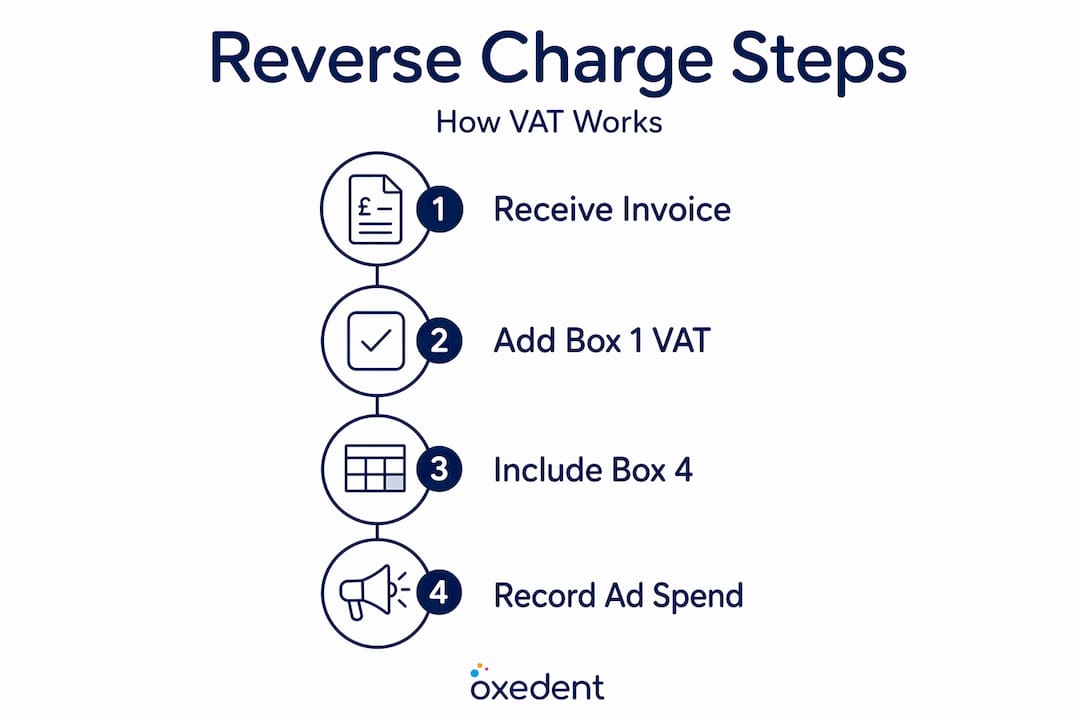
- Google invoices you for, say, £1,000 in ad spend with no VAT shown.
- You calculate 20% of £1,000, which is £200.
- You add £200 as output VAT in Box 1 of your VAT return.
- You reclaim £200 as input VAT in Box 4.
- The net VAT liability from that transaction is zero, but both figures must appear on your return.
Reverse charge is mandatory with no option to bypass it, even when your invoice clearly shows 0% VAT. That zero is not an exemption. It is a signal that reverse charge applies.
HMRC investigations into VAT on digital services have intensified considerably, with 1 in 3 large companies having a VAT investigation opened in 2024 to 2025. Missing reverse charge entries on advertising spend is exactly the type of bookkeeping error that flags during an audit.

Pro Tip: Check your last three VAT returns now. If you are spending on Google Ads but there are no reverse charge entries anywhere, speak to your accountant before your next filing date.
How VAT affects your Google Ads billing and pricing
The billing side of Google Ads VAT is straightforward once you understand reverse charge. The pricing side, however, catches far more businesses off guard.
Billing and invoices
When you provide Google with a valid UK VAT number, your invoices come through with zero VAT shown. That is correct and expected. The responsibility for the VAT entry sits with you. Omitting your VAT number causes Google to treat you as a B2C customer, at which point Google charges 20% VAT directly on your bill. That charge is difficult to reclaim because it was technically charged incorrectly from the start.


Think about what that means on a £5,000 monthly ad budget. Without the reverse charge set up properly, you could be paying £1,000 per month in VAT that serves no purpose and is hard to get back.
Pricing in your own ads
The pricing rules for ads you serve to customers carry their own set of VAT obligations. Compare the two scenarios:
| Audience | VAT in ad price | How to label |
|---|---|---|
| Consumers (B2C) | Must include VAT | Show the full price, e.g. £120 |
| Businesses (B2B) | May exclude VAT | Must clearly state, e.g. £100 + VAT @ 20% |
| Mixed audience | Must include VAT | Always show VAT-inclusive price |
Prices in ads accessible to both consumers and businesses must include VAT to comply with CAP regulations. If your Google Shopping ads, Display ads, or Search ads show a product price and a consumer could see that ad, the price shown must be the full VAT-inclusive amount. Running an ex-VAT price without a clear label is one of the leading causes of ASA complaints for eCommerce brands.
Pro Tip: If you sell to both trade and retail customers, create separate ad campaigns with separate pricing. Never run a single ad with an ex-VAT price to a mixed audience, even if most of your revenue is B2B.
Getting your Google Ads account setup right
This is where most VAT problems begin. Your Google Ads account setup is not just an administrative step. Some choices you make at that stage are permanent, and they directly determine your VAT treatment.
Follow these steps to set up your account correctly for reverse charge eligibility:
- Choose “Organisation” as your account type. The “Individual” account type disables the VAT number input field entirely. You cannot add a VAT number later on an Individual account without creating a new account.
- Enter your UK VAT registration number in the billing settings. Do this before you add a payment method or run your first campaign. The VAT number triggers reverse charge from the outset.
- Select Pound Sterling as your billing currency. Currency choice is permanent in Google Ads. If you accidentally set your account to Euro or USD, every transaction will involve a currency conversion with associated fees. This adds to your effective cost per click and complicates VAT calculations.
- Download and verify your first invoice. After your first billing cycle, open your invoice and confirm that VAT is shown as 0% or not charged. That confirms reverse charge is active.
- Inform your accountant or bookkeeper. They need to know reverse charge applies so they can set up the correct accounting entries from day one.
If you have already set up your account as an Individual, or if the currency is wrong, the practical fix is to create a new Organisation account and migrate your campaigns across. It is disruptive, but it is the only clean solution. Leaving an incorrectly configured account running locks in avoidable costs and compliance gaps over time.
You can read more about Google Ads billing settings and how they affect your overall ad costs in the context of agency management and budget planning.
Pro Tip: If you are an established business using a Google Ads account set up years ago, check your billing profile today. Many older accounts were set up as Individual accounts before business owners understood the VAT implications.
VAT compliance and record-keeping for Google Ads
Good compliance is not complicated. It does require consistent habits and the right system in place. Here is what best practice looks like for UK eCommerce businesses running Google Ads.
- Download your invoices monthly. Google Ads generates a tax invoice for each billing period. Download it, store it, and make sure your accountant has access. These are the source documents for your reverse charge entries.
- Configure your accounting software for reverse charge. Platforms like Xero and QuickBooks have specific reverse charge VAT codes for services received from abroad. Using the wrong VAT code, or no code at all, means your VAT return will be incorrect.
- Reconcile your ad spend against invoices quarterly. Discrepancies between what you see in Google Ads and what appears on the invoice can indicate billing errors or currency conversion issues worth investigating.
- Keep a clear record of your VAT number submission to Google. A screenshot or export of your billing profile showing the VAT number is useful evidence if HMRC ever questions your reverse charge treatment.
- Review your consumer-facing ad prices regularly. If you update pricing, check that your ads reflect the correct VAT-inclusive amounts. Automated price feeds from your eCommerce platform can sometimes strip VAT from prices before they reach Google Shopping.
Businesses that treat VAT compliance as a one-time setup task rather than an ongoing discipline are the ones most likely to face problems. The reverse charge mechanism creates an obligation on every single VAT return for as long as you are spending on Google Ads. It cannot be set and forgotten.
Many UK businesses mistakenly believe Google Ads are VAT-exempt because invoices show zero VAT. That misinterpretation leads directly to missing entries on VAT returns and, increasingly, to audit risk. A thorough Google Ads account audit will surface these gaps before HMRC does.
My perspective: the VAT mistakes I see most often
I have worked with dozens of UK eCommerce businesses on their Google Ads accounts, and the VAT errors follow a predictable pattern.
The most common mistake I see is an account set up as an Individual rather than an Organisation. It usually happened years ago when the business was small and VAT registration was not yet on the radar. By the time the business is spending serious money on ads, it is being billed 20% VAT by Google on every invoice because the VAT number was never entered. Nobody noticed because the invoices still cleared payment and the campaigns kept running.
The second most common mistake is correct reverse charge setup but wrong accounting treatment. The VAT number is in place, Google invoices show zero VAT, and the business owner assumes that means there is nothing to do. The bookkeeper never codes the reverse charge entries. The VAT returns go in incomplete. Years of this creates a significant under-declaration of output VAT, even if the input reclaim would have cancelled it out. That still constitutes an error in HMRC’s eyes.
My honest take is this: conventional wisdom says VAT compliance is your accountant’s problem. I disagree. As the business owner running Google Ads, you are the one who set up the account, chose the account type, and added the billing details. The accountant can only work with what you give them. If the account is wrong, the downstream compliance problems are baked in from the start.
Treating VAT as integral to your ad cost management is not onerous. It takes about 20 minutes of setup and a consistent monthly habit. The alternative is an HMRC investigation at a time when 1 in 3 large businesses are already under scrutiny.
— Biplab
How Oxedent helps UK eCommerce brands get this right
Managing VAT and Google Ads correctly is one part of a much larger picture.


At Oxedent, every new client account goes through a structured setup and audit process that covers VAT number verification, billing currency, account type, and invoice configuration before a single penny of ad spend is committed. If you are taking on an existing account, the audit checks for historic VAT errors and flags them for your accountant to correct. Beyond the technical setup, Oxedent’s eCommerce PPC management includes attention to pricing compliance in ad copy and Shopping feeds, making sure the prices your customers see in ads meet CAP and ASA requirements. VAT compliance is not an afterthought here. It is part of running campaigns that are genuinely profitable and audit-proof. If you want a second set of eyes on your current account, start with an eCommerce Google Ads audit to see exactly where you stand.
FAQ
What is the reverse charge on Google Ads in the UK?
The reverse charge shifts the responsibility for accounting for VAT from Google to the UK business receiving the advertising service. You declare both output and input VAT on your return, resulting in a net zero VAT position if your business is fully taxable.
Does Google charge VAT on Google Ads in the UK?
Google does not charge VAT when a valid UK VAT number is on the account, as the reverse charge mechanism applies. Without a VAT number, Google charges 20% VAT as it treats the account as a B2C customer.
Do my Google Ads prices need to include VAT?
Yes, if your ads are visible to consumers. CAP and ASA guidance requires that any price shown in an ad accessible to the general public must include VAT. B2B-only ads may show ex-VAT prices if clearly labelled.
What happens if I set up my Google Ads account as an Individual?
Choosing the Individual account type disables the VAT number field, meaning Google will charge 20% VAT on all your ad spend. The only fix is to set up a new Organisation account, as this choice is permanent and cannot be changed on an existing account.
How do I record Google Ads VAT on my UK VAT return?
Add the VAT-equivalent amount (20% of your Google Ads spend) to Box 1 as output VAT and to Box 4 as input VAT on your VAT return. Both entries must appear even though they cancel each other out, and your accounting software should have a specific reverse charge code for this purpose.