


A bid strategy is the rule set, whether manual, automated, or a hybrid of both, that controls how much you bid in every ad auction to meet a stated campaign goal. According to practical guidance on bidding frameworks, it is the decision framework that determines bid amounts in real-time auctions and should align with your unit economics, budgets, and growth objectives. Get it right and your budget works harder; get it wrong and you either overspend on low-value traffic or starve your campaigns of the volume they need.
Here is a quick goal-to-strategy map to orient you before we go deeper:
- Drive clicks and traffic → Maximise clicks or Manual CPC
- Dominate search visibility → Target impression share
- Generate conversions (fixed cost target) → Target CPA or Maximise conversions
- Maximise revenue at a set return → Target ROAS or Maximise conversion value
- Drive video views or interactions → CPV / Target CPV
- Awareness at scale (display/video) → CPM, vCPM, or tCPM
Google’s Smart Bidding and Meta’s automated bid strategies both implement these approaches using machine learning. However, the underlying logic maps to the same goal-first framework.
Key takeaways
The most effective bid strategy is the one that matches your current data maturity: start with volume-focused strategies, then migrate to target-based approaches once conversion volume and tracking quality support it.
| Point | Details |
|---|---|
| Match strategy to goal | Clicks need Maximise clicks or Manual CPC; conversions need Target CPA or Maximise conversions; revenue needs Target ROAS. |
| Conversion tracking is non-negotiable | Smart Bidding learns from your conversion data, so inaccurate or incomplete tracking directly degrades performance. |
| Allow the learning period | Wait at least two weeks and 30–50 conversions before judging a new strategy’s performance or making further changes. |
| Use portfolio strategies for low-volume campaigns | Pooling campaigns gives the algorithm enough data to learn when individual campaigns lack sufficient conversion volume. |
| Oxedent for managed expertise | Oxedent audits and manages bid strategies for ecommerce brands spending at least £2,000/month, with no long-term contract required. |
Table of Contents
- What is a bid strategy and why does it matter?
- What types of bid strategies are available?
- Which bid strategy fits your campaign goal?
- How does Smart Bidding actually work?
- When will a bid strategy underperform?
- How to set up bid strategies in Google Ads and Meta Ads
- Agency-grade ecommerce checks before you commit to a strategy
- An agency perspective on bid strategy selection
- Oxedent manages bid strategies so your budget works harder
- Sources
What is a bid strategy and why does it matter?
A bid strategy translates your business objective into auction behaviour. Every time your ad is eligible to appear, the platform runs an auction. Your bid strategy determines whether you enter that auction, how aggressively you compete, and at what cost. Google defines automated bidding as using its AI to set bids based on the likelihood of clicks or conversions, with each automated type designed to meet a specific goal.
Three components define any strategy:
- Objective: what you are optimising for, whether clicks, conversions, conversion value, impressions, or views
- Bidding logic: how the bid is calculated, ranging from a fixed manual amount to rule-based adjustments to full AI-driven auction-time decisions
- Constraints: the guardrails you apply, such as a target CPA, a target ROAS, a maximum bid cap, or a daily budget ceiling
A well-constructed bidding strategy balances control, efficiency, and scale. Manual gives you transparency and precise control; automated brings scale and uses many signals, but needs sufficient data to learn. Neither is universally superior. The right choice depends on your data maturity, campaign volume, and tolerance for cost volatility.
Where you set the strategy also matters. In the Google Ads API, strategies can be applied as a standard campaign-level strategy (one campaign, one strategy) or as a portfolio strategy shared across multiple campaigns. Portfolio strategies pool conversion data, which is especially useful when individual campaigns lack the volume for Smart Bidding to learn reliably.
What types of bid strategies are available?
Google documents several automated bidding strategies mapped to common business goals, with availability varying by network. Here is the full catalogue:
Conversion and value-based Smart Bidding
These four strategies form the core of Google’s Smart Bidding suite:
- Target CPA (cost per action): sets bids to get as many conversions as possible at or below your target cost per conversion
- Target ROAS (return on ad spend): optimises bids to maximise conversion value at a set return ratio
- Maximise conversions: spends your full budget to get the highest number of conversions, without a specific cost target
- Maximise conversion value: spends your full budget to maximise total conversion value, without a specific ROAS target
Click and traffic strategies
- Maximise clicks: automatically sets bids to get the most clicks within your budget; available on Search and Display
- Manual CPC: you set the maximum cost-per-click for each keyword or ad group; full control, no automation
- Enhanced CPC (eCPC): a hybrid that adjusts your manual bids up or down based on conversion likelihood; being phased out on some campaign types in favour of full Smart Bidding
- Target CPC: sets bids to achieve a specific average cost per click
Visibility and awareness strategies
- Target impression share: sets bids to show your ad in a target percentage of eligible auctions, at the top of the page or anywhere on the page
- CPM (cost per thousand impressions): you pay per 1,000 impressions; standard for Display and YouTube
- vCPM (viewable CPM): you pay only for viewable impressions; available on Display
- tCPM (target CPM): sets bids to average a target cost per thousand impressions; used for YouTube and Display reach campaigns
Video-specific strategies
- CPV / Target CPV (cost per view): you pay when a viewer watches a set portion of your video or interacts with it; the standard strategy for TrueView in-stream ads on YouTube
Meta Ads bid strategies
Meta explains that your chosen bid strategy tells its ad system how to bid in auctions while considering your spend and cost goals. Meta’s main options are:
- Highest volume (formerly lowest cost): spends your budget to get the most results at the lowest cost per result
- Highest value: maximises the total purchase value delivered within your budget
- Cost per result goal: targets a specific average cost per result (equivalent to Target CPA)
- ROAS goal: targets a minimum return on ad spend
- Bid cap: sets a hard maximum bid per auction for tighter cost control
Which bid strategy fits your campaign goal?
The table below maps the most common campaign goals to the strategies best suited to each, along with the key trade-offs to weigh.
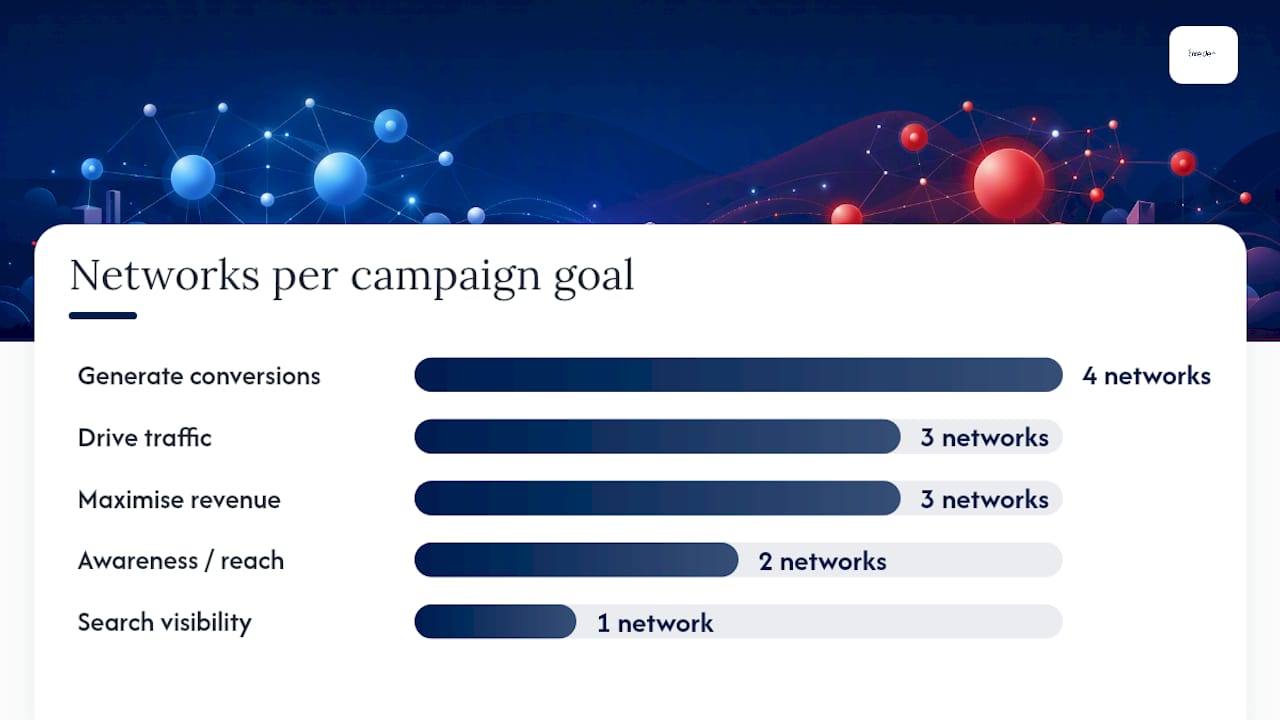

| Goal | Recommended strategy | Control level | Prerequisites | Primary risk | Networks |
|---|---|---|---|---|---|
| Drive traffic / clicks | Maximise clicks, Manual CPC | Medium to high | Budget only | Clicks without conversions | Search, Display, Shopping |
| Search visibility / brand defence | Target impression share | Medium | Budget only | CPCs can spike to hit share targets | Search |
| Generate conversions (cost target) | Target CPA, Maximise conversions | Low to medium | Conversion tracking; a recommended minimum number of conversions per month | CPA volatility during learning | Search, Display, Shopping, PMax |
| Maximise revenue at a set return | Target ROAS, Maximise conversion value | Low | Accurate conversion values; higher volume | Under-delivery if ROAS target is too aggressive | Search, Shopping, PMax |
| Video views / engagement | CPV, Target CPV | Medium | Video creative | Low view-through rates with weak creative | YouTube |
| Awareness / reach | CPM, vCPM, tCPM | Medium | Creative assets | Impressions without engagement | Display, YouTube |
| Meta conversions | Cost per result goal, Highest volume | Low to medium | Meta Pixel, conversion events | Cost instability in small audiences | Meta (Facebook/Instagram) |
Practical selection advice:
- Start with Maximise conversions when you have fewer than 30 conversions per month. It gathers data without requiring a pre-set cost target. Agency guidance consistently recommends moving to Target CPA or Target ROAS only once you have stable conversion volume.
- Use portfolio strategies when individual campaigns are too small to feed Smart Bidding on their own. Pooling campaigns gives the algorithm more signal.
- Manual CPC suits new accounts, very low-volume niches, or situations where you need granular bid control by keyword, such as brand defence or competitor terms.
How does Smart Bidding actually work?
Smart Bidding sets a unique bid for every single auction, a process called auction-time bidding. Rather than applying one fixed bid to every search, the algorithm evaluates a rich set of contextual signals in real time and adjusts the bid up or down accordingly.
The signals Google uses include:
- Device type: mobile, desktop, or tablet
- Location and location intent: where the user is and where they are searching about
- Time of day and day of week
- Remarketing list membership: whether the user has previously visited your site or interacted with your brand
- Browser and operating system
- Search query context: the specific words used, their order, and related intent signals
- Ad characteristics: the format, extension set, and landing page
This means two searches for the same keyword can receive very different bids if the users show different conversion signals. A returning visitor on a desktop in London at midday may attract a significantly higher bid than a first-time visitor on mobile at midnight.
The algorithm learns from your conversion data over time. This is why a learning period exists after any significant change to a Smart Bidding strategy. During this period, performance can fluctuate while the model recalibrates. Campaigns with higher conversion volume exit the learning period faster and produce more stable results.


Pro Tip: Avoid making multiple simultaneous changes (budget, target, creative, audience) during the learning period. Each change can reset the clock and extend instability.
When will a bid strategy underperform?
Automated bidding reduces manual guesswork, but it requires strict conversion hygiene or the optimisation will be biased by noise. Here are the most common failure points:
Prerequisites for Smart Bidding to work:
- Working, verified conversion tracking with consistent event firing
- Sufficient conversion volume (Google recommends at least 30–50 conversions per month per campaign, or pooled via a portfolio strategy)
- Accurate conversion values if you are using Target ROAS or Maximise conversion value
- A realistic target: a Target CPA or ROAS set far outside historical performance will starve delivery
Common red flags to watch for:
- CPA spikes immediately after switching from manual to Smart Bidding (often a learning-period effect, but persistent spikes signal a data or target problem)
- Under-delivery with a strict ROAS target, where the algorithm cannot find enough auctions that meet the threshold
- Inflated spend driven by weak conversion definitions, such as tracking page views or add-to-cart events as primary conversions when you actually care about purchases
- Cross-device attribution gaps that undercount conversions and make the algorithm appear to be underperforming
Pro Tip: Before switching bid strategies, audit your conversion actions. Remove or demote any event that does not represent genuine business value. Garbage in, garbage out applies directly to Smart Bidding.
How to set up bid strategies in Google Ads and Meta Ads
Google Ads setup
- Open Google Ads and navigate to the campaign you want to update.
- Click Settings in the left-hand menu.
- Under Bidding, click the current bid strategy to open the selector.
- Choose your strategy from the list. For Smart Bidding options (Target CPA, Target ROAS, Maximise conversions, Maximise conversion value), you will be prompted to enter a target value or leave it unconstrained.
- If you want a portfolio strategy shared across campaigns, go to Tools and Settings → Shared Library → Bid strategies and create a new portfolio strategy there. Bidding strategies in the Google Ads API are represented as distinct objects at both campaign and portfolio level, which mirrors this interface structure.
- Set your conversion actions under Tools and Settings → Measurement → Conversions. Confirm the correct actions are marked as primary.
- Check your attribution model and conversion window to ensure they reflect your actual customer journey.
Meta Ads setup
- In Meta Ads Manager, create or edit a campaign.
- At the ad set level, scroll to Optimisation and delivery.
- Under Bid strategy, select your preferred option (Highest volume, Cost per result goal, ROAS goal, or Bid cap). Meta’s system uses your chosen strategy to direct how it bids in auctions relative to your spend and cost goals.
- Select the optimisation event that matches your objective (Purchase, Add to cart, Lead, and so on). The event must be firing correctly via the Meta Pixel or Conversions API.
- Set your daily or lifetime budget at the ad set or campaign level.
Before switching any strategy, check:
- Conversion windows are set to match your typical purchase cycle
- Event deduplication is configured if you use both Pixel and Conversions API
- Attribution settings reflect how you want credit assigned across touchpoints
- You have a baseline of recent performance data to compare against during the learning period
Monitor these metrics during the learning period:
- Impression share and delivery volume (is the campaign spending?)
- Cost per conversion trend (is it stabilising?)
- Conversion rate by device and audience segment
- Budget utilisation (under-delivery often signals an overly strict target)
Wait at least two weeks and until you have accumulated sufficient conversions before drawing conclusions about a new strategy’s performance.
Agency-grade ecommerce checks before you commit to a strategy
Choosing a bid strategy is not just a platform setting. For ecommerce brands, the choice has direct implications for margin, revenue, and Shopping campaign profitability. Here are the checks that matter most before you commit.
Pre-flight checklist:
- Feed quality: for Shopping and Performance Max campaigns, your product feed is the foundation. Inaccurate titles, missing GTINs, or stale prices will undermine any bid strategy regardless of how well it is configured.
- Accurate conversion values: if you are running Target ROAS, the values passed at conversion must reflect actual revenue, not a fixed proxy. Margin-adjusted values give the algorithm a more accurate signal.
- Stable product margins: if your margins vary significantly by product category, a single account-wide ROAS target may be profitable on some products and loss-making on others. Segment campaigns by margin tier where volume allows.
- Sensible attribution: last-click attribution undervalues upper-funnel activity. Data-driven attribution (available once you have sufficient conversion volume) gives Smart Bidding a more accurate picture of what is actually driving sales.
Tactical staging approach:
The most reliable path for a new ecommerce campaign is to start with Maximise conversions to build a conversion history, then migrate to Target CPA once you have 30–50 conversions per month, and then move to Target ROAS once you have stable revenue data and confident conversion values. This staged approach is well-supported by agency guidance and reflects how the algorithm actually learns.
For accounts with multiple low-volume campaigns, use a portfolio bid strategy to pool conversion data across campaigns. This is particularly effective for brands running separate campaigns by product category or brand versus non-brand.
Agency insight: The most common mistake we see in ecommerce accounts is setting a Target ROAS too high, too early. The algorithm cannot find enough qualifying auctions and the campaign under-delivers. Start with a target close to your recent historical ROAS, then tighten it gradually as volume and confidence grow. A 10–15% incremental adjustment every two weeks is far safer than a large one-time change.
Pro Tip: Set a budget pacing rule alongside your bid strategy. Smart Bidding can accelerate spend when it finds high-conversion signals, so a daily budget cap is your primary safeguard against overspend during volatile periods.
An agency perspective on bid strategy selection
The most persistent misconception about bid strategies is that choosing the “right” one is a one-time decision. In practice, the right strategy for a campaign at launch is almost never the right strategy six months later.
When Oxedent takes on a new ecommerce account, the starting point is almost always volume-focused. Maximise conversions, or Highest volume on Meta, gives the algorithm room to learn without the constraint of a cost target it cannot yet meet. Locking in a Target CPA or Target ROAS before the account has enough conversion history is a common reason campaigns stall in the learning phase and never recover.
The transition to target-based strategies is where the real craft lies. Setting a ROAS target is not just a platform input; it is a statement about the margin structure of the business. A target that looks conservative on paper can still be too aggressive if the product mix has shifted, if a sale event has distorted recent conversion values, or if attribution has changed. Understanding ROAS targets in depth is one of the most underrated skills in ecommerce PPC.
The other thing agencies see regularly is advertisers treating bid strategy as a substitute for measurement hygiene. Smart Bidding is only as good as the conversion data it learns from. An account with clean, purchase-level conversion tracking and accurate revenue values will consistently outperform one with messy, multi-event tracking, regardless of which strategy is selected.
For brands spending less than £2,000 per month on paid media, the data volume rarely supports sophisticated Smart Bidding. Manual CPC or Maximise clicks with a budget cap is often more predictable at that stage. Once budgets and conversion volumes grow, the case for managed Smart Bidding becomes compelling, and that is where a specialist agency adds the most value.
Oxedent manages bid strategies so your budget works harder
Bid strategy selection is one part of a much larger picture. Getting it right requires clean conversion tracking, accurate product data, sensible margin-aware targets, and the patience to let algorithms learn before making changes. That is a significant operational commitment for any ecommerce team managing campaigns alongside everything else.


Oxedent is a specialist ecommerce PPC management agency that works exclusively with online retail brands. The team manages Google Ads, Meta Ads, Google Shopping, and Performance Max campaigns with a direct focus on profitability and return on ad spend, not clicks or impressions. Every engagement starts with a thorough audit of your current bid strategies, conversion tracking, and feed quality, so you know exactly what is working and what is not before any budget is committed. There are no long-term contracts. If you are spending at least £2,000 per month on paid media and want a specialist team to manage your bid strategy end-to-end, request a PPC audit to get started.
Sources
The following official documentation and practical guides were used in this article and are worth bookmarking for ongoing reference:
- Smart bidding – Google Ads Help
- About Meta Bid Strategies | Meta Business Help Center
- Google Ads Bidding Strategies: Complete Guide | Digital Codex
- Bid strategy: what it is, key features and use cases — Wizbrand