


A lookalike audience is a group of new users that an ad platform generates by matching the traits of your best existing customers, so you can target people who have never heard of you but behave like people who already buy from you. It differs from a custom audience, which retargets people who already know your brand. If you have a clean list of purchasers, testing a lookalike is almost always worth the ad spend. If your only “seed” is a scraped email list or a tiny handful of contacts, hold off until you have better data.
The mechanics rest on three components:
- Seed audience: your customers, converters, or pixel events
- Algorithm: the platform’s model that finds shared traits
- Target audience: the new, net-new users it produces
Pro Tip: Before building anything, export your last 90 days of purchasers rather than your entire customer history. Recent buying behaviour usually predicts new buyers better than a five-year-old list.
Key Takeaways
Lookalike audiences work by matching your best customers’ traits to find new prospects, and seed quality, not audience size alone, determines whether that match converts.
| Point | Details |
|---|---|
| Seed quality beats seed size | Purchasers and recent converters produce stronger lookalikes than broad engagement lists. |
| Platforms behave differently | Meta uses an explicit similarity slider; Google Demand Gen now treats seeds as signals, not strict rules. |
| Start narrow, broaden with proof | Test 1% against 5% before committing budget to a wider, cheaper audience. |
| Lookalikes are country-specific | Build a fresh audience per market rather than reusing one across borders. |
| Refresh regularly | Rebuild seed lists every 60 to 90 days to avoid signal dilution. |
Table of Contents
- How does lookalike audience modelling actually work?
- Which ad platforms offer lookalike or similar audiences?
- What should you use as your seed audience?
- Narrow or broad: what similarity percentage should you pick?
- How do you create a lookalike audience on each platform?
- How do you test and optimise lookalike audiences?
- What are the limitations and privacy rules around lookalikes?
- What has Oxedent learned from testing ecommerce lookalikes?
- Why the “bigger seed is always better” advice misses the point
- Frequently asked questions about lookalike audiences
- Sources
How does lookalike audience modelling actually work?
The process behind every lookalike audience follows the same basic sequence, whichever platform you use. You supply a seed audience, the platform analyses shared traits across that group, it builds a similarity model from those traits, and it returns a new set of users who were not in your original list but score highly against the same pattern. Wikipedia’s summary of lookalike audiences describes this as an algorithmically generated group matched against a supplied seed, and that framing holds across every major ad network.
What goes into the model varies by platform but usually draws on demographics, on-platform behaviours, device usage, and purchase or browsing patterns pulled from pixel or app events, as explained in detail in AI and AR in Online Retail: Try, Preview, Personalize. The quality of your seed data changes the outcome more than any setting you tweak afterwards: a seed built from vague page views produces a weaker signal than one built from completed purchases.
- Demographic signals (age, location, household composition)
- Behavioural signals (page visits, video views, app opens)
- Transactional signals (purchases, cart value, repeat orders)
- Device and platform usage patterns
Seed size matters more than most advertisers assume. Meta’s own guidance historically recommends at least 300 to 500 contacts for a workable model, and audiences built from smaller lists tend to drift towards generic population traits rather than traits specific to your buyers.
Which ad platforms offer lookalike or similar audiences?
Three platforms dominate this space, and each treats the concept differently enough that you cannot assume one platform’s rules apply to another.
Meta (Facebook and Instagram) remains the most explicit about control. You choose a source audience, pick a country, and set a similarity level, typically between 1% and 10% of that country’s population, according to the Meta Business Help Center. This gives you control over the trade-off between precision and scale.


Google Ads has moved away from a strict similarity model. Lookalike segments inside Demand Gen now treat your seed list as a signal rather than a hard constraint, and the reach slider no longer restricts targeting the way it once did. The old minimum seed size of 100 users no longer applies for Demand Gen lookalikes either, which changes how small advertisers should approach seed-building on this platform.
LinkedIn leans towards B2B seed types, matching audiences based on company lists, contact lists, or website visitors, and tends to reward tighter, role-specific seeds over broad ones.
- Meta: explicit similarity percentile, country-specific
- Google Demand Gen: seed as signal, no strict minimum, reach slider loosened
- LinkedIn: company and contact-based seeds, B2B-weighted
Pro Tip: Check each platform’s own help documentation before building a campaign. Google’s Demand Gen behaviour has changed enough that guidance written even a year ago may already be outdated.
What should you use as your seed audience?
Not every seed produces the same quality of lookalike, and the difference between a good seed and a mediocre one shows up directly in your cost per acquisition. Purchaser lists and recent high-value converters tend to outperform broad engagement audiences, because Google’s own guidance for Demand Gen lookalikes recommends high-intent seed lists over passive engagement data.
Your realistic options, roughly ranked by strength:
- Purchaser or high-value converter lists: the strongest signal available
- Website pixel events: add-to-cart, checkout-started, and purchase events
- App events: install, in-app purchase, or subscription completions
- Engagement audiences: video viewers, page likers, ad clickers, generally the weakest seed type
Larger seeds generally win, but only up to a point. A seed of a few hundred genuine buyers usually outperforms a seed of tens of thousands of casual page visitors, because the model has a clearer pattern to learn from. Quality beats scale here more often than advertisers expect.
Before you upload anything, clean the list. Deduplicate entries, strip out anyone older than 90 to 180 days unless you are targeting a longer purchase cycle, and confirm your data collection has the consent basis required under UK GDPR before it ever reaches the platform’s hashing process.
Pro Tip: Split your seed into two lists, purchasers and near-purchasers who abandoned a cart. Test both separately rather than merging them into one file. The results are rarely identical.
Narrow or broad: what similarity percentage should you pick?
- 1% (narrow): highest match quality, smallest reach, best for high-ticket or niche products
- 3 to 5% (moderate): a workable middle ground for most ecommerce accounts
- 7 to 10% (broad): maximum scale, most useful once you need volume and can absorb a softer match
The simple decision rule: start narrow if your seed is small or your average order value is high, and broaden only once you have proof the narrow audience converts and you have exhausted its scale.
How do you create a lookalike audience on each platform?
Each platform has its own quirks worth preparing for before you open the ad manager.
- Meta: upload or connect your seed, choose a country, set your similarity percentage (1 to 10%), and publish. Meta’s system typically finishes building the audience within a few hours to a couple of days, per SocialRails’ creation walkthrough.
- Google Demand Gen: add your seed list as a signal rather than a strict rule. Because the minimum seed size requirement no longer applies, even a smaller purchaser list is worth testing, and the reach slider behaves as guidance rather than a hard cap.
- LinkedIn: build from company lists, contact uploads, or website visitor data. B2B advertisers typically need tighter, role-specific seeds, and niche industries may take longer to reach a usable audience size.
Give any newly built lookalike at least three to five days before judging performance, since the audience itself needs time to stabilise and your campaign needs a comparable window to gather conversion data.
How do you test and optimise lookalike audiences?
Treat your first lookalike campaign as an experiment, not a launch. A simple test matrix works well: run a lookalike against an interest-based audience, run a narrow lookalike against a broad one, and run a purchaser-seeded lookalike against an engagement-seeded one. Three tests, one variable changed at a time, and you will know within a few weeks which lever actually moves your numbers.
Before you look at results, lock down your measurement setup:
- Confirm your conversion window matches your typical purchase cycle
- Check attribution settings are consistent across the audiences you’re comparing
- Hold out a small control group where possible to estimate incremental lift, not just observed conversions
Once a lookalike is proven, scaling it usually comes down to seed quality, layered targeting, and disciplined budget allocation rather than simply raising the daily spend. Layering a lookalike with a light interest filter can sharpen relevance without shrinking reach too far, and testing fresh creative against the same audience often unlocks more headroom than switching audiences again.
Watch for signal dilution and audience overlap, two of the most common ways a lookalike quietly stops working:
- Rising cost per acquisition with flat or falling conversion rate
- Frequency climbing fast within the first two weeks
- Overlap reports showing significant crossover with your retargeting audience
- A lookalike that hasn’t been refreshed in months while your customer base has moved on
Salesforce’s explanation of lookalike audiences notes that the entire point of the mechanism is matching new prospects to the traits of your best existing customers, so an audience built from stale seed data works against its own purpose. Refresh your seed list every 60 to 90 days if your customer base or product mix shifts meaningfully.
What are the limitations and privacy rules around lookalikes?
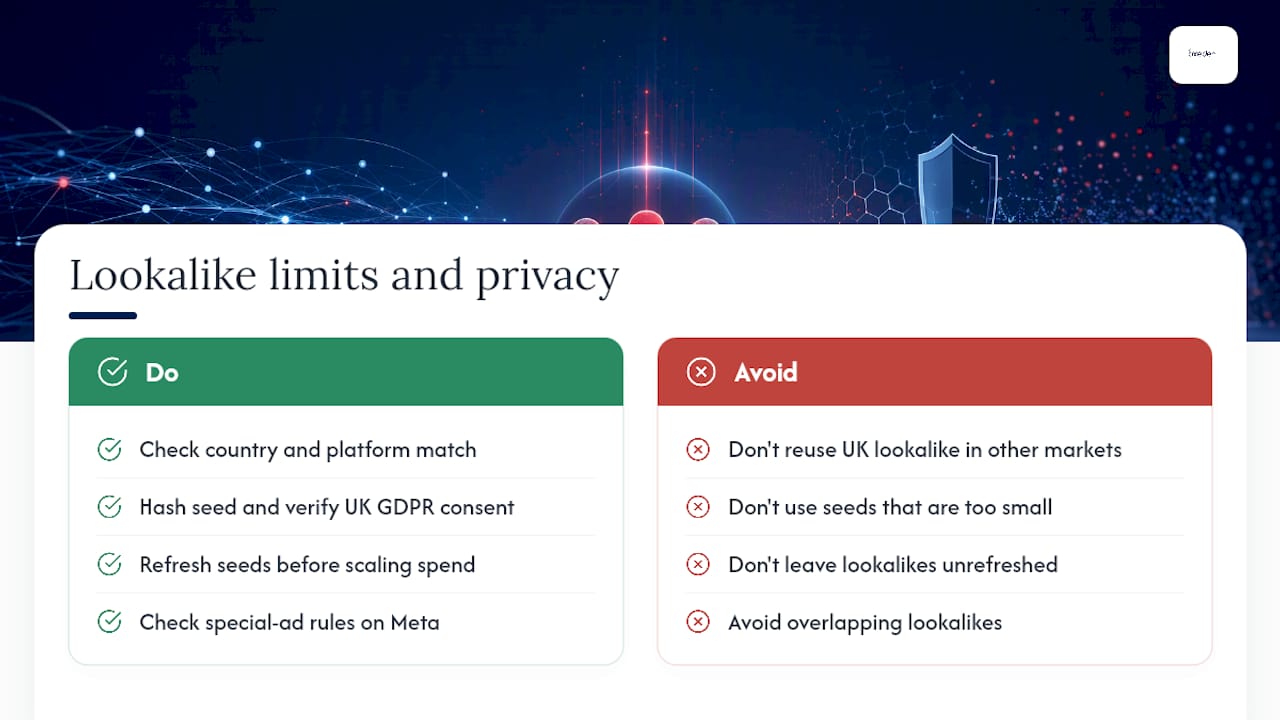
Lookalike audiences are built per country and per platform, because the underlying models rely on local population data, and this isn’t a formatting inconvenience you can work around. Wikipedia’s overview confirms that you generally cannot reuse a UK lookalike in another market and expect the same match quality, which matters directly if you’re expanding into new markets.
Seed data has to be hashed before it reaches the platform, and your consent basis for collecting that data has to hold up under UK GDPR before it ever gets uploaded. Special ad categories, including housing, credit, and employment, carry additional targeting restrictions on Meta specifically, so check the category rules before assuming your seed and similarity settings will apply unrestricted.
The most common pitfalls are avoidable: seeds too small to be representative, the same lookalike reused for months without refreshing, and overlapping lookalikes cannibalising each other’s reach without anyone noticing until CPA quietly climbs. None of this is exotic. It’s mostly a matter of checking your seed size and refresh schedule before you scale spend, not after.

What has Oxedent learned from testing ecommerce lookalikes?
Across ecommerce accounts, purchaser and recent-converter seeds consistently outperform broad engagement seeds, which lines up with Google’s own recommendation to favour high-intent seed lists. A seed built from people who bought in the last 90 days almost always beats one built from anyone who ever clicked an ad.
A workable test plan for a four to six week window:
- Hypothesis: purchaser seed outperforms engagement seed on cost per acquisition
- Audience variations: 1% purchaser lookalike vs. 5% engagement lookalike
- Creative control: identical ad creative across both, so the audience is the only variable
- Measurement window: minimum three weeks before comparing results, longer for higher-ticket products
Structure your account so lookalike tests sit in their own campaign, separate from retargeting, and feed your product catalogue data into the campaign wherever the platform supports it. Clean feed data sharpens targeting almost as much as a clean seed list does.
If running these tests in-house feels like more than your team has bandwidth for, Oxedent’s eCommerce PPC management service builds and manages exactly this kind of structured testing across Meta, Google, and Performance Max, with a strict focus on return on ad spend rather than vanity clicks. Oxedent works with established retail brands on flexible terms, with no long-term contract locking you in, so testing a new audience strategy doesn’t mean committing to a service you can’t step away from if it isn’t earning its keep.
Why the “bigger seed is always better” advice misses the point
Most guides treat lookalike audiences as a numbers game: bigger seed, bigger lookalike, bigger results. The evidence points the other way. A tight seed of genuine purchasers consistently outperforms a sprawling engagement list, because the model has less noise to sort through. Advertisers who chase scale first and quality second usually end up funding an expensive lesson in signal dilution.
The bigger gap in most advice is platform literacy. Treating Meta, Google, and LinkedIn as interchangeable wastes budget, because Google’s shift towards seed-as-signal in Demand Gen genuinely changes what a “small” seed can achieve, while Meta still rewards precise similarity control. Advertisers who read the platform’s own documentation before building outperform those copying last year’s playbook.
If you take one thing from this, prioritise your seed list over your settings. Get 90 days of clean purchaser data before you touch a similarity slider. Everything downstream, cost per acquisition, scale, campaign longevity, follows from that one decision.
Frequently asked questions about lookalike audiences
What is a lookalike audience in simple terms?
It’s a group of new users an ad platform builds by finding people who share traits with your existing customers, so you can advertise to prospects who resemble your best buyers without having interacted with your brand before.
How is a lookalike audience different from a custom audience?
A custom audience targets people who already know you, such as past visitors or existing customers. A lookalike audience targets net-new users who have never engaged with you but match the profile of people who have.
What’s a good example of a lookalike audience?
Do I need a minimum number of contacts to build one?
Meta has historically suggested at least 300 to 500 contacts for reliable results, though Google’s Demand Gen lookalikes no longer enforce a strict minimum seed size, according to Google’s own Ads Support documentation.
Can I use the same lookalike audience across different countries?
Not effectively. Lookalike modelling relies on local population data, so you typically need to build a separate audience for each country you target.
Sources
- Use Lookalike segments to grow your audience
- About Lookalike Audiences | Meta Business Help Center
- Lookalike audience
- Lookalike audience
- Facebook Lookalike Audiences: How to Create, Optimize & Scale (2026)