


The Meta Pixel (still widely called the Facebook Pixel) is a small JavaScript snippet you place on your website that reports visitor behaviour back to Meta for ad measurement, audience building, and campaign optimisation. According to Meta’s own documentation, it records events such as page views, add-to-cart actions, and purchases, then surfaces that data inside Meta Events Manager so you can see exactly what your ads are driving. Meta now sometimes labels it a “dataset” in Events Manager, but the underlying fbq code and 15–16 digit ID remain identical.
Why does it matter? Three reasons:
- Conversion attribution: the Pixel tells you which ads led to sales, not just clicks.
- Audience building: it powers Custom Audiences for retargeting and Lookalike Audiences for prospecting.
- Algorithm training: Meta’s delivery algorithms use Pixel events to identify and bid for users who match your best customers.
The Pixel is free to use. Data appears in Events Manager within hours of installation, but the algorithm needs consistent conversion volume over days or weeks before it can reliably optimise bids.
Pro Tip: Install the Pixel before you launch any paid campaigns. Even a week of baseline data gives Meta’s machine learning a head start when you switch on spend.
Table of Contents
- What events does the Pixel record?
- How do you install the Meta Pixel on your site?
- How do you verify the Pixel is working correctly?
- Why does browser-side tracking have limits, and what is the Conversions API?
- Do you actually need the Meta Pixel?
- Key takeaways
- Why Pixel quality matters more than Pixel presence
- Oxedent handles your Pixel and CAPI setup, so your campaigns start with clean data
- Useful sources
What events does the Pixel record?
Standard events
Meta defines a set of named events that its system recognises natively. Using the correct standard event names means Meta can apply them directly to campaign objectives without any additional configuration.
| Event name | What it represents |
|---|---|
PageView |
Any page load; fires automatically with base code |
ViewContent |
A product or content page view |
AddToCart |
Item added to shopping basket |
InitiateCheckout |
Checkout process started |
Purchase |
Completed transaction |
Lead |
Form submission or sign-up |
Advanced Matching and privacy-safe hashing
Advanced Matching lets you pass customer identifiers alongside events. Before any data leaves the browser, the library applies SHA-256 hashing, so raw personal data never reaches Meta’s servers. Fields you can pass include email address, phone number, first name, last name, and postcode. Each additional field improves match rates, particularly on iOS where cookie-based identity is restricted.
For retail brands, a practical example from the jewellery sector shows how vendor data combined with Pixel events can sharpen audience targeting and improve lead quality on Facebook campaigns.
How do you install the Meta Pixel on your site?
Step 1: create your dataset in Events Manager
- Go to Meta Events Manager (business.facebook.com/events_manager)
- Click Connect Data Sources, select Web, then choose Meta Pixel
Step 2: choose your installation method
Meta supports four main routes:
- Partner integrations: — Shopify, WooCommerce, and other major platforms offer native Pixel connection. In Shopify, go to Online Store > Preferences and paste your Pixel ID. The platform handles base code and standard e-commerce events automatically.
Installation method comparison
| Method | Best for | Technical effort | Event flexibility |
|---|---|---|---|
| Manual code | Simple sites, full control | Medium | High |
| Google Tag Manager | Most sites, iterative changes | Low (after setup) | High |
| Shopify / WooCommerce | E-commerce platforms | Very low | Medium |
| Developer-assisted | Complex custom builds | Low (for you) | High |
Pro Tip: With GTM, use a dedicated trigger for each event rather than a catch-all trigger. This prevents duplicate firing and gives you clean, auditable event data from day one.
Advanced Matching during installation
You can enable Advanced Matching directly in Events Manager after installation. Toggle on the fields you want to pass (email, phone, etc.) and confirm your privacy notice covers this data sharing. For GTM implementations, pass hashed values as data layer variables rather than raw strings.
How do you verify the Pixel is working correctly?
Two tools handle the bulk of Pixel diagnostics: Meta Events Manager and the Facebook Pixel Helper Chrome extension.
Diagnostic checklist:
- Facebook Pixel Helper: — install the Chrome extension, visit your site, and open the extension popup. It shows which Pixel IDs are active, which events fired, and flags errors such as missing parameters or duplicate events.
Signal loss reminder: because ad blockers and browser restrictions can suppress 15–40% of browser-side events, a clean Pixel alone is not sufficient for high-volume advertisers. If Events Manager diagnostics look healthy but campaign attribution still seems low, that gap is the signal to implement the Conversions API.
Pro Tip: Run the Test Events check in an incognito window with no ad blocker active first, then repeat with an ad blocker enabled. The difference in events received tells you exactly how much signal you are losing to browser-side restrictions.
Why does browser-side tracking have limits, and what is the Conversions API?
Browser-side Pixel tracking misses conversions. Ad blockers, Safari’s Intelligent Tracking Prevention, Firefox’s Enhanced Tracking Protection, and Apple’s App Tracking Transparency framework all suppress or block the fbevents.js requests that carry your event data to Meta. The result is a a substantial gap between actual conversions and what the Pixel reports.
The Conversions API (CAPI) solves this by sending events server-to-server, from your web server or CRM directly to Meta’s endpoint, bypassing the browser entirely. Because the request originates from your server, ad blockers and browser privacy settings cannot intercept it.
Pixel vs CAPI vs Pixel + CAPI
| Setup | Signal reliability | Real-time behaviour | Privacy surface |
|---|---|---|---|
| Pixel only | Moderate (15–40% loss) | Immediate, browser-dependent | Third-party cookies, browser-side |
| CAPI only | High for server events | Slight delay (server processing) | Server-side, no browser cookies |
| Pixel + CAPI | Highest | Real-time browser + server confirmation | Layered; deduplication required |
Meta recommends running both in parallel, with the Pixel capturing real-time browser behaviour and CAPI confirming events server-side. The critical requirement is deduplication: pass an identical event_id in both the Pixel event and the CAPI event for the same action. Meta uses this shared ID to count the conversion once, not twice.
Implementation options for CAPI:
- Native platform plugins (Shopify’s Meta Sales Channel includes CAPI support).
- Meta’s own server-side gateway (no-code option in Events Manager).
- Custom server implementation via Meta’s Graph API.
- Cloud functions or middleware for headless or custom-built stores.
Pro Tip: When setting up CAPI, pass the same match keys server-side that you use in Advanced Matching (hashed email, phone). The more match keys both signals share, the better Meta can deduplicate and attribute accurately.
Do you actually need the Meta Pixel?
If you are running any paid traffic to a website, yes. Without the Pixel, Meta’s algorithm cannot attribute conversions, cannot build retargeting audiences, and cannot optimise bids toward users likely to purchase. You are essentially paying for traffic with no feedback loop.
Who should install it immediately:
- Any advertiser running Meta campaigns to a website.
- E-commerce retailers tracking add-to-cart, checkout, and purchase events.
- Subscription or SaaS businesses tracking trial sign-ups and lead forms.
- Any brand planning to build Custom Audiences or Lookalike Audiences.
Quick decision checklist before you install:
- Do you have a consent management solution in place (or are you ready to implement one)?
- Does your site receive enough traffic to generate meaningful conversion volume within 30 days?
- Do you have access to your site’s
<head>code, GTM, or a platform integration? - Can your developer or platform pass
value,currency, andcontent_idson purchase events? - Is your privacy notice up to date and does it reference Meta as a data recipient?
If you answered yes to all five, install today.
Concise best practices:
- Install the base code across every page, not just conversion pages.
- Always send
valueandcurrencyonPurchaseevents. - Enable Advanced Matching with at least email and phone fields.
- Run CAPI in parallel once your conversion volume justifies the setup effort.
- Verify via Events Manager Test Events and Facebook Pixel Helper before going live.
- Review your Meta Ads ecommerce strategy to align Pixel event structure with your campaign objectives.
Cost and timeline: the Pixel itself is free. Initial data appears in Events Manager within hours. Reliable optimisation, where Meta’s algorithm has enough signal to make confident bid decisions, typically requires consistent conversions over several days to a few weeks depending on your volume.
Pro Tip: For implementation guidance specific to GTM, standard events, and common mistakes, the Digital Codex implementation guide is one of the most thorough publicly available references.
Key takeaways
The Meta Pixel is free to install, fires data within hours, but needs consistent conversion volume to train Meta’s machine learning and deliver reliable optimisation.
| Point | Details |
|---|---|
| What the Pixel does | Records website events and sends them to Meta for attribution, audience building, and algorithm training. |
| Signal loss is real | Browser-side tracking alone misses 15–40% of conversions; run Pixel and CAPI together to recover lost signal. |
| Events need parameters | Always pass value, currency, and content_ids on Purchase events or value-based bidding will not work. |
| UK consent is mandatory | Under UK GDPR and PECR, you must obtain explicit consent before firing marketing cookies or passing Advanced Matching data. |
| Oxedent’s role | Oxedent implements and audits Pixel and CAPI stacks for ecommerce brands, directly linking event quality to measurable ROAS improvement. |
Why Pixel quality matters more than Pixel presence
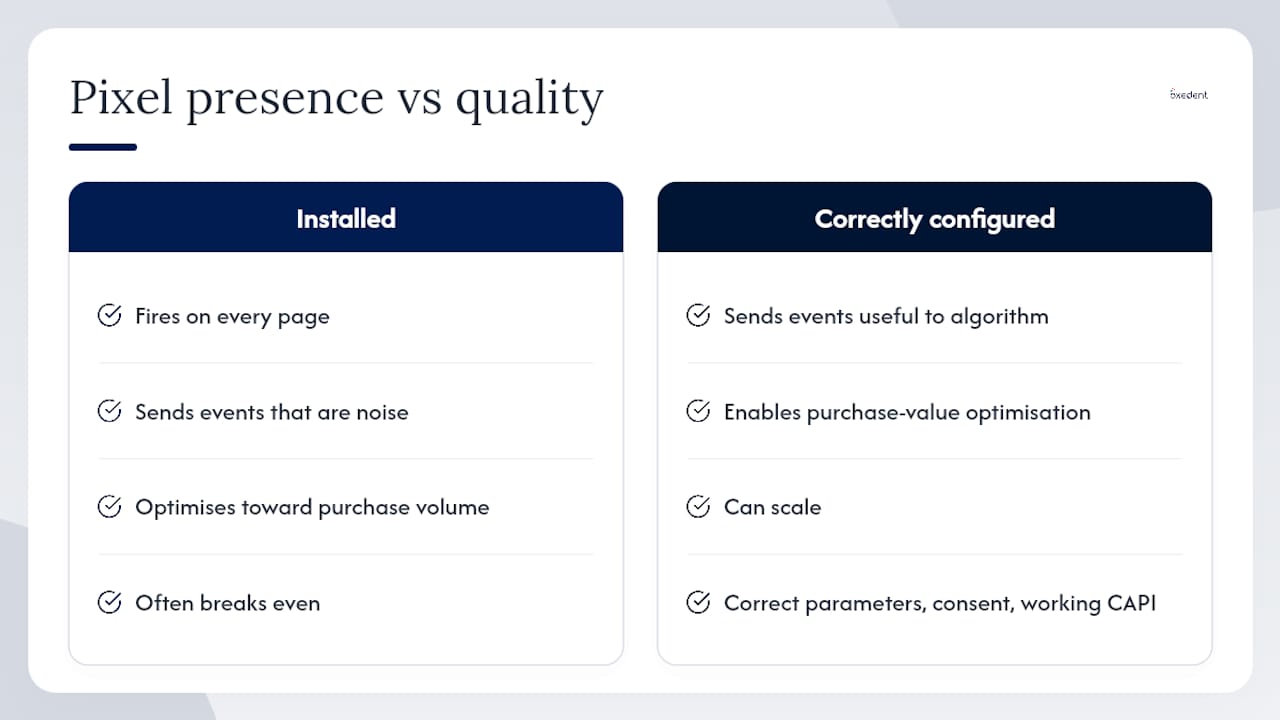
Most articles treat the Meta Pixel as a binary: either you have it or you do not. That framing misses the more consequential question, which is whether the events you are sending are actually useful to Meta’s algorithm.
A Pixel that fires PageView on every page but sends Purchase events without value or currency is not a measurement tool. It is noise. Meta’s delivery system will optimise toward purchase volume rather than purchase value, which means it will find buyers, just not necessarily profitable ones. The gap between a Pixel that is “installed” and a Pixel that is “correctly configured” is often the gap between a campaign that breaks even and one that scales.
The same logic applies to Advanced Matching. Passing hashed email alongside purchase events can meaningfully improve match rates, particularly on iOS where cookie-based attribution has been curtailed. But most advertisers either skip it entirely or enable it without verifying that the hashed values are formatted correctly. A poorly formatted hash is no better than no hash at all.
The Conversions API compounds this further. Running Pixel and CAPI in parallel without a shared event_id does not recover lost signal; it double-counts conversions and inflates reported ROAS. That is arguably worse than missing conversions, because it creates false confidence in campaign performance. Understanding how to improve ROAS for ecommerce brands starts with getting the measurement layer right, not with adjusting bids.
The Pixel is not complicated to install. Getting it right, consistently, across every event, with correct parameters, proper consent handling, and a working CAPI layer, is where most advertisers fall short.

Oxedent handles your Pixel and CAPI setup, so your campaigns start with clean data
Getting the Pixel installed is one thing. Getting it configured correctly, with every purchase event passing value, currency, and content_ids, Advanced Matching enabled, CAPI running in parallel with proper deduplication, and UK consent handling that satisfies ICO requirements, is a different job entirely.


Oxedent sets up and audits Pixel and CAPI stacks for established ecommerce brands as part of its eCommerce PPC management service. You get correct implementation from day one, event-quality improvements that feed directly into bidding decisions, and ongoing optimisation focused on ROAS rather than vanity metrics. No long-term contract required. If your current Pixel setup has gaps, or you want to build the measurement foundation before scaling Meta spend, get in touch with Oxedent for a paid media audit.
Useful sources
- What Is the Meta Pixel? Complete 2026 Guide for Advertisers
- Learn about Meta Pixel | Meta Business Help Center
- Meta Pixel: Setup Guide for Facebook Ads (2026)
- What is the Meta Pixel, and how do you make the most of it?
- Meta Pixel Explained: What It Is, How It Works, and How to Set It Up
- Meta Pixel Implementation: Setup, Events & GTM | Digital Codex