


Performance Max is a goal-based, AI-powered Google Ads campaign type that runs from a single campaign across Search, YouTube, Display, Discover, Gmail and Maps. It works best once you’ve got reliable conversion tracking and enough order volume for Google’s system to learn from, and it’s built to add conversions on top of what your Search and Shopping campaigns already deliver, not replace them.
The core moving parts you’ll set up are:
- Asset groups – your headlines, images, videos and text grouped by theme or product line
- Audience signals – the starting hints (Customer Match lists, remarketing audiences) that guide the AI
- Smart Bidding – the automated bidding engine, usually Target ROAS or Maximise Conversion Value
- Google Merchant Center – required if you’re feeding in product data for retail
Google reports advertisers who adopt Performance Max see an average 27% increase in conversions or conversion value at a similar cost per action or return on ad spend.
Key Takeaways
Performance Max works when reliable conversion tracking, sufficient asset variety, and a genuine six-week learning period combine to give Google’s AI enough signal to optimise properly.
| Point | Details |
|---|---|
| Definition | Performance Max is a goal-based campaign running across Search, YouTube, Display, Discover, Gmail and Maps from one campaign. |
| Complement, not replacement | Keep Search running for branded and priority terms; use brand exclusions to avoid cannibalisation. |
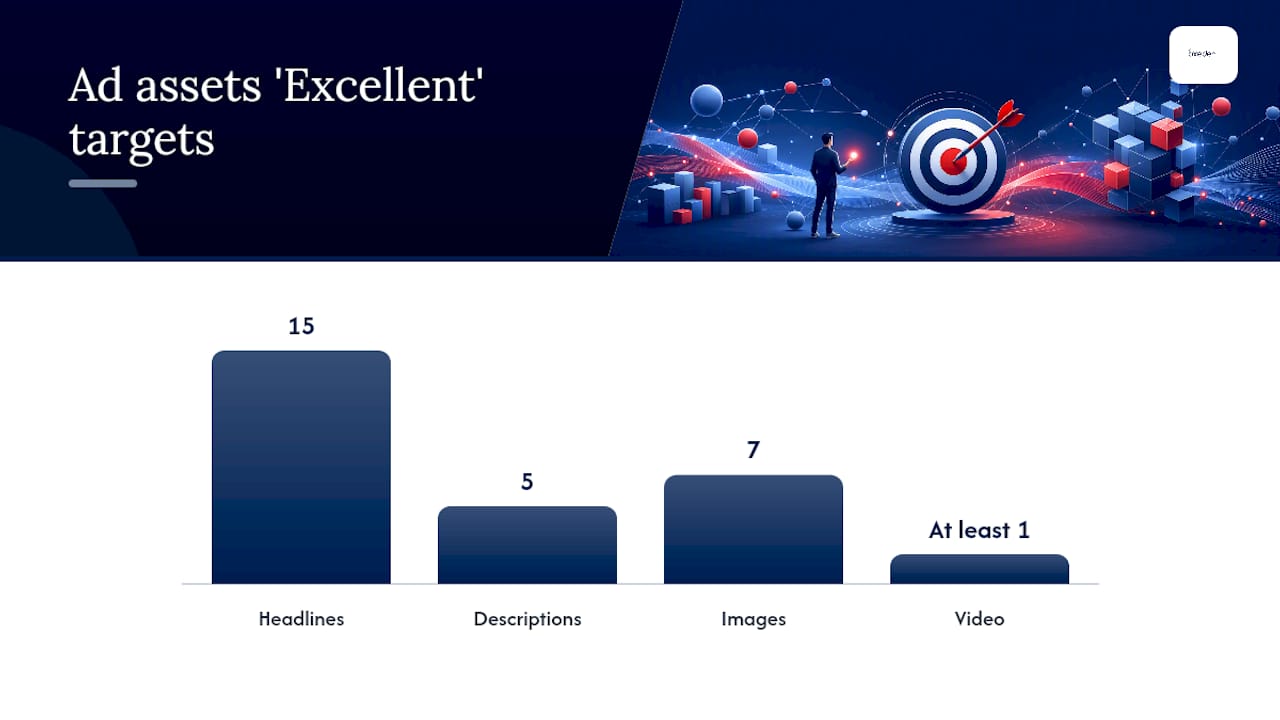
| Asset minimums matter | Aim for 15 headlines, 5 descriptions, 7 images and one video per asset group to reach “Excellent” ad strength. |
| Respect the learning period | Avoid major changes for at least six weeks; allow 1–2 weeks stabilisation after any significant edit. |
| Judge campaign-level, not channel-level | Channel splits can mislead; total ROAS or CPA is the metric that matters. |
| Get specialist help if needed | Oxedent audits tracking, feeds and asset quality before recommending or building a Performance Max campaign for ecommerce clients. |
Table of Contents
- What is Performance Max and how does it actually work?
- What are the main benefits of Performance Max?
- What do you need to set up before launching Performance Max?
- How do you optimise a Performance Max campaign?
- How should you measure and report on Performance Max?
- Why is my Performance Max campaign underperforming?
- How does an agency structure a Performance Max account for ecommerce?
- Sources
What is Performance Max and how does it actually work?
Performance Max hands Google’s AI the wheel on placement and creative combination, while you retain control over the goal, the budget, and the raw materials it’s allowed to use. You feed it a conversion goal, a budget, and a set of assets. Smart Bidding then decides, in real time, which combination of headline, image and video to show, to whom, on which surface, and at what bid.
That’s the fundamental shift from a standard Search campaign. You’re not writing ad copy for a fixed set of keywords anymore. You’re supplying raw material, primarily text, images and video, organised into asset groups by product category, theme, or campaign objective, and letting the system assemble and test combinations automatically. Google decides where those assets get served:
- Search – matched against relevant queries, similar to standard Search ads
- YouTube – in-stream and Shorts placements using your video assets
- Display – across the Google Display Network
- Discover – within the Discover feed on mobile
- Gmail – promotional tab placements
- Maps – local surfaces, particularly relevant for store-visit goals
Performance Max uses Google AI across bidding, audience signals, creative assembly and attribution to maximise conversions and value across every one of these channels from one unified campaign, rather than requiring separate campaigns per surface.
The trade-off is transparency. You set the strategy; Google executes the tactics. That’s precisely why the reporting section further down matters so much, because you lose the channel-by-channel visibility you’d get from running Search, Display and YouTube as separate campaigns.
What are the main benefits of Performance Max?
The strongest case for Performance Max is incremental reach without the operational overhead of managing six separate campaign types by hand. You get access to Google’s full inventory, automated bid optimisation tuned to your actual goal, and creative testing that runs continuously rather than whenever you get round to it.
Here’s where it earns its place in an account:
- You’re scaling and need volume beyond what Search alone can deliver
- Your goals span multiple channels (sales, leads, store visits) and you don’t have the resource to manage each one manually
- You already have healthy conversion tracking and want Google’s automation working with clean data
- You want to capture demand you can’t reach with keyword targeting, browsing behaviour and visual intent signals, for instance
It’s not the right fit everywhere. If you need granular control over which exact keywords trigger which ad, if your monthly conversion volume is too thin for Google’s models to learn from, or if you’re running a bespoke B2B funnel with a long, relationship-driven sales cycle, Performance Max alone won’t serve you well. It’s designed to complement keyword-based Search campaigns, not replace them.
Pro Tip: Run Performance Max alongside your existing Search campaign for branded and priority commercial terms, and use account-level negative keywords or brand exclusions to stop PMax competing with, and inflating the cost of, traffic your Search campaign already owns.
What do you need to set up before launching Performance Max?
Getting the foundations right before you switch a Performance Max campaign on saves weeks of wasted spend. Google’s AI is only as good as the data you give it, so treat this as a genuine pre-flight checklist rather than a formality.
Start with measurement. Your conversion tracking needs to fire accurately and point at the right action, whether that’s a purchase, a qualified lead, or a store visit. For lead generation specifically, using deeper-funnel conversion actions and validating lead quality with form checks or server-side validation helps the AI target better prospects, not just more form fills.
For retail advertisers, a clean Google Merchant Center feed is non-negotiable if you want product data to power your asset groups. Decide upfront whether you’re running a feed-only campaign or a full build with text, image and video assets added on top.
On the creative side, you need enough variety for Google’s system to actually test combinations:
- At least 15 headlines, 5 descriptions, 7 images across formats, and one video per asset group to reach “Excellent” ad strength
- Audience signals such as remarketing lists, Customer Match, or custom intent segments to give the AI a head start
- Brand exclusions and content suitability settings configured at account level
- A decision on Final URL Expansion, whether you want Google finding new landing pages automatically or keeping URLs fixed
Our Performance Max campaign setup guide covers this checklist in more detail if you want the full walkthrough before you launch.
How do you optimise a Performance Max campaign?
Optimisation is sequential, not simultaneous. Get the foundations locked in first, then let the system learn before you start pulling levers.
- Complete every asset group fully before launch rather than adding assets piecemeal afterwards.
- Seed audience signals with your best available first-party data, Customer Match lists and existing remarketing audiences included.
- Choose your bidding strategy deliberately. Use Target ROAS when you have stable historical conversion value data; use Maximise Conversions when you’re newer or value data is thin.
- Leave the campaign alone for the learning period. Google recommends at least six weeks before making significant changes to budget, bidding or creative.
- Test structure, not just creative, once you’re past initial learning, by splitting asset groups by product category or margin tier.
Frequent tinkering during that six-week window can reset the learning phase entirely. Practitioners generally recommend letting a campaign stabilise for three to four weeks before attempting any major creative overhaul, and any significant change after that still needs a further one to two weeks to settle.
| Asset Type | “Excellent” Ad Strength Target |
|---|---|
| Headlines | 15 |
| Descriptions | 5 |
| Images (landscape/square/portrait) | 7 |
| Video | At least 1 |

Pro Tip: If your Ad Strength is stuck at “Good” rather than “Excellent,” it’s almost always a headline or image variety problem. Google notes advertisers improving to “Excellent” see roughly 6% more conversions on average, so it’s worth the extra hour of asset production.
Final URL Expansion and search term exclusions deserve their own attention pass once you have a few weeks of data. Review the search terms report, add negatives where the AI has drifted into irrelevant territory, and decide whether URL expansion is finding genuinely useful new landing pages or just diluting your intended user journey. Our guide to Performance Max strategy for ecommerce managers walks through structuring these tests properly.


How should you measure and report on Performance Max?
Judge Performance Max on total campaign ROAS or CPA, not on individual channel performance, because the whole system is built to chase marginal returns across every surface at once. A conversion that gets attributed to Display might have been influenced by a YouTube view three days earlier; the channel-level split simply won’t tell you that story accurately.
That’s exactly why channel-level metrics for Performance Max can mislead advertisers who are used to judging Search and Display as separate line items.
Because the algorithm optimises for total value across Google’s entire inventory, isolating one channel’s number and drawing conclusions from it usually produces the wrong decision.
What you can and should rely on:
- Asset-level reporting to see which headlines, images and videos are actually earning impressions and conversions
- Search term insights to spot irrelevant queries triggering your ads and add exclusions
- Campaign-level ROAS or CPA as your primary success metric
- Server-side conversion tracking and conversion-scoped values, where feasible, to protect data quality against browser restrictions
If your reporting stack still leans on last-click, channel-siloed dashboards, expect the numbers to look worse than actual performance. Our piece on how Performance Max works for ecommerce covers the specific reporting setup we recommend for retail accounts.
Why is my Performance Max campaign underperforming?
Most underperformance traces back to one of three causes: the campaign is still learning, the tracking is broken, or the assets are too thin. Before you touch a single setting, check whether you’re still inside that six-week ramp-up window; premature tinkering is the single most common cause of a campaign that never seems to stabilise.
Run through this quickly:
- Low conversion volume? Check conversion tracking is firing correctly before assuming the campaign itself is the problem.
- Irrelevant placements? Review search terms and add exclusions; check Final URL Expansion isn’t sending traffic to unrelated pages.
- Sudden drop after a landing page change? The AI’s learning was based on the old page; expect a stabilisation period, not an instant recovery.
- Bid strategy underdelivering? Adjust tCPA or tROAS gradually rather than in large jumps, which can reset learning.
If performance stays poor after a genuine six-week run with clean tracking, that’s the point to re-evaluate the whole campaign structure rather than keep nudging settings.
How does an agency structure a Performance Max account for ecommerce?
A specialist account gets audited before it gets touched. That means checking conversion tracking accuracy, Merchant Center feed health, and product data quality before a single asset gets uploaded, because AI optimisation built on bad data just automates the wrong outcome faster.
From there, the checklist looks like this:
- Full account audit covering tracking, feed and historical performance
- Measurement foundation confirmed (correct conversion actions, values, server-side tracking where relevant)
- Asset groups built by product category or margin tier, not lumped into one generic group
- Audience signals seeded from Customer Match and existing remarketing lists
- Brand exclusions and content suitability settings locked in at account level
- Staged budget ramp with a defined experiment plan for the first eight weeks
Pro Tip: Splitting campaigns by product margin, rather than by product type alone, lets you set different Target ROAS goals for high-margin and low-margin lines instead of forcing one blended target across your whole catalogue.
Our full agency approach to Performance Max goes deeper into how we sequence this for larger retail accounts.
What actually changes when best practices are followed
In accounts where the foundations are done properly, meaning full asset builds, clean tracking, and a genuine six-week hands-off learning period, we typically see conversion volume stabilise and start improving from around week four onwards, rather than the account bouncing between good and bad weeks indefinitely. Before recommending Performance Max at all, we look for one thing above everything else: enough historical conversion data for the AI to have something worth learning from. Accounts that pass that bar tend to see meaningful improvement in cost per acquisition once the campaign exits its initial learning phase.

How Oxedent runs Performance Max for growing retailers
Oxedent is the specialist alternative to a generalist agency for Performance Max in the US or UK ecommerce market: we run PPC exclusively, so every asset build, feed check and bidding decision comes from a team that isn’t splitting attention across social media, email and five other channels.


Our eCommerce PPC management service covers the full build, from Merchant Center feed optimisation through asset group creation to ongoing bid strategy management, with no long-term contract locking you in if it isn’t delivering. For retailers weighing up feed-only versus a full asset build, our breakdown of the trade-offs is worth reading first. If you’d rather skip the research and get a straight answer on whether your account is ready for Performance Max, book an audit through our Performance Max for ecommerce page and we’ll tell you exactly what needs fixing before you spend a single pound.
Sources
- About Performance Max campaigns – Google Ads Help