


Yes — Google Ads requires daily monitoring for most eCommerce accounts. Without it, you risk wasted spend, degraded Smart Bidding performance, and undetected tracking failures that can quietly drain your budget for days. Oxedent treats daily monitoring as a non-negotiable operational discipline, not an optional extra.
Two facts make the urgency concrete. First, Google’s spend averaging means a campaign can spend up to roughly twice its daily budget on a single day, with overspends only surfacing at month-end reconciliation. Second, when conversion tags stop firing, Smart Bidding can begin bidding blind within 24–48 hours, often showing as sudden CPA anomalies long after the damage is done.
Your daily TL;DR checklist:
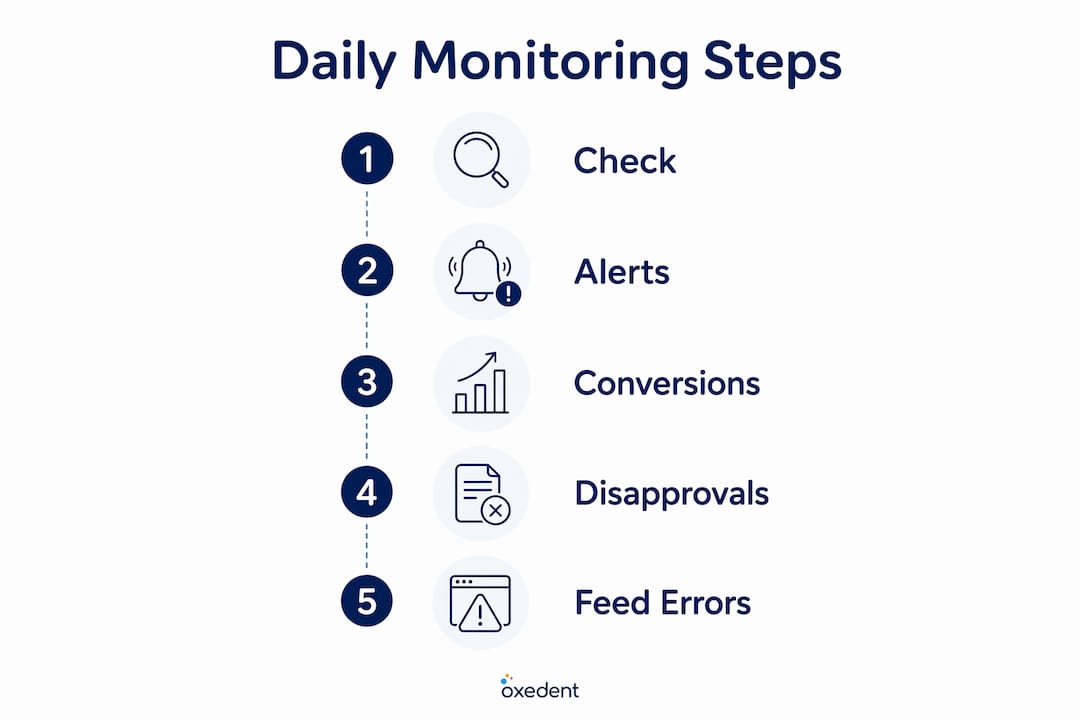
- Check spend pacing against your expected daily budget
- Confirm conversion count is not zero across all campaigns
- Scan for disapproved ads or limited serving status
- Check Merchant Centre for feed errors or product disapprovals
- Spot-check at least one key landing page for 404 or checkout errors
Table of Contents
- Why daily monitoring matters more than most teams realise
- What you should check every day, ranked by urgency
- Your copy-ready daily checklist with time estimates
- Which tools actually help you monitor Google Ads effectively?
- How to act on alerts: decision rules and escalation paths
- Daily, weekly, and monthly: who owns what
- Oxedent’s sample daily monitoring SOP
- Key takeaways
- The discipline most teams underestimate
- Oxedent’s managed monitoring for eCommerce PPC
- Useful sources
Why daily monitoring matters more than most teams realise
Neglecting daily checks creates two distinct cost types, and most teams only think about one. The obvious one is direct wasted spend: broken conversion tags, dead landing pages, and disapproved ads all burn budget without producing revenue. The less visible one is opportunity cost — the auction windows you miss while a competitor’s budget runs dry.
On the opportunity side, competitors with smaller budgets often exhaust their daily spend by early afternoon. Advertisers monitoring daily can capitalise on lower competition and cheaper clicks in that afternoon window. Without daily visibility, those moments pass unnoticed.
Statistic to know: Google’s 30.4-day billing cycle allows actual daily spend to exceed your daily budget on any given day. A campaign can spend up to roughly twice its daily budget in a single day — and that overspend may only surface at month-end reconciliation.
The technical consequences for Smart Bidding are equally serious. Smart Bidding depends on a continuous stream of conversion signals to calibrate bids. When that signal drops — because a tag breaks, a checkout page errors, or a product feed fails — the algorithm doesn’t pause. It keeps bidding, but on corrupted data. The hidden cost of not monitoring is both the direct waste and the opportunity cost that accumulates while the issue goes undetected.
Consider a straightforward scenario: a conversion tag breaks on a Friday evening. By Monday morning, Smart Bidding has spent two days optimising towards zero conversions. CPA appears to spike, ROAS collapses, and the account may have already made automated bid adjustments that take another 7–14 days to correct. A daily check on Saturday morning catches it in hours, not days.



What you should check every day, ranked by urgency
Not every metric deserves equal attention at 9 AM. Prioritising your daily checks by urgency keeps the routine fast and focused.
Critical — check these first, every day:
- Spend pacing: Is today’s spend on track relative to your daily budget? A campaign spending up to twice its daily budget on a single day requires immediate attention if not explained by campaign activity or billing cycle behaviour.
- Conversion count: Zero conversions across all campaigns is a red flag. It could mean a tag break, a checkout failure, or a tracking configuration issue.
- Disapproved ads or limited serving: Any disapproval stops your ads from showing. Check the status column in Google Ads and resolve within the same business day.
- Merchant Centre feed errors: Feed failures directly affect Shopping and Performance Max campaigns. A single feed error can pull a significant portion of products from auction. Merchant Centre feed monitoring is non-negotiable for eCommerce accounts.
- Landing page errors (404 or checkout failures): Spot-check your primary destination URLs. A broken checkout page wastes every click that reaches it.
High priority — check after the critical items:
- CPA or ROAS drifting more than 20% beyond your 7-day rolling average
- CPC increases on your highest-spend campaigns
- Impression share drops on key SKUs or product categories
- Search terms report showing irrelevant spend from broad or phrase match
Monitor weekly, not daily:
- Creative CTR shifts (trend over 7–14 days before acting)
- Minor keyword-level bid volatility
- Small Quality Score movements
Native Google Ads alerts handle some of these adequately. For cross-platform issues — particularly Merchant Centre feed failures and conversion tag breaks — you need monitoring that spans both platforms, not just the Google Ads interface.
Your copy-ready daily checklist with time estimates
A disciplined daily scan takes 5–15 minutes. Here is a step-by-step routine you can follow immediately, with time budgets for each step.
- Spend pacing check (1–2 minutes): Open the Campaigns view and compare today’s spend against your expected daily budget. Flag any campaign spending significantly above its expected daily budget by mid-morning.
- Conversion count check (1–2 minutes): Filter by today’s date. Zero conversions across all campaigns triggers immediate investigation of your conversion tags and checkout flow.
- Disapproved ads scan (1 minute): Filter ads by status. Any “Disapproved” or “Limited” status needs same-day resolution to avoid serving gaps.
- Merchant Centre feed check (2–3 minutes): Log into Merchant Centre and check for feed errors, product disapprovals, or warnings. Cross-reference with your Shopping campaign impression data.
- Search terms review (3–5 minutes): Scan for irrelevant queries burning budget. Add negatives immediately for clear mismatches.
- Landing page spot-check (1–2 minutes): Click through to your primary destination URLs. Confirm the checkout flow is live and functional.
- Conversion tag status (1–2 minutes): Check Google Tag Manager or the Conversions section in Google Ads for any tags showing “Inactive” or “No recent conversions.”
Sample alert thresholds to configure:
- Zero conversions for 6+ hours during peak trading hours
- Spend exceeding the expected daily budget by a notable margin (potentially up to twice the daily budget on certain days; monitor for unusual overshoots) within any 3-hour window
- CPA rising more than 20% above the 7-day rolling average
- Any ad status changing to “Disapproved”
Automate the alerting for pacing and conversion-count checks using Google Ads automated rules or a third-party tool. The search terms review and landing page checks require human judgement — they cannot be fully automated.
Which tools actually help you monitor Google Ads effectively?
Three monitoring tiers exist, and the right one depends on your monthly ad spend.
Tier 1: Manual checks with native Google tools. Google Ads automated rules, Google Ads Editor, and the built-in alerts panel cover basic pacing and disapproval notifications. These are free and sufficient for accounts spending under roughly £2,000/month, but they lack anomaly detection and cross-platform visibility.
Tier 2: Scripts and platform auto-rules. Google Ads scripts can run hourly checks, send email alerts for zero conversions, and flag pacing anomalies. They require technical setup but offer significant flexibility at low cost. Suitable for accounts in the £2,000–£8,000/month range with an in-house developer or technically capable marketer.

Tier 3: AI-driven continuous monitoring. AI monitoring systems learn rolling baselines (typically 7–30 day averages) and trigger alerts when metrics deviate beyond statistical thresholds, catching both sudden breaks and gradual decay. For accounts above approximately £8,000–£10,000/month, continuous automated monitoring is the minimum viable approach — manual checks alone cannot keep pace with the volume of signals.
| Feature | Google native alerts | Scripts | Third-party tools (e.g. Optmyzr, Adalysis, Opteo, Ryze AI) |
|---|---|---|---|
| Real-time / near-real-time alerting | Limited | Hourly (scheduled) | Yes — continuous |
| Anomaly detection | No | Custom-built only | Yes — baseline learning |
| Analytics & Merchant Centre integration | Partial | Custom | Yes (varies by tool) |
| Automation options | Auto-rules | Full scripting | Auto-rules + AI suggestions |
| Reporting & visualisation | Basic | Custom | Dashboard-level |
| Pricing model | Free | Free (dev time) | Paid subscription |
Optmyzr offers rule-based automation and audit workflows well suited to agencies managing multiple accounts. Adalysis focuses on ad testing and quality score monitoring with strong alerting. Opteo surfaces prioritised suggestions based on account data, making it accessible for in-house teams. Ryze AI positions itself as an AI agent for continuous account monitoring and optimisation. All four are worth evaluating based on your account scale and team structure.
AI is also reshaping how eCommerce brands manage performance signals more broadly. AI applications in eCommerce extend well beyond ads, with monitoring and anomaly detection becoming standard expectations rather than premium features.
How to act on alerts: decision rules and escalation paths
An alert is only useful if you know what to do with it. These decision rules give you a clear response for the most common scenarios.
If conversions drop to zero:
Check conversion tags in Google Tag Manager first. If tags are firing, check the checkout flow and thank-you page. If tags are not firing, raise a developer ticket immediately. Do not adjust bids until the tracking issue is confirmed resolved.
If spend overshoots above the daily budget by a significant margin (noting Google can allow up to twice the budget in a single day due to its averaging logic):
Check which campaigns are driving the overspend. If it is a single campaign with a sudden CPC spike, review recent search terms for broad match expansion. Lower bids on the offending ad group, but avoid pausing the campaign unless spend is catastrophic.
If an ad is disapproved:
Identify the policy violation in the Ads status column. For straightforward violations (destination mismatch, capitalisation), fix and resubmit within the same business day. For complex policy issues, open a Google Ads support case. SLA target: resolution within 24 hours.
If a landing page returns a 404:
Notify the development team immediately and pause the affected ad group to stop wasted spend. Restore the page or redirect before re-enabling.
Pro Tip: During a Smart Bidding learning period (typically 7–14 days after a significant change), avoid making further bid strategy changes even if CPA looks elevated. The algorithm needs consistent conversion signal to recalibrate. Intervening too early resets the learning window and prolongs the instability.
The Smart Bidding learning window is one of the most misunderstood aspects of Google Ads management. Knee-jerk bid changes during this period are one of the most common agency mistakes that compound performance problems rather than solving them.
Daily, weekly, and monthly: who owns what
Splitting monitoring work across cadences keeps daily checks fast and strategic reviews meaningful.
Daily (5–15 minutes per account):
Fires only. Pacing, zero conversions, disapprovals, feed errors, landing page status. Owned by the account manager or in-house paid media lead. Automation handles alerting; humans confirm and act.
Weekly (20–30 minutes per account):
Trend analysis. CPA and ROAS vs. 7-day rolling average, search terms review and negative keyword additions, impression share trends, bid adjustment review, ad copy performance. Owned by the account manager with input from the wider marketing team.
Monthly (1–2 hours per account):
Deep audit. Conversion tracking validation, audience and demographic performance, Quality Score review, budget allocation across campaigns, alert threshold tuning, and a full eCommerce ad account audit against a structured checklist. Owned by a senior account manager or agency lead, with developer involvement for any tracking fixes.
For teams managing multiple accounts, aggregated dashboards and delegated daily ownership per account are the only way to maintain this cadence without burnout. Automation should handle hourly pacing checks and conversion-count alerts; humans review the flagged items each morning and make the judgement calls.
Oxedent’s sample daily monitoring SOP
The following SOP reflects the operational approach Oxedent applies to eCommerce PPC accounts. Adapt it to your own team structure and alert tooling.
- 07:30 — Automated alert review: Check overnight alerts from Google Ads automated rules and any third-party monitoring tool. Flag any zero-conversion alerts, pacing anomalies, or disapprovals for immediate action.
- 08:00 — Spend pacing check: Review all active campaigns against expected daily budget. Escalate any campaign with significant spend above its expected daily budget to the account lead, especially if trending toward double the daily budget.
- 08:15 — Conversion count confirmation: Verify conversion counts are registering across all campaigns. If any campaign shows zero conversions for the prior 6+ hours during peak trading, initiate tag investigation.
- 08:30 — Disapproval and feed scan: Check Google Ads for disapproved or limited ads. Log into Merchant Centre and check feed health. Raise a fix ticket for any feed errors affecting more than 5% of products.
- 09:00 — Search terms spot-check: Review the previous day’s search terms report for clear irrelevant queries. Add negatives immediately.
- 09:15 — Landing page confirmation: Click-test primary destination URLs for key campaigns. Confirm checkout is live.
- Escalation SLA: Disapprovals resolved within 24 hours. Conversion tag breaks escalated to developer within 2 hours of detection. Landing page 404s paused within 30 minutes of detection.
Oxedent aligns every alert and SOP to ROAS and conversion quality rather than vanity metrics. The goal is profitability protection, not dashboard aesthetics.
Key takeaways
Daily monitoring is the single most effective way to protect Smart Bidding performance, prevent wasted spend, and catch tracking failures before they compound into significant revenue loss.
| Point | Details |
|---|---|
| Daily checks are non-negotiable | Pacing, zero conversions, disapprovals, and feed errors must be checked every day to prevent compounding losses. |
| Smart Bidding needs clean signal | A broken conversion tag degrades Smart Bidding within 24–48 hours; daily checks catch this before significant damage occurs. |
| Use thresholds, not gut feel | Configure alerts for zero conversions (6+ hours), spend above 120% of expected, and CPA rising more than 20% above the 7-day average. |
| Match tools to spend level | Accounts above £8,000–£10,000/month need continuous automated monitoring; native alerts alone are insufficient at that scale. |
| Oxedent’s SOP proves the model | Oxedent’s daily monitoring routine — from 07:30 automated alerts to 09:15 landing page checks — is built around profitability protection and ROAS, not vanity metrics. |
The discipline most teams underestimate
The conventional framing of daily monitoring is that it is about catching problems. That is true, but it misses the more interesting half of the argument. The accounts that compound performance gains fastest are the ones where the monitoring routine is so tight that issues are resolved before they affect the weekly data. The weekly review then becomes a genuine strategy session rather than a post-mortem.
What I see most often is teams treating monitoring as a reactive task — something you do when performance looks off. By then, Smart Bidding has already spent days optimising on bad data, and the recovery period extends the damage further. The shift from reactive to proactive is not about checking more often; it is about building a system where alerts do the watching and humans do the deciding. A disapproved ad caught at 8 AM costs nothing. The same disapproval caught on Friday afternoon costs a full weekend of lost impressions.
The other underestimated point is the competitive gap. Competitors with tighter budgets often exhaust their daily spend by mid-afternoon. If you are monitoring daily and they are not, you can capitalise on those lower-CPC windows deliberately rather than stumbling into them by accident.
Oxedent’s managed monitoring for eCommerce PPC
If the daily checklist above describes work your team is not currently doing, that gap is costing you money every day it stays open.


Oxedent’s eCommerce PPC management service covers continuous alerting, conversion tracking validation, Merchant Centre feed audits, and SLA-backed daily monitoring as standard — not as an add-on. Every account gets the same morning SOP described above, aligned to ROAS and profitability rather than clicks or impressions. There are no long-term contracts: you stay because the results justify it. If you are running Google Ads for an established eCommerce brand and want managed monitoring that protects your budget from day one, speak to the Oxedent team about what a managed account looks like in practice.
Useful sources
- Monitor your ads and keywords — Google Ads Help: Google’s own guidance on monitoring ad and keyword status; the primary reference for disapproval checks and performance fluctuation context.
- About daily spending limits in Google Ads accounts — Google Support: Official documentation on how Google manages daily and monthly spend averaging; essential reading for understanding pacing behaviour.
- How to analyse Google Ads successfully — Google Business: Google’s practical guide to conversion tracking, ROI measurement, and search terms analysis.
- Google Ads monitoring: the complete guide — Go Insights: Comprehensive field guide covering spend averaging, high-spend account thresholds, and monitoring cadence recommendations.
- Ad monitoring best practices — Adspirer: Covers conversion tracking failures, cadence design, and the hidden cost of delayed detection.
- Google Ads monitoring: why you need an AI watchdog — AdPredictor: Explains how AI monitoring systems learn baselines and detect both sudden breaks and gradual decay.
- Why Google Ads still requires daily human optimisation — Digi06: Makes the case for human oversight alongside automation, including the competitive gap opportunity.