


Consent Mode v2 is Google’s protocol for telling tags which consent categories a visitor has granted, so those tags adapt their behaviour instead of firing blind. If you run Google Ads or GA4 for audiences in the EEA or UK, the immediate task is straightforward: confirm your consent management platform sends all four signals, ad_storage, analytics_storage, ad_user_data and ad_personalization, and update them the moment a user makes a choice.
TL;DR:
- Confirm your consent management platform sends all four signals—ad_storage, analytics_storage, ad_user_data, and ad_personalization—for proper functioning in the EEA and UK.
- Implement advanced mode if your site has a high volume of conversions and legal approval to benefit from better modelling, but avoid it with low-volume sites due to minimal practical gains.
- Ensure default consent values are declared before tags load, and your CMP calls the update command upon user choice for signals to trigger accurately in production.
- Verify in DevTools that network requests contain correct gcs and gcd parameters reflecting user consent, and test persistence to prevent false denial on page reloads.
- Recognize modelled data offers directional insights and never replaces first-party measurement, requiring ongoing verification and first-party tracking improvements.
Table of Contents
- What is consent mode v2 and why does it matter now?
- Basic mode versus advanced mode: which fits your traffic?
- How to implement or upgrade consent mode v2
- Testing and verification: proving it actually works
- What modelling actually recovers, and where it falls short
- Legal considerations before you switch to advanced mode
- An ecommerce advertiser’s priority order for the v2 upgrade
- Get your consent signals right, then let them earn their keep
- Sources
What is consent mode v2 and why does it matter now?
The four signals split into two generations. Version one gave you ad_storage and analytics_storage, which controlled whether cookies could be written for advertising and measurement purposes. Version two adds two more: ad_user_data and ad_personalization, which govern whether Google can use personal data for ad purposes and whether it can build remarketing lists or personalised targeting from that data.
That distinction is the whole point of the upgrade. Storage consent tells Google whether it can drop a cookie. Data-use consent tells Google whether it can do anything with the information it collects, cookie or not. Regulators increasingly care about the second question more than the first, and Google’s own consent documentation confirms both new signals sit alongside the original pair rather than replacing them.
For engineers, the visible change turns up in HTTP requests as new query parameters. You’ll see gcs (Google Consent Status) expand to encode all four states, and gcd (Google Consent Default) appear on pings to show what default state applied before the user interacted. Anyone auditing network traffic in DevTools needs to know these exist, otherwise the pings look like noise rather than signal.
Here’s what each of the four controls, in plain terms:
- ad_storage: permits or blocks cookies and other storage used for advertising, including remarketing tags.
- analytics_storage: permits or blocks cookies used for Google Analytics measurement, such as session and user identifiers.
- ad_user_data: governs whether user data can be sent to Google for advertising purposes at all, regardless of storage.
- ad_personalization: governs whether that data can be used to build personalised ads, including remarketing and similar audiences.
Miss the second pair and your remarketing lists and Performance Max signals quietly degrade, even if cookies are technically allowed. That’s the trap most sites fall into during a lazy upgrade.
Basic mode versus advanced mode: which fits your traffic?
Basic mode is the cautious option. Tags simply don’t fire until a visitor accepts your consent banner. No pings, no data, nothing sent to Google for anyone who hasn’t said yes. It’s clean from a privacy standpoint, but it means every visitor who declines, or who never interacts with the banner, becomes a total blind spot. Google can only apply general, market-wide modelling to fill that gap, and general modelling is a blunt instrument.
Advanced mode changes the mechanics. Tags load immediately in a denied state, and instead of staying silent, they send cookieless pings, stripped-down signals with no cookies attached, that tell Google a visit happened without identifying who made it. Google’s consent mode overview explains that these pings are what unlock advertiser-specific modelling rather than the coarser, industry-level estimates Basic mode relies on.
The trade-offs split cleanly by discipline:
- Measurement: Advanced mode recovers meaningfully more conversion volume in reporting once modelling kicks in, because it has real signal from your own site to model against.
- Legal exposure: Advanced mode sends data before consent is granted, even without cookies, which some data protection authorities interpret more strictly than others. Basic mode sends nothing until consent, which is the more conservative legal posture.
- Data volume: Advanced mode only pays off once you clear the minimum data thresholds Google requires. Below that, you’re sending pings for little practical return.
Pro Tip: If your site gets under a few thousand monthly conversions in the market you’re modelling for, don’t assume Advanced mode is worth the legal conversation. Run the numbers on your consent opt-in rate first, low opt-in plus low volume often means the modelling uplift never clears the threshold anyway.
Smaller sites in particular tend to sit below the thresholds Google needs, which means the theoretical upside of Advanced mode never materialises in practice.
How to implement or upgrade consent mode v2
Treat this as a sequence, not a single deployment. Skipping steps is exactly how sites end up with signals that look correct in code but silently fail in production.
- Set your default consent state before any tag fires. Every one of the four signals needs a default value declared at the top of your page, before gtag.js or GTM loads any measurement or advertising tag. Undeclared signals are treated as denied by default in most current implementations, so be explicit rather than relying on that assumption.
- Wire your CMP to call the update command. When a user makes a choice, your consent management platform must call
gtag('consent', 'update', {...})with the four parameters set to'granted'or'denied'as appropriate. Google’s setup guidance is explicit that this update call, not the default, is what actually changes tag behaviour. - Persist that choice and re-trigger it on every page load. A returning visitor who already granted consent should never be treated as denied on their second page view. Your CMP needs to read its own stored choice and fire the update command again, automatically, without asking the question twice.
- In Google Tag Manager, confirm your consent settings and tag firing triggers. GTM’s built-in consent checks let you require specific consent states before a tag is allowed to fire. If you’re using an asynchronous CMP, make sure it loads early enough in the container sequence that tags don’t fire on stale defaults.
- Audit your CMP for genuine v2 support. Not every consent banner vendor updated cleanly. Confirm yours actually sends ad_user_data and ad_personalization, not just the original two signals renamed. If you serve EEA or UK ad inventory through certain Google ad products, Google may also require the CMP itself to hold certification.
- Upgrade mobile SDKs separately. Android and iOS apps need their Google Analytics and Ads SDKs updated to v2-capable versions before app events carry the new signals. This is easy to forget because it sits with the app development team, not the web team, and the two often deploy on different schedules.
- Run a staged rollout, not a big-bang switch. Push the change to a small percentage of traffic or a staging environment first, verify the pings look correct, then widen the rollout.
Your release checklist before going live should cover:
- Default consent values declared for all four signals on every page template.
- CMP confirmed to fire the update command on both initial choice and page reload.
- GTM consent settings tested against both granted and denied states.
- Mobile SDKs updated and confirmed in a test build.
- A rollback plan if pings look malformed after deployment.
Practitioner walkthroughs like Simo Ahava’s implementation notes are worth bookmarking here, because they cover the exact code-level questions that Google’s own documentation states but doesn’t always demonstrate with worked examples.
One thing worth flagging early: Google’s guidance states that meaningful modelling uplift typically only becomes visible after seven full days of clean implementation, so don’t judge your upgrade by what the dashboard shows on day two.
Testing and verification: proving it actually works
Deploying the code is the easy half. Proving it behaves correctly under real consent scenarios is where most implementations quietly fall short.
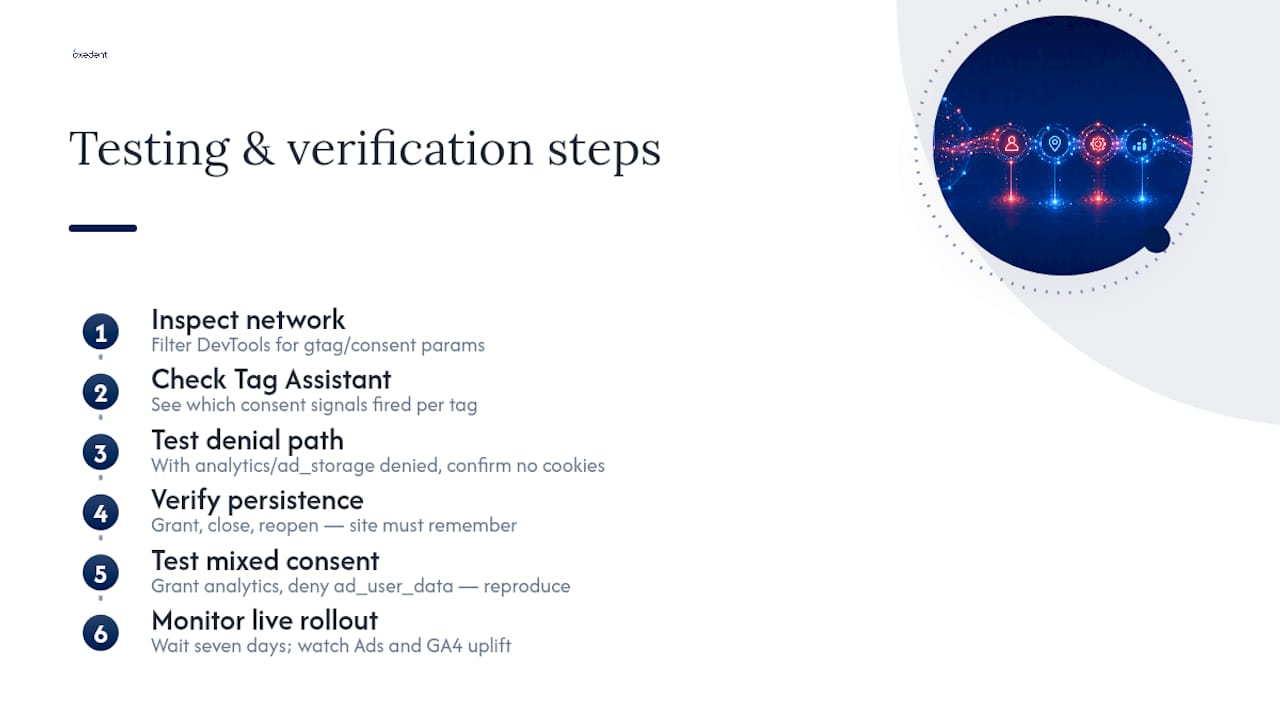
Start in the browser. Open DevTools, filter network requests for collect or google_ads style calls, and check the gcs and gcd parameters against the consent state you’d expect for that session. Google’s Tag Assistant extension does this more visually, flagging which consent signals were active when each tag fired, and it’s the fastest way to catch a default that’s silently wrong.
Then test the denial path specifically. With analytics_storage and ad_storage both denied, confirm no cookies are actually written, check the Application tab in DevTools, not just the network requests. If you’ve enabled ads_data_redaction, verify that requests reroute to redaction-aware domains rather than the standard endpoints; Google’s documentation notes this specifically avoids third-party cookie data appearing in request headers.
Persistence is the check most teams skip. Grant consent, close the browser, return the next day, and confirm the site doesn’t ask again or treat you as denied. This is the single most common Advanced mode bug: a CMP that stores the choice locally but never re-fires the update command on the next page load.
Pro Tip: Don’t just test the happy path. Test a user who grants analytics_storage but denies ad_user_data, that mixed state is common in real consent banners and it’s where a lot of implementations quietly break because developers only tested “all granted” or “all denied”.
Once live, give it the full seven days before drawing conclusions, then watch your Ads and GA4 reporting for the modelled uplift Google’s documentation describes rather than expecting it immediately.

What modelling actually recovers, and where it falls short
Modelling fills the gap left by denied consent, but it’s an estimate built from aggregate patterns, not a reconstruction of individual users. Google’s own material is clear that this is directional data for optimisation, not audit-grade reporting you’d reconcile line by line against your order management system.
The mechanics matter for how you use the numbers:
- Modelling only activates once you clear Google’s minimum data thresholds and have run for the seven-day observation window.
- It feeds into Google Ads bidding algorithms and GA4 conversion counts, giving both systems a fuller picture to optimise against.
- It will never match your first-party order data exactly, because it’s statistically inferred, not directly observed.
- One published case, Google’s TUI example, reported a 7% increase in measured conversions after implementing Consent Mode with modelling, though results like this vary by traffic volume, consent rate and market.
The practical discipline is to watch modelled versus observed conversion slices side by side rather than trusting either one blindly. If you want that ground truth to actually hold up, pair Consent Mode with genuine first-party measurement, and improving your ecommerce conversion tracking is the natural companion project, since modelling only ever fills gaps around a foundation your own tracking has to provide. The same logic applies across Performance Max and other campaign types, where bidding decisions increasingly lean on modelled signals you can’t directly audit.
Legal considerations before you switch to advanced mode
Consent Mode is a signalling protocol, nothing more. It tells tags what a visitor has agreed to, but it doesn’t create the lawful basis for processing their data in the first place. That job sits entirely with your consent management platform, which has to genuinely obtain consent, record it with a timestamp and choice history, and be able to produce that evidence if a regulator asks.
Sending cookieless pings for a user who hasn’t consented, even without third-party cookies attached, sits in genuinely contested territory under ePrivacy interpretation. Some regulators treat the absence of a cookie as decisive; others focus on whether any data left the browser at all. This is not settled the same way across every EEA member state or the UK’s ICO guidance, and it’s exactly the kind of question worth putting to your own data protection counsel before flipping Advanced mode on.
Before adopting Advanced mode, work through a short compliance list: confirm your CMP holds Google certification if you’re serving EEA or UK ad products through platforms that require it, consider ads_data_redaction if your legal team wants a stricter posture that avoids cookie data in headers entirely, and keep an audit trail of consent choices that goes beyond what’s strictly required, because retrofitting evidence after a complaint is far harder than logging it from day one.
None of this replaces proper legal advice, but it does explain why Oxedent treats measurement resilience as an operational problem alongside a compliance one: verifying tags fire correctly and reconciling modelled data against observed conversions matters just as much as getting the consent banner itself right.
An ecommerce advertiser’s priority order for the v2 upgrade
If you’re short on engineering time, sequence it like this: verify your CMP sends all four v2 signals correctly before anything else, that’s the compliance floor. Then decide Basic or Advanced based on legal advice and your actual traffic volume, not on what a competitor is doing.
Treat modelling as an optimisation input, never a single source of truth. The gap between modelled and observed numbers is where the real operational risk hides, and it’s why Oxedent pushes ecommerce clients towards first-party measurement and server-side tagging alongside Consent Mode, not instead of it. Verification and monitoring aren’t a one-off task; they’re the difference between trusting your reporting and guessing at it.
— Biplab
Get your consent signals right, then let them earn their keep
Getting Consent Mode v2 correctly wired is only half the job. The other half is making sure your bidding algorithms and reporting can actually trust the data flowing through it, which is exactly where paid media performance gets won or lost. Oxedent works with established ecommerce brands to audit tracking gaps, tighten feed and campaign structures, and make sure Performance Max and Shopping campaigns are bidding against signal you can stand behind. If your consent upgrade has left you unsure whether your Performance Max campaigns are scaling on solid measurement or your Google Shopping feed is set up to capture what Consent Mode recovers, that’s precisely the audit conversation worth having. And if the product feed itself needs work before any of this pays off, the practical lessons in Packwire’s feed optimisation breakdown are worth a read alongside your own audit.
This article is general information, not a substitute for advice from a qualified lawyer. Consult a qualified legal professional about your own circumstances before acting on anything here.
Sources
- Set up consent mode on websites | Tag Platform
- About consent mode – Google Ads Help
- Consent Mode V2 For Google Tags — Simo Ahava