


Most Merchant Center suspensions are reversible. If you run a full site, feed and account audit before you appeal, and back your review request with clear evidence, reinstatement is realistic in the majority of non-egregious cases. Start now: check your Merchant Center notice, screenshot everything, and keep at least one product live so review flows stay open.
TL;DR:
- Most Merchant Center suspensions can be reversed if a thorough site and feed audit is completed before appealing and supported by clear evidence.
- Typical triggers include misrepresentation, checkout failures, feed mismatches, policy inconsistencies, and unverified or restricted products, which usually reflect patterns across the entire site.
- Fixing the issues requires verifying policy pages, ensuring checkout functions correctly, validating feed accuracy, and confirming account details before submitting an appeal.
- A well-structured appeal report must clearly map fixes to policy violations, include timestamped screenshots, and avoid partial remedies to prevent repeated suspensions.
- Continuous account monitoring and feed validation post-reinstatement are essential for maintaining compliance and avoiding further risks, especially for larger or multi-account setups.
Table of Contents
- What triggers a merchant center suspension and what to do first
- Why does Google suspend Merchant Center accounts?
- Step-by-step site and feed audit before you appeal
- How do you request a merchant account review?
- How to write an appeal that actually gets approved
- Keeping your account clean after reinstatement
- A real-world reinstatement workflow in practice
- Does account type change how suspension is handled?
- When to fix it yourself and when to bring in a specialist
- How a specialist agency helps you recover and stay reinstated
- Sources
What triggers a merchant center suspension and what to do first
The first 24 to 72 hours decide how fast you recover, so treat this window as damage control, not diagnosis. Google’s own guidance on issues in Merchant Center explains that a suspension is an account-level action, meaning it can shut off Shopping ads, Performance Max feeds and free listings all at once. Waste stops the moment you pause spend on affected campaigns.
Work through this order:
- Open Merchant Center’s “Needs attention” tab and copy the exact suspension reason word for word.
- Pause or reduce Shopping and Performance Max campaigns pulling from the suspended feed to stop wasted spend.
- Screenshot the notification, the diagnostics page and any affected product listings, with timestamps visible.
- Confirm at least one product is still live in your feed. Review requests need an active account, not an empty one.
- Run a basic site check. Test your checkout end to end and note anything that fails.
Pro Tip: Screenshot the diagnostics page before you touch anything. Google’s review team wants to see the “before” state, not just your fixes, so evidence of the original problem matters as much as evidence of the repair.
Why does Google suspend Merchant Center accounts?
Google groups suspension causes into recognisable policy families, and knowing which one applies to you determines your entire remediation plan. Google’s Merchant Center guidance confirms that account-level issues escalate from warnings to disapprovals to suspension when data or site content breaches Shopping policy, and some violations trigger immediate suspension with no warning period at all.
The five most common triggers:
- Misrepresentation: mismatched business details, exaggerated claims, or a store that doesn’t clearly show who is selling and what buyers get.
- Checkout failures: broken payment flows, missing confirmation pages, or forced account creation before purchase.
- Feed mismatches: prices, availability or shipping costs in your feed that don’t match what the landing page actually shows.
- Missing or inconsistent policy information: absent contact details, unclear returns terms, or shipping information that contradicts your feed.
- Identity verification and restricted products: unverified business identity, or listings for counterfeit or prohibited goods.
Practitioner analysis from Search Engine Land makes an important point here: misrepresentation suspensions rarely come from a single bad page. They usually reflect a pattern of trust signals failing across the whole site, which is why patching a single product page almost never restores an account on its own.
Step-by-step site and feed audit before you appeal
Never request a review until this audit is finished. A partial fix invites a second suspension and burns a review attempt you can’t easily get back.
- Check policy pages. Contact details, returns policy, shipping terms and Terms of Service must be easy to find and consistent with your feed.
- Test checkout completely. Run every payment method through to a working confirmation page. Google’s own checkout incomplete troubleshooting guide treats any gated or broken checkout step as a suspension-grade fault, not a minor bug.
- Validate your feed. Confirm landing page URLs resolve correctly, prices and availability match the live page, GTINs are accurate, and product structured data lines up using Schema markup for price and availability.
- Review Merchant Center settings. Business name, address, shipping rules, tax settings and identity verification status all need to match your live website exactly.
- Pull diagnostics. Developers can query the Merchant API’s account issues endpoint to see the precise machine-readable flags Google’s system has raised, which is far more reliable than guessing from the dashboard alone.
- Document before and after. Save server logs, crawl reports and dated screenshots of every fix.
Pro Tip: If your feed and your live site disagree on price or availability even slightly, fix that before anything else. Feed-to-page mismatches are one of the fastest routes back into suspension, even for merchants who’ve already been reinstated once.
How do you request a merchant account review?
You’ll request your review through one of three places in Merchant Center: the “Needs attention” tab, the Diagnostics page, or Policy Manager, depending on which issue triggered the suspension. Each shows an “I fixed the issue” or “I disagree” option, and Google’s review request guidance sets out exactly what each path expects from you.
A few things to plan around:
- Identity verification is often required before a review will even proceed, particularly for misrepresentation or restricted-category suspensions. Acceptable documentation usually includes business registration papers, a verified domain, and matching payment processor details.
- Recrawls happen fast. Feed or site edits typically get recrawled within 24 to 48 hours, but the full review itself usually takes between three and seven business days once submitted.
- Extra edits mid-review can restart the clock. Finish your fixes first, then submit. Don’t keep tinkering after you’ve clicked review.
- Review attempts are limited. Repeated failed reviews trigger a cool-down period during which you can’t request another one, so a rushed first appeal often costs you more time than a careful one would have.
How to write an appeal that actually gets approved
Reviewers see hundreds of appeals a week, and the ones that succeed read like an audit report, not a plea. Structure yours accordingly:
- Open with a concise summary: what the suspension flagged and what you changed.
- List each fix mapped directly to the policy point it addresses. Don’t make the reviewer guess the connection.
- Attach before-and-after screenshots with visible timestamps, plus crawl reports, server logs, and payment confirmation screenshots where checkout was the issue.
- Keep the tone factual. State what was wrong and what’s now true. Avoid anything that reads as an attempt to talk your way around the policy rather than fix it.
Pro Tip: Never open a second account to dodge a suspension while the first is under review. Google treats parallel or renamed accounts as a fresh misrepresentation signal, and it can turn a recoverable suspension into a much harder one.
The most common cause of repeat suspensions is submitting a review the moment one issue is patched, while three related problems sit untouched. Fix the whole category, not just the flagged instance.
Keeping your account clean after reinstatement
Reinstatement isn’t the finish line. It’s the point where governance needs to start doing real work, because Google is watching this account more closely than a clean one for a while.
- Check Merchant Center diagnostics daily for at least a month, then weekly after that.
- Run automated feed validation before every upload, not after something breaks.
- Use staged deployments and versioned feed files so you can roll back a bad change in minutes, not hours.
- Tighten customer service response times. A spike in complaints or chargebacks can resurface trust concerns even without a new policy breach.
| Governance area | Action | Frequency |
|---|---|---|
| Feed accuracy | Automated validation before upload | Every upload |
| Site consistency | Cross-check policy pages against feed | Monthly |
| Diagnostics | Review Merchant Center “Needs attention” | Daily, then weekly |
| Change control | Versioned feed backups and rollback plan | Ongoing |
A real-world reinstatement workflow in practice
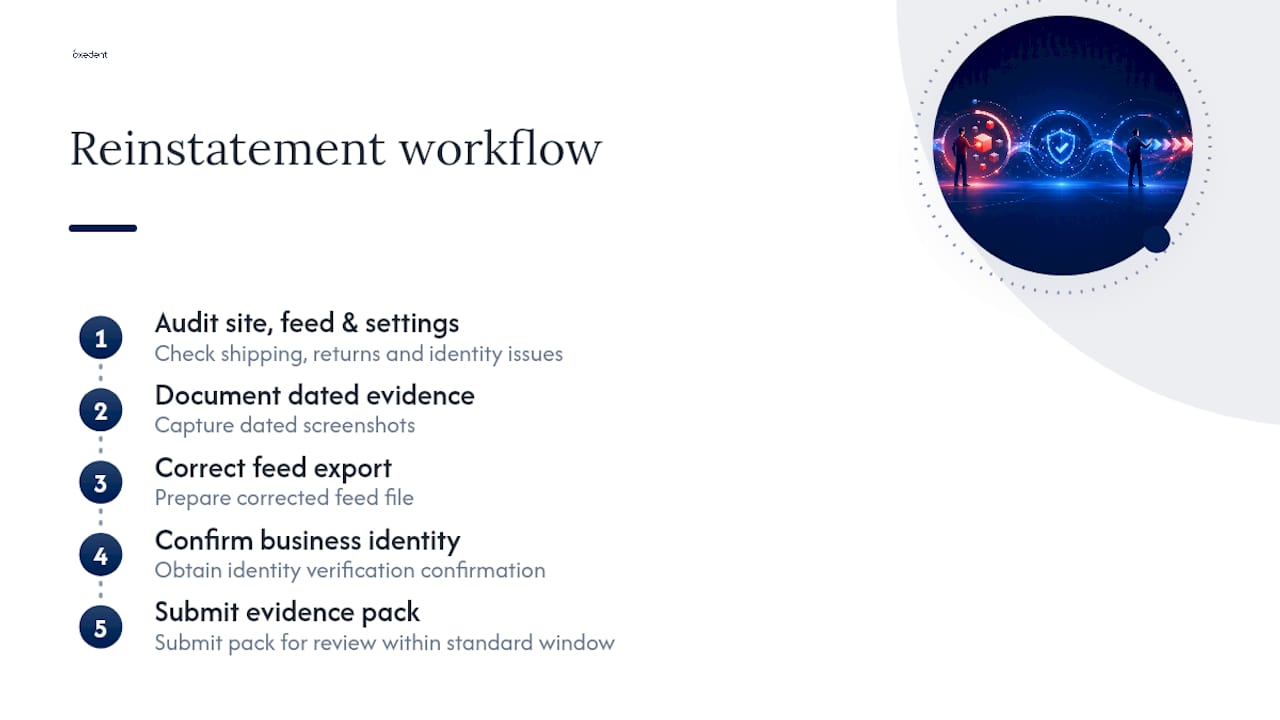
One misrepresentation suspension Oxedent worked through followed a familiar pattern: mismatched shipping costs between the feed and the live site, an outdated returns page, and an unverified business identity. The audit covered site content, feed accuracy and Merchant Center account settings together, not in isolation. The evidence pack submitted with the review included dated screenshots, a corrected feed export, and confirmation of identity verification. Reinstatement followed within the standard review window once every flagged item was documented, not just fixed.

Does account type change how suspension is handled?
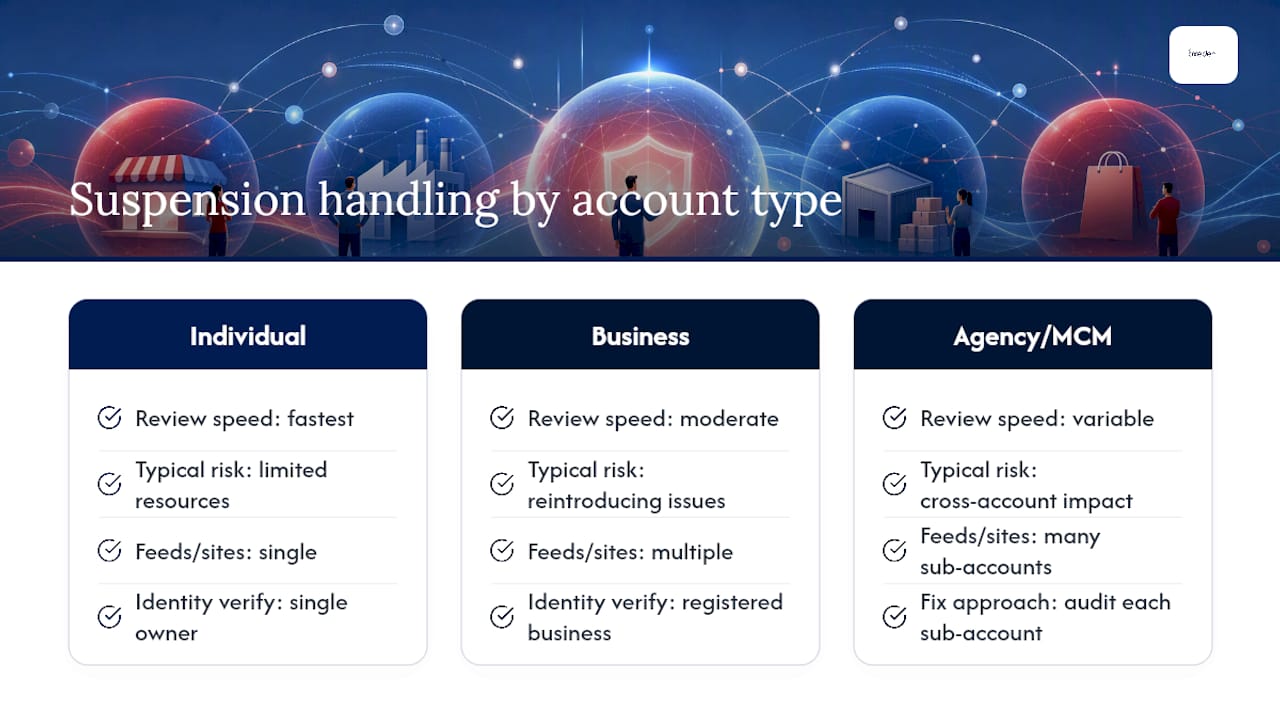
An individual merchant running a single Merchant Center account, a growing business with multiple staff logins, and a multi-client management account (an agency or a marketplace aggregator managing several sub-accounts) all face the same policy rules, but the practical handling differs.
Individual accounts tend to move fastest through review once fixed, because there’s usually one website, one feed and one identity to verify. The risk is resourcing. A solo owner juggling a suspension alongside daily operations often takes longer to complete the audit simply through lack of hours in the day.
Established business accounts typically have more moving parts, more historical feed data, and more people who can inadvertently reintroduce an issue mid-fix. Identity verification is usually more straightforward here, since registered business details already exist to cross-reference.
Multi-client or agency-managed accounts carry a different risk entirely: a suspension on one sub-account can sometimes affect visibility or trust signals for the parent structure, depending on how accounts are linked. Google’s distinction between product-level and account-level issues matters here, because a single sub-client’s misrepresentation problem needs isolating fast, before it’s mistaken for a pattern across the wider account structure. Agencies managing several suspended accounts at once should audit each one independently rather than assuming one fix template covers all of them.
When to fix it yourself and when to bring in a specialist
If the suspension traces to one clear checkout bug or a single feed field, your own developer can usually resolve it. Escalate to a specialist when the cause is unclear, when it’s a repeat suspension, or when the account drives meaningful revenue and every extra day of downtime is expensive. Weigh speed and risk of a second suspension against the cost of getting outside help.
— Biplab
How a specialist agency helps you recover and stay reinstated
A good agency runs the audit-to-appeal process as one connected job, not three separate guesses. That’s the practical difference for a business losing daily Shopping revenue: instead of patching the one issue you can see and hoping, you get a full diagnostic across site, feed and account settings before anything gets submitted to Google.


The core service covers a Merchant Center audit, feed corrections, identity verification support where needed, and a documented evidence pack built specifically for the review your account requires. Onboarding runs in three stages: diagnostic first, then fixes mapped to the exact policy points flagged, then appeal support once everything is verified and screenshotted. If Shopping or Performance Max campaigns are part of a wider paid media setup, Oxedent’s eCommerce PPC management service picks up where reinstatement leaves off, keeping feed governance and campaign structure aligned so the same issue doesn’t resurface in three months. Start with a Google Shopping setup review to see exactly where your account and feed stand before you submit another review request.
Sources
- Issues in Merchant Center – Google Merchant Center Help
- How to fix: Checkout incomplete warning/suspension – Google Merchant Center Help
- How to fix a suspended Google Merchant Center account – Search Engine Land