


Product titles are the primary relevance and discovery signal on every major shopping platform. They determine which searches trigger your listings, influence your position in Shopping auctions, and shape whether a shopper clicks or scrolls past. If your titles are wrong, no amount of bidding strategy will rescue your impressions. Fix them first.
Three changes you can make in the next 24–72 hours:
- Put the product first, not your store name. Structure every title as Brand + Product/Model + Key Variant. Leading with your retailer name is associated with shorter ad lifespans in Google Shopping; product-first titles tend to perform better in long-running Shopping ad archives.
- Front-load your highest-intent keyword and a variant term. Google’s matching system reads title tokens from left to right. Shoppers on mobile see roughly the first 70 characters before truncation. Both reasons point to the same fix: your most important descriptor belongs at the start, not buried after a brand name.
- Strip promotional language and verify feed compliance. Phrases like “Best Price” or “Sale Now On” do not belong in product titles. If you are using AI-generated titles, the Google Merchant Center
structured_titleattribute is mandatory, and it requires adigital_source_typesub-attribute. Non-compliant titles risk disapproval.
Pro Tip: Run a quick filter on your feed right now: sort titles by character count and flag anything under 30 characters or over 150. Short titles almost always signal missing attributes; very long ones often contain stuffed keywords or promotional copy.
Table of Contents
- How do product titles influence visibility, ranking, and shopper behaviour?
- What are the platform requirements for compliant product titles?
- Category-specific title templates: apparel, electronics, consumables, and home
- How to build a scalable title optimisation workflow
- What mistakes in product titles damage visibility and shopper trust?
- How do you measure and A/B test the impact of title changes?
- Which tools and automation patterns help you scale title optimisation?
- How Oxedent applies title optimisation in paid campaigns and Performance Max
- Key takeaways
- Oxedent’s feed and title optimisation services
- Useful sources to bookmark
- The case for treating titles as infrastructure, not copy
How do product titles influence visibility, ranking, and shopper behaviour?
Product titles function as both algorithmic signals and the shopper’s first cue. Get them right and you earn impressions from relevant queries, a higher expected click-through rate, and better Ad Rank in the Shopping auction. Get them wrong and your products simply do not appear for the searches that matter.
Shopping platforms parse title tokens to classify products and match them to queries. Google Shopping does not rely on hidden keyword fields the way search text ads do. The title is the primary text input the system uses to decide relevance. Omitting a high-intent keyword from a title pushes the product into lower-ranking positions or out of the auction entirely, because the matching signal is absent. SKUAnalyzer’s feed guidance confirms that titles feed directly into Shopping matching systems and therefore affect both impressions and ad position.
Shopper behaviour adds another layer. The serial position effect means people recall and act on information presented earliest in a sequence. On mobile, where Shopping tiles are narrow and titles truncate quickly, the first three to five words carry almost all the weight. A title that opens with a generic brand name or category label wastes that prime real estate.
Salsify’s consumer research found that 51% of shoppers rely on product title and description as the most important elements for completing a purchase. That figure puts titles ahead of images and reviews as a purchase driver, which means title quality is a conversion lever, not just a traffic lever.
The downstream effects on conversion are direct:
- A title that matches the shopper’s query builds immediate relevance and reduces bounce rate.
- Variant information in the title (size, colour, model) pre-qualifies the click, so the shopper who arrives already knows the product fits their need.
- Titles that mirror the language on the landing page reduce cognitive friction and support a high-converting product page.
What are the platform requirements for compliant product titles?
The single most important compliance rule: your title must accurately describe the product on the landing page, in the language of the target country, with no promotional or pricing language included.
Google Merchant Center essentials:
- Use the
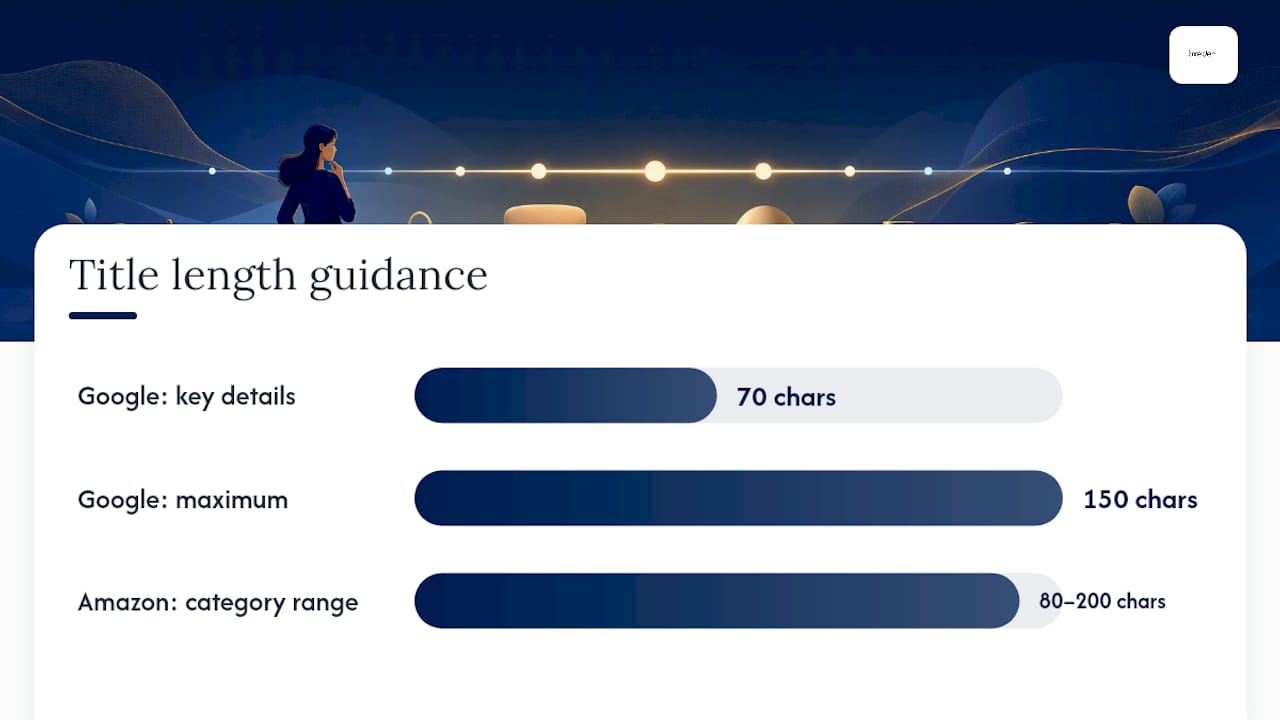
titleattribute for standard titles; usestructured_titlewhen the title is AI-generated, and include the requireddigital_source_typesub-attribute. - Maximum 150 characters; Google recommends using as many as the product genuinely needs, with key details in the first 70 characters.
- No promotional text: “Free Shipping”, “Sale”, “Best Price”, “Limited Offer” will trigger policy violations.
- Titles must match the product name on the landing page. A mismatch is a disapproval risk.
- Include variant attributes (colour, size, material) where the category requires them, particularly for apparel and footwear.
Amazon UK differences:
Amazon’s style guide sets category-specific character limits (often 80–200 characters depending on category) and has its own sequencing conventions. Critically, Amazon titles are written for a search-bar context and often include more keyword variants than a Google Shopping title needs. Copying an Amazon title verbatim into a Google Shopping feed is a common mistake: the result is usually a keyword-stuffed string that violates Google’s promotional language rules or exceeds the effective display window.
Compliant vs non-compliant examples:
| Status | Example title |
|---|---|
| Non-compliant | BEST PRICE Nike Air Max 90 Trainers Sale Free Delivery |
| Compliant | Nike Air Max 90 Men’s Trainers White/Black UK 10 |
| Non-compliant | Running Shoes by SportShop.co.uk — Great Value |
| Compliant | Adidas Ultraboost Women’s Running Shoes Grey UK 7 |
For AI-generated titles specifically, the official Merchant Center guidance is unambiguous: structured_title is mandatory, not optional. Submitting an AI-generated title under the standard title attribute is a policy violation.

Category-specific title templates: apparel, electronics, consumables, and home
Apparel
The first tokens must establish gender, then garment type, then brand. Shoppers filter by gender before anything else in fashion. For designer brands, the brand name can lead because it carries the primary search intent.
One-line rule: Gender + Garment Type + Brand + Colour + Size (or Brand + Garment + Gender + Colour + Size for designer labels).
- Do include UK sizing (e.g. UK 10, UK 12) rather than generic S/M/L where possible.
- Do not use seasonal promotional language (“Summer Collection 2026”, “New In”).
- For fashion SEO beyond Shopping feeds, fashion brand SEO best practices offer useful guidance on language and localisation.
Before: Floral Dress — New Season
After: ASOS Women’s Floral Wrap Midi Dress Blue/White UK 14
Electronics
Model numbers are the primary search signal. Shoppers searching for electronics usually know the model; your title needs to confirm it immediately and add the spec that differentiates variants.
One-line rule: Brand + Model Number + Core Spec + Compatibility or Form Factor.
- Front-load the model number, not a generic category label.
- Include storage capacity, screen size, or RAM where these are the key purchase differentiators.
- Compatibility notes (e.g. “for MacBook Pro M3”) belong at the end, not the start.
Before: Laptop Stand Adjustable Height Compatible with Various Laptops
After: Twelve South HiRise Pro Adjustable Laptop Stand for MacBook Pro/Air
Consumables
Pack count, volume, and weight are the variant signals shoppers use to compare value. These belong immediately after the product name.
One-line rule: Brand + Product + Pack Size/Volume + Key Ingredient or Flavour.
- Never include expiry dates, batch numbers, or promotional pricing in the title.
- For supplements and food products, the key ingredient or flavour variant is a matching signal, not just a descriptor.
Before: Vitamin C Tablets — Great Value Multipack
After: Solgar Vitamin C 1000mg Tablets 100 Pack
Home and soft furnishings
Material, dimensions, and colour are the three attributes shoppers filter by. Dimensions are especially important because a product that does not fit is returned.
One-line rule: Brand + Product Type + Material + Dimensions + Colour.
- Include dimensions in centimetres for UK audiences.
- Material comes before colour because it is a stronger purchase filter.
Before: Grey Rug — Large Size Available
After: Habitat Woven Cotton Flatweave Rug Grey 160cm x 230cm
How to build a scalable title optimisation workflow
A structured process prevents ad hoc rewrites that create inconsistency across your feed. Here is a six-step workflow your team can follow:
-
Build your keyword and category vocabulary. Use your Google Shopping search term reports to identify the exact phrases shoppers use. Cross-reference with your top-performing SKUs to find which terms correlate with conversions, not just clicks.
id title brand colour size structured_title SKU Nike Air Max Men’s Trainers Black UK 10 Nike Black UK 10 (if AI-generated)
Pro Tip: Prioritise your top 20% of SKUs by revenue first. Title improvements on high-traffic products deliver measurable results faster and give you the data to justify broader rollouts to stakeholders.
For the technical feed setup that underpins this workflow, the Google Shopping setup guide covers feed mapping and attribute configuration in detail.
What mistakes in product titles damage visibility and shopper trust?
The three most damaging errors are keyword stuffing, retailer-first titles, and a mismatch between the title and the landing page product. Each one either triggers a policy flag, reduces matching accuracy, or erodes the shopper’s confidence the moment they click.
Common pitfalls checklist:
- Keyword stuffing: Repeating the same term or stacking synonyms (“Running Shoes Trainers Athletic Footwear Running”) confuses the matching system and reads as spam to shoppers. Google’s guidance is clear: titles should describe the product, not game the algorithm.
- Retailer-first titles: Leading with your store name (“SportsDirect Nike Trainers”) wastes the most valuable tokens. AdSpyder’s data shows retailer-first titles are less common among long-running Shopping ads, with only 9.4% of stable performers using this pattern.
- Landing page mismatch: If the title says “Blue” and the landing page shows “Navy”, or the title describes a bundle the page does not sell, you risk disapproval and a high bounce rate.
- Missing variant for variant SKUs: A size-specific SKU with no size in the title will match broad queries but attract the wrong clicks.
- Promotional language: Discount language appears in just 0.1% of Shopping titles overall and 0.0% among long-running ads, per AdSpyder’s analysis. It is not a competitive tactic; it is a compliance risk.
- Inconsistent localisation: UK feeds must use British English and UK units. Mixing US spellings (“color”, “aluminum”) or US sizing creates a jarring experience and can affect matching for UK queries.
Red flags to scan for in the first 10 minutes of a feed audit:
- Titles containing “Sale”, “Free”, “Discount”, “%” or “£” symbols
- Titles shorter than 30 characters (almost always missing attributes)
- Titles that begin with the website or store name
- Duplicate titles across variant SKUs (size or colour not differentiated)
- Titles in a language other than the target feed language
Key insight: Promotional language in Shopping titles is not just ineffective — it is actively penalised. Long-running, high-performing ads almost universally avoid it. If your titles read like banner ads, they are working against you in the auction.
How do you measure and A/B test the impact of title changes?
The primary metric to track is relevant impressions, followed by click-through rate. Conversions are the secondary metric because they are influenced by too many variables (landing page, price, competition) to attribute cleanly to a title change alone. Start with impressions and CTR; conversion impact confirms the direction.
Metrics to monitor at SKU level:
- Impressions (absolute and query-matched)
- Click-through rate (CTR)
- Conversion rate
- Cost per conversion
- Revenue per impression (a useful composite for high-margin SKUs)
Experiment checklist:
- Split your SKUs into a control group (unchanged titles) and a test group (rewritten titles), matched by category and traffic level.
- Run the test for a minimum of 14 days, ideally 21–28 days, to account for weekly seasonality patterns.
- Avoid making simultaneous changes to bids, images, or prices in the test group during the experiment window. Confounding changes make results unreadable.
- Segment results by traffic source: Shopping impressions and organic product listing impressions respond differently to title changes.
- Use Google Merchant Center’s product-level performance data or your feed management platform’s reporting to compare before/after at the SKU level.
Benchmark context:
| Metric | Benchmark context |
|---|---|
| Shopper reliance on title/description | 51% of shoppers cite it as the top purchase driver (Salsify) |
| Winning title character range | 50–100 characters, with 50.6% of long-running Shopping ads in this band (AdSpyder) |
| Discount language in long-running ads | 0.0% — absent from stable performers (AdSpyder) |
| Retailer-first titles in long-running ads | 9.4% — uncommon among stable performers (AdSpyder) |
For low-traffic SKUs, individual title tests rarely reach statistical significance quickly. Pool similar SKUs into a single test group (same category, similar price band) and measure the group’s aggregate CTR lift rather than individual SKU performance. A practical rule of thumb: aim for at least 500 impressions per variant before drawing conclusions.
Pro Tip: Set a calendar reminder to review title test results at day 14 and day 28. Checking daily introduces noise and tempts premature conclusions. Patience here is a competitive advantage.
Which tools and automation patterns help you scale title optimisation?
The four tool categories you need are: a Product Information Management system (PIM), a feed management platform, a keyword and search term analytics tool, and a bulk CSV manager or ETL script for pushing changes.
How each category fits the workflow:
- Feed management platforms (e.g. FeedOps, Bidnamic): — Map your attribute data to title templates and push compliant feeds to Google Merchant Center and other channels. FeedOps and Bidnamic both offer feed-level title rules and scheduled updates, which removes the manual CSV step for ongoing maintenance.
For UK-specific considerations: confirm your feed platform supports UK marketplace connectors (Google Shopping UK, Amazon UK) and handles British English localisation without defaulting to US spellings or US sizing.
Pro Tip: Automation is powerful for generating title candidates, but always run a human QA pass before pushing to live feeds. Automated templates can produce grammatically awkward strings when attribute data is incomplete or inconsistently formatted. A 30-minute review of a sample batch catches 90% of issues before they reach shoppers.
For a broader view of how feed optimisation connects to campaign performance, Oxedent’s feed guidance covers attribute mapping and feed health in practical detail.
How Oxedent applies title optimisation in paid campaigns and Performance Max
Oxedent treats title optimisation as a feed-level foundation for every Google Shopping and Performance Max engagement. Before adjusting bids or restructuring campaigns, the team audits feed health, because a structurally weak title limits what any campaign can achieve regardless of budget.
Feed and title audit checklist:
- Export the full product feed and check title length distribution.
- Flag titles with promotional language, retailer-first structure, or missing variant attributes.
- Cross-reference titles against the top search queries triggering impressions in the Shopping report.
- Identify SKUs with impressions but low CTR — these are the highest-priority title rewrites.
- Check
structured_titlecompliance for any AI-generated title content. - Confirm language and localisation consistency across all titles in the UK feed.
- Review variant SKUs to confirm each has a unique, differentiated title.
Anonymised scenario: A UK apparel brand had strong impression volume but a CTR well below category benchmarks. An audit revealed that 60% of titles led with the store name and omitted size and colour. After applying a gender + garment + brand + colour + size template across the top 200 SKUs, impressions on relevant queries increased and CTR improved materially within 21 days. The conversion rate held steady, confirming the clicks were better qualified, not just more numerous.
Metrics to present to stakeholders when pitching title optimisation:
- Impression share on target queries (before and after)
- CTR at SKU and category level
- Cost per conversion change (lower cost signals better match quality)
- Revenue per impression for high-margin SKUs
Pro Tip: Frame title optimisation to stakeholders as a feed quality project, not a copywriting task. “Feed quality” resonates with commercial teams because it connects directly to auction eligibility and Ad Rank, not just aesthetics.
Understanding Google Shopping campaign dynamics helps contextualise why title changes have a disproportionate impact compared with equivalent effort spent on bid adjustments.
Key takeaways
Product titles are the single highest-leverage feed element for improving impressions, CTR, and conversion quality on Google Shopping and Performance Max.
| Point | Details |
|---|---|
| Product-first structure | Lead every title with Brand + Product/Model + Key Variant; retailer-first titles underperform in long-running Shopping ads. |
| Front-load keywords and variants | Place your highest-intent keyword and variant term in the first 70 characters to capture mobile truncation and algorithmic weighting. |
Use structured_title for AI content |
Google Merchant Center requires the structured_title attribute with a digital_source_type sub-attribute for any AI-generated title. |
| Test your highest-traffic SKUs first | Run 14–28 day experiments on top SKUs; pool low-traffic SKUs by category to reach meaningful impression volumes before drawing conclusions. |
| Oxedent’s approach | Oxedent audits feed title structure as the first step in every Google Shopping and Performance Max engagement, prioritising SKUs by traffic and margin before applying category templates. |
Oxedent’s feed and title optimisation services
Established eCommerce brands with meaningful ad budgets often find that title and feed quality is the bottleneck holding back their Shopping and Performance Max performance, not their bids. Oxedent’s eCommerce PPC management service addresses this directly: feed audits, title template development, bulk rewrite projects, and ongoing feed management are built into every Shopping and Performance Max engagement.


There are no long-term contracts. Oxedent works with brands that are ready to treat feed quality as a commercial priority, not an afterthought. If your Shopping campaigns are generating impressions but not the right clicks, a feed and title audit is the logical first step.
Request a feed audit to find out where your titles are costing you impressions and revenue.
Useful sources to bookmark
Practitioners working on title optimisation regularly should keep these resources to hand:
- [Title [title] and structured title [structured_title] — Google Merchant Center Help](https://support.google.com/merchants/answer/6324415?hl=en)
- Product Title Optimization Tips (With Winning Examples) | Salsify
- Winning Google Shopping Product Titles | May 2026 Data Study
- Product Title Optimization for Google Shopping: Best Practices
- Linguistic characteristics of e‑commerce titles — empirical analysis
Practitioner note: The Google Merchant Center guidance is the only source that governs compliance. Every other resource informs best practice. When they conflict, the Merchant Center documentation wins.
The case for treating titles as infrastructure, not copy
Most eCommerce teams treat product titles as a copywriting task. That framing is the root of most title problems.
A Shopping title is not persuasive copy. It is a structured data input that tells an algorithm what your product is and tells a shopper whether it matches their need. The moment you start writing titles to “sound good” rather than to classify accurately, you introduce the exact failure modes this guide covers: promotional language, missing variants, retailer-first structures, and keyword stuffing.
The counterintuitive implication is that the best title writers for Shopping feeds are not copywriters. They are data managers who understand attribute sequencing, platform constraints, and query matching. The creative skill involved is knowing which attributes matter most for a given category and placing them in the right order, not crafting a compelling sentence.
Where I see teams consistently underinvest is in the QA step. Bulk rewrites are relatively straightforward with a good template. What is harder, and more valuable, is the systematic check that catches the edge cases: the SKU where the colour attribute is blank, the variant where the size was entered as “One Size” instead of a specific measurement, the product where the brand field contains the retailer name. Those edge cases are where impression quality degrades quietly, without triggering a disapproval that would alert you to the problem.
Title optimisation is infrastructure work. It is unglamorous, it requires discipline, and the results accumulate over weeks rather than appearing overnight. That is precisely why most competitors do it poorly, and why doing it well is a durable advantage.