


Google Shopping UK is a product discovery and advertising platform that displays product images, prices, and seller information directly within Google Search results, connecting retailers with high-intent shoppers at the exact moment they are ready to buy. If you run an e-commerce business in the UK, understanding this platform is not optional. Google Shopping ads account for 76.4% of retail search ad spend globally, which tells you where the market has already placed its confidence. This guide covers how the platform works, how to set it up correctly for UK compliance, and how to get the most from your campaigns in 2026.
What is Google Shopping UK and how does it differ from standard search ads?
Google Shopping UK is formally known as a product listing ad platform, though most retailers and marketers refer to it simply as Google Shopping. Unlike standard text ads, Shopping listings display a product image, title, price, and retailer name before a shopper clicks anything. Google Shopping connects shoppers with retailers by showing this information prominently in search results, often above organic listings. That visual, comparison-focused format means shoppers arrive at your product page already informed, which shortens the buying journey considerably.
Google Shopping is not a marketplace. You do not list products on Google’s own storefront the way you would on a third-party retail platform. Google acts as a discovery engine, matching search queries with your product feed and sending traffic directly to your website. That distinction matters for how you think about the platform and how you measure its success.


How does Google Shopping work for UK retailers?
The platform runs on three interconnected components: Google Merchant Center, your product feed, and a Google Ads campaign.
Google Merchant Center is the account where you host your product data. Every product you want to advertise needs a feed entry containing the title, description, image URL, price, availability, and several other attributes. Google reads this feed, checks it against its policies, and uses it to match your products to relevant search queries.
Google Ads campaigns then control how your products are shown and what you pay. Two campaign subtypes are available:
- Standard Shopping campaigns give you manual control over bidding at the product group level. You decide how much to bid per click and can structure campaigns by product category, brand, or margin.
- Performance Max campaigns use Google’s machine learning to serve ads across Search, Display, YouTube, Gmail, and Maps simultaneously. The algorithm decides where and when to show your ads based on conversion signals.
The pay-per-click model means you only pay when a shopper clicks your listing. Free Shopping listings also exist, appearing in the Shopping tab with lower visibility than paid placements. Free listings give smaller retailers a way to gain organic clicks without ad spend, though paid campaigns deliver far greater reach and placement priority.
Pro Tip: Start with Standard Shopping to build historical data and understand which products convert. Once you have clean conversion data, test Performance Max on your top performers.

The shopper experience is straightforward. Someone searches “men’s running shoes size 10” on Google. A row of product images appears at the top of the results page, each showing a photo, price, and retailer name. The shopper compares options without visiting a single website, then clicks the listing that best matches their needs. This visual presentation shortens the buying journey by presenting informed options early, which is why conversion rates on Shopping traffic tend to be strong.
How to set up Google Shopping UK: steps and compliance requirements
Setting up Google Shopping correctly in the UK requires more than creating an account. Compliance with UK consumer protection standards is built into the process, and skipping steps leads to feed disapprovals.
-
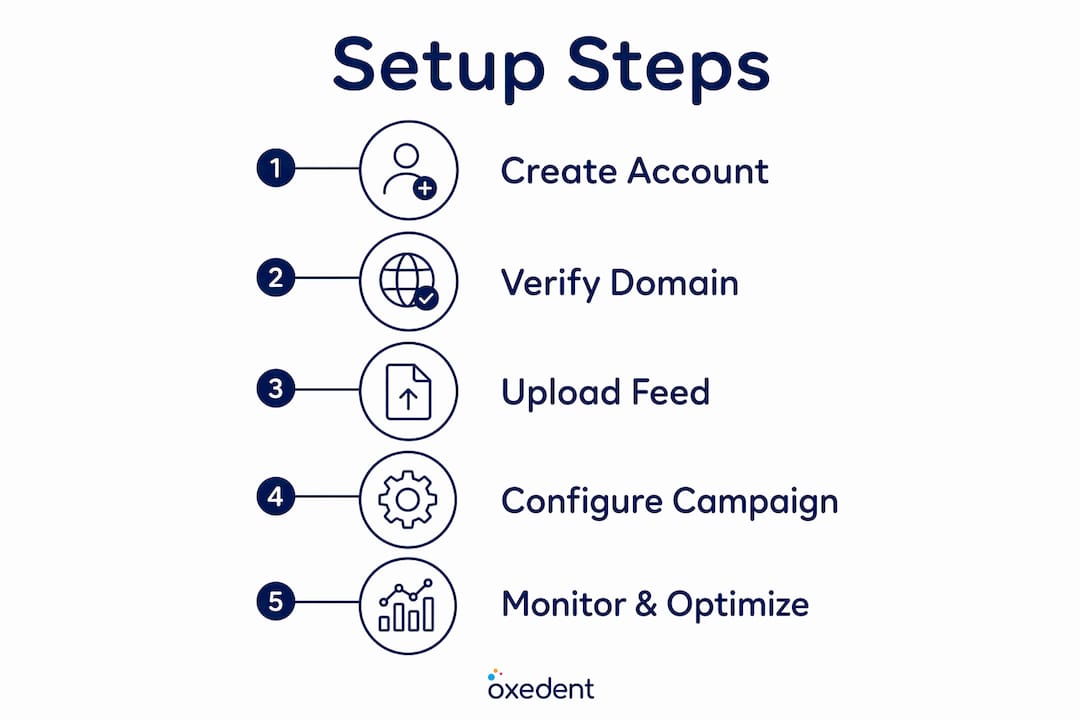
Create a Google Merchant Center account. Go to Merchant Center and sign in with your Google account. Enter your business name, country (United Kingdom), and website URL.
-
Verify and claim your domain. Google requires proof that you own the website you are advertising. You can verify via Google Tag Manager, an HTML tag added to your site’s header, or a DNS record. This step is non-negotiable and is a common source of delay for newcomers.
-
Build your product feed. Your feed must include VAT-inclusive pricing for all products. UK regulations require product feeds to accurately reflect VAT-inclusive pricing and shipping policies aligned with consumer protection laws. Missing or inconsistent shipping information is one of the most common reasons for product disapprovals.
-
Link Merchant Center to Google Ads. Open your Google Ads account, navigate to the linked accounts section, and connect it to your Merchant Center. This link is what allows your feed data to power your ad campaigns.
-
Create your Shopping campaign. Choose between Standard Shopping and Performance Max. For a detailed breakdown of which suits your situation, the Performance Max vs Standard Shopping guide from Oxedent covers the trade-offs clearly.
-
Set your budget and bids. Start conservatively. You need real data before you can bid confidently. A modest daily budget across a focused product range gives you cleaner signals than spreading spend thinly across your entire catalogue.
-
Monitor and resolve disapprovals. Check your Merchant Center diagnostics tab regularly in the first two weeks. Feed errors appear here and must be fixed before those products can serve.
Typical setup takes 2–4 hours for experienced practitioners, but newcomers should allow 1–2 weeks to account for domain verification, feed compliance checks, and initial troubleshooting. Rushing this stage is the single biggest mistake new advertisers make.
Pro Tip: Use Google’s feed rules within Merchant Center to fix common data issues without editing your source feed. This saves significant time when your e-commerce platform exports data in a format that does not perfectly match Google’s requirements.
For a full walkthrough, Oxedent’s Google Shopping setup guide covers each step with UK-specific detail.
What are the key optimisation strategies for Google Shopping UK?
Getting your campaigns live is the starting point, not the finish line. Performance depends heavily on what happens after launch.
Feed quality drives everything
Your product feed is your most important asset. Google’s algorithm uses feed data to match your products to search queries, so weak titles and vague descriptions mean your products appear for the wrong searches or not at all.
- Product titles should lead with the most important attributes: brand, product type, key specification, and variant. “Nike Air Zoom Pegasus 41 Men’s Running Shoe Grey Size 10” outperforms “Running Shoe” every time.
- Product descriptions should include secondary keywords and material or technical details that shoppers search for.
- Images must be clean, well-lit, and show the product clearly on a white or neutral background. Poor images reduce click-through rates regardless of how competitive your price is.
For a deeper look at feed quality, Oxedent’s feed optimisation tips cover the ten most impactful changes you can make.
Bidding and algorithm factors
Google’s ad algorithm values historical account performance and landing page experience as much as bidding value. A high bid on a slow, poorly structured landing page will not outperform a moderate bid on a fast, well-optimised product page. This is a critical point that many retailers miss.
| Factor | Why it matters |
|---|---|
| Product feed quality | Determines which queries trigger your ads |
| Landing page speed | Affects Quality Score and conversion rate |
| Historical account data | Influences how Google’s algorithm allocates impressions |
| Bidding strategy | Controls cost per click and campaign aggressiveness |
| Negative keywords | Prevents wasted spend on irrelevant queries |
Mobile optimisation
61.9% of clicks on Google Ads in the UK come from mobile devices. That figure means your product pages must load quickly and display cleanly on a smartphone. A shopper who clicks your Shopping ad on mobile and lands on a page that takes four seconds to load will leave before they see your product. Mobile speed is not a nice-to-have. It is a direct revenue factor.
Negative keyword management
Standard Shopping campaigns do not use keywords in the traditional sense, but they do respond to negative keywords. Adding negatives prevents your products from appearing for searches that are clearly not commercial or are mismatched to your catalogue. Review your search term reports weekly in the early weeks of a campaign.
What are the practical benefits of Google Shopping UK for e-commerce businesses?
Google Shopping captures shoppers at the highest point of purchase intent. Someone searching “buy leather wallet UK” is not browsing. They are ready to spend. Appearing in that moment with a clear image, competitive price, and trusted retailer name gives you a direct line to a buyer.
The platform also complements your other channels rather than competing with them. Shoppers who discover your brand through Google Shopping may later find you on social media or return via a direct search. The average ROAS on Google Shopping in the UK is approximately 8:1, which reflects the platform’s strength at capturing demand that already exists rather than creating it from scratch.
Key practical benefits for UK retailers include:
- Visibility before organic results. Paid Shopping listings appear above the standard search results, giving you prime placement without requiring high organic rankings.
- Pre-qualified traffic. Shoppers see your price before they click. If they click, they already accept your price point, which improves conversion rates compared to traffic from generic text ads.
- Catalogue-level advertising. You can advertise hundreds or thousands of products simultaneously without writing individual ad copy for each one.
- Free listing access. Even without an ad budget, your products can appear in the Shopping tab through free listings, giving smaller businesses a foothold.
Google Shopping works best for online-only businesses with clear product catalogues, competitive pricing, and well-structured websites. If your product pages are thin, your prices are uncompetitive, or your site is slow, the platform will expose those weaknesses quickly.
Key takeaways
Google Shopping UK is the most cost-efficient way for UK retailers to reach high-intent shoppers, but performance depends on feed quality, landing page speed, and compliance with UK consumer protection standards, not bid size alone.
| Point | Details |
|---|---|
| Feed quality is foundational | Accurate titles, VAT-inclusive prices, and clean images determine which searches trigger your ads. |
| UK compliance is mandatory | Product feeds must reflect VAT-inclusive pricing and correct shipping information to avoid disapprovals. |
| Algorithm rewards more than bids | Landing page speed and account history influence ad placement as much as your bid amount. |
| Mobile is the primary channel | With 61.9% of UK Google Ads clicks from mobile, fast mobile product pages are non-negotiable. |
| Free and paid listings both exist | Paid ads deliver priority placement; free listings offer a lower-visibility option for smaller budgets. |
My honest take on Google Shopping UK in 2026
I have worked with UK e-commerce businesses across a wide range of categories, and the pattern I see most often is this: retailers treat Google Shopping as a simple “set it and leave it” channel. They get their feed live, launch a campaign, and then wonder why performance plateaus after a few weeks.
The truth is that Google Shopping rewards ongoing attention. The algorithm is not static. Google updates its policies, introduces new feed attributes, and shifts how Performance Max distributes budget across placements. Retailers who treat their feed as a living document, updating titles and images as they learn what converts, consistently outperform those who set up once and walk away.
The compliance piece is also underestimated. I have seen well-funded campaigns grind to a halt because a feed update accidentally removed VAT from pricing or introduced a shipping mismatch. UK consumer protection standards are not bureaucratic noise. They are the baseline Google enforces before your products can serve at all.
My strongest recommendation is to prioritise data quality over bid aggression. A clean feed, a fast product page, and a well-structured campaign with sensible negatives will outperform a high-bid, low-quality setup every time. The most effective campaigns manage product data quality, bidding, and account history as a system, not as separate tasks. Treat them that way and the results follow.
— Biplab
How Oxedent helps UK retailers get more from Google Shopping
Running Google Shopping profitably takes more than a live campaign. It takes feed management, bid discipline, and the kind of ongoing optimisation that most in-house teams do not have time for.


Oxedent specialises exclusively in eCommerce PPC, which means Google Shopping is not a side service. It is the core of what the team does every day. From feed optimisation and campaign structuring to Performance Max management and waste reduction, Oxedent works with established UK retailers who are ready to scale their ad spend profitably. If you want a team focused entirely on your return on ad spend, explore Oxedent’s eCommerce PPC management service to see how it fits your business.
FAQ
What is Google Shopping UK?
Google Shopping UK is a product discovery and advertising platform that displays product images, prices, and retailer information within Google Search results. Retailers advertise through Google Merchant Center and Google Ads, paying on a cost-per-click basis.
How do I set up Google Shopping UK?
Setting up Google Shopping requires a Google Merchant Center account, domain verification, a compliant product feed with VAT-inclusive pricing, and a linked Google Ads campaign. Newcomers should allow 1–2 weeks for verification and feed compliance checks.
Is Google Shopping free for UK retailers?
Free and paid listings both exist on Google Shopping. Free listings appear in the Shopping tab with limited visibility. Paid campaigns use cost-per-click bidding and deliver significantly greater placement priority and reach.
What is the difference between Standard Shopping and Performance Max?
Standard Shopping gives you manual control over bids and campaign structure at the product group level. Performance Max uses Google’s machine learning to serve ads across multiple Google channels simultaneously. The right choice depends on your data maturity and how much control you want over placement decisions.
Why are my Google Shopping products being disapproved?
The most common causes of product disapprovals in the UK are missing VAT-inclusive pricing and inconsistent shipping information. Check your Merchant Center diagnostics tab and correct feed errors before expecting your products to serve.